Most breach stories have a person in them: someone who clicked, approved a prompt, reused a password. The Dropbox Sign breach mostly doesn't. The intruder reached an automated system configuration tool and a service account that belonged to the product's back end, an account built for software to use, with rights to do "a variety of actions within Sign's production environment". One of those actions was reading the customer database.
Dropbox noticed on 24 April 2024 and disclosed on 1 May, in a blog post and an SEC filing. The data reached covered all users of Dropbox Sign (formerly HelloSign), and for some of them it included credentials that could be used again elsewhere. This piece walks through what happened, what Dropbox did that a small SaaS can copy, and how to give your own service accounts less to lose.
Step 1: the configuration tool
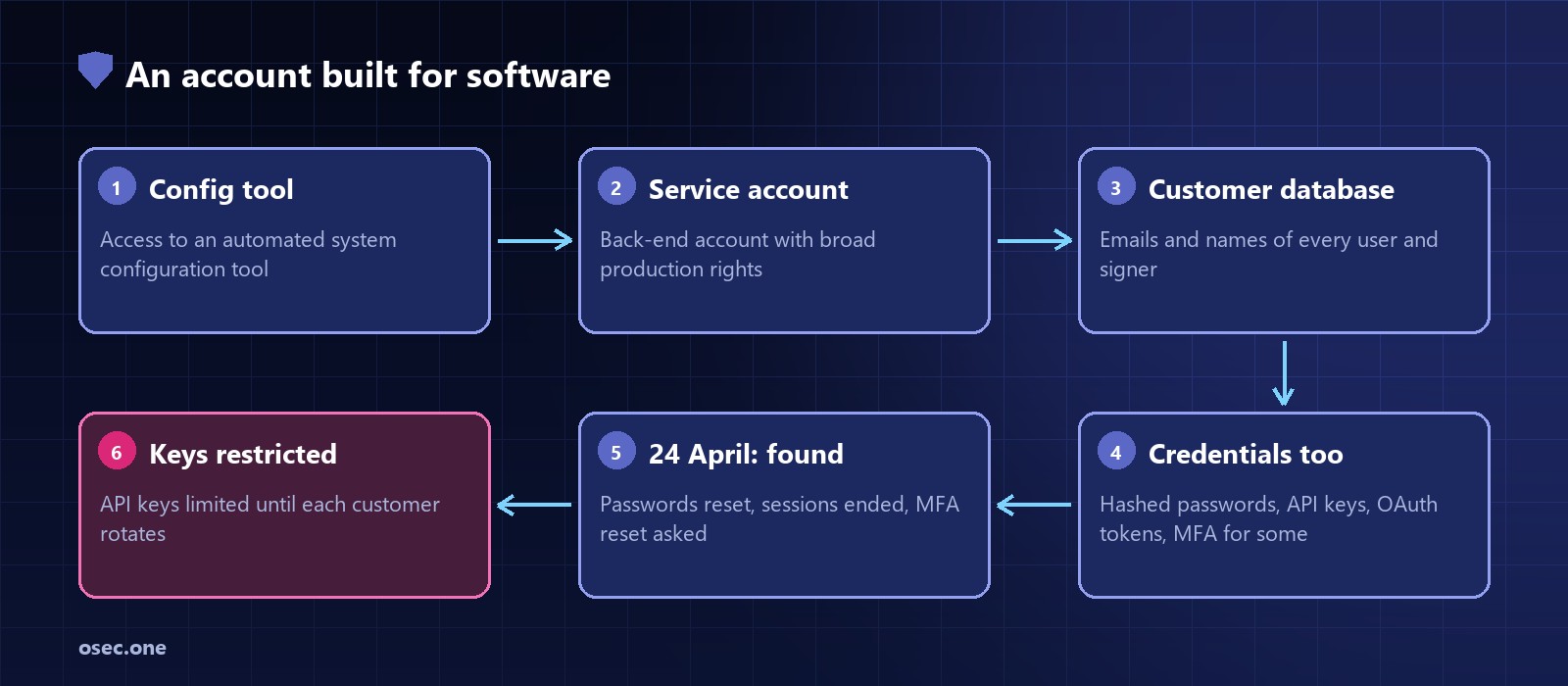
Dropbox's post says a third party "gained access to a Dropbox Sign automated system configuration tool"; its FAQ says the way in was "an access token that had been compromised". Dropbox didn't say publicly how the token was obtained. A configuration tool is the system that sets up and changes servers and services automatically, which is why it needs strong rights in production, and why it is a good place for an intruder to start.
Step 2: a service account that could do a lot
Through that tool the intruder used a service account that was part of Sign's back end. Dropbox's words: the account "had privileges to take a variety of actions within Sign's production environment". That included access to the customer database. The FAQ puts the first access on 19 April.
Step 3: what it reached
• Every user: email addresses, user names and general account settings.
• Some users: phone numbers, hashed passwords, and authentication data: API keys, OAuth tokens and multi-factor authentication details.
• People who only signed a document and never made an account: their names and email addresses.
• Not reached, as far as the investigation found: the documents and templates themselves, and payment details.
• Users who signed up with Google had no password stored, so none could be exposed.
Dropbox said Sign's infrastructure was "largely separate" from other Dropbox services, and the incident stayed inside it. That separation, a product acquired in 2019 and kept on its own systems, is the one control that clearly limited the damage.
Step 4: how Dropbox contained it
1. Reset every user's password and logged users out of every device connected to Dropbox Sign.
2. Asked users of authenticator apps to reset their MFA, since the seeds that generate the codes were among the data.
3. Restricted all API keys until each customer created a new one. Sending documents for signature kept working; everything else waited for the rotation. That forced rotation without breaking customers' signing flows on day one.
4. Warned about phishing: with every user's email address out, fake "Dropbox Sign" emails were the obvious next step.
5. Closed the investigation in June 2024 with a final update.
Step 3 is the part worth copying. Telling customers to rotate keys gets you a fraction of them; making the old key useless for anything risky gets all of them, and the product keeps working for the part that matters most.
Why service accounts end up with too much
• They're made once, at the start, by whoever was setting up the system, usually with admin rights so nothing failed.
• Nobody signs in as them, so nobody notices how much they can do. There's no user to complain about extra access, and no MFA prompt.
• Their credentials are long-lived: a token or key in a config file, valid until someone remembers to change it.
• Automation tools collect them. A deploy or configuration tool needs to reach everything it manages, so its accounts become the widest in the company.
• Their activity looks normal. A back-end account reading a database is what back-end accounts do.
It's the same pattern behind other stories on this site: Cloudflare's Thanksgiving 2023 intrusion ran through a service-account token missed in a rotation, and in Salesloft Drift 2025 integration tokens opened customers' Salesforce.
A least-privilege checklist for a small SaaS
1. List every non-human account: database users, cloud IAM roles and keys, CI deploy credentials, the deploy/config tool, internal admin scripts, third-party integrations. Owner and purpose for each.
2. One account per job. The migration runner, the web app, the backup job and the analytics export each get their own database user, not one shared app user that can do all four.
3. Match rights to the job. The deploy tool needs to ship code and restart services, not SELECT on the users table. The web app needs its tables, not DROP or the ability to create users.
4. Keep the most sensitive columns away from broad accounts. Store API keys as hashes (like passwords) so a copy of the table can't be used, and keep OAuth tokens and MFA seeds encrypted with a key that only the sign-in service can use.
5. Short-lived credentials. Cloud roles and workload identity instead of static keys; database credentials issued per deploy where you can.
6. Limit where each account works from: only the app servers' addresses, only inside the private network.
7. Alert on what's unusual for software: a service account used from a new address, used interactively, or reading far more rows than its job ever does.
8. Plan rotation, including for your customers. Can you invalidate every customer API key at once and let them make new ones? Dropbox's restricted-until-rotated mode is a good model.
9. Keep fewer passwords. Users who signed in with Google lost no password in this breach. Every password you don't store is one you can't leak.
Point 9 is easy to act on. osec Auth adds email codes plus Google and Apple sign-in to any site, so you don't store a password to hash, leak or reset. No OAuth setup on your side, free.
Add passwordless sign-in