On 10 April 2025 Fortinet published something unusual for a vendor: not a new bug, but a warning that fixing the old ones had not been enough. Attackers who had broken into FortiGate firewalls through three SSL-VPN flaws from 2022 to 2024 had left a symbolic link behind in the folder that serves the VPN portal's language files. The link pointed into the device's root filesystem. Owners then upgraded, the holes were closed, and the link stayed. Anyone who knew where it was could keep reading files off the firewall, including its full configuration, over the same public web port as the VPN login page.
Five days later Shadowserver counted 16,620 internet-facing Fortinet devices still carrying it. Ten months after that, a researcher showed the clean-up itself could be bypassed. This write-up goes through the case step by step, and ends with the list a small company with one firewall can actually work through: what to upgrade to, what to replace, and why "patched" and "clean" are two different checks.
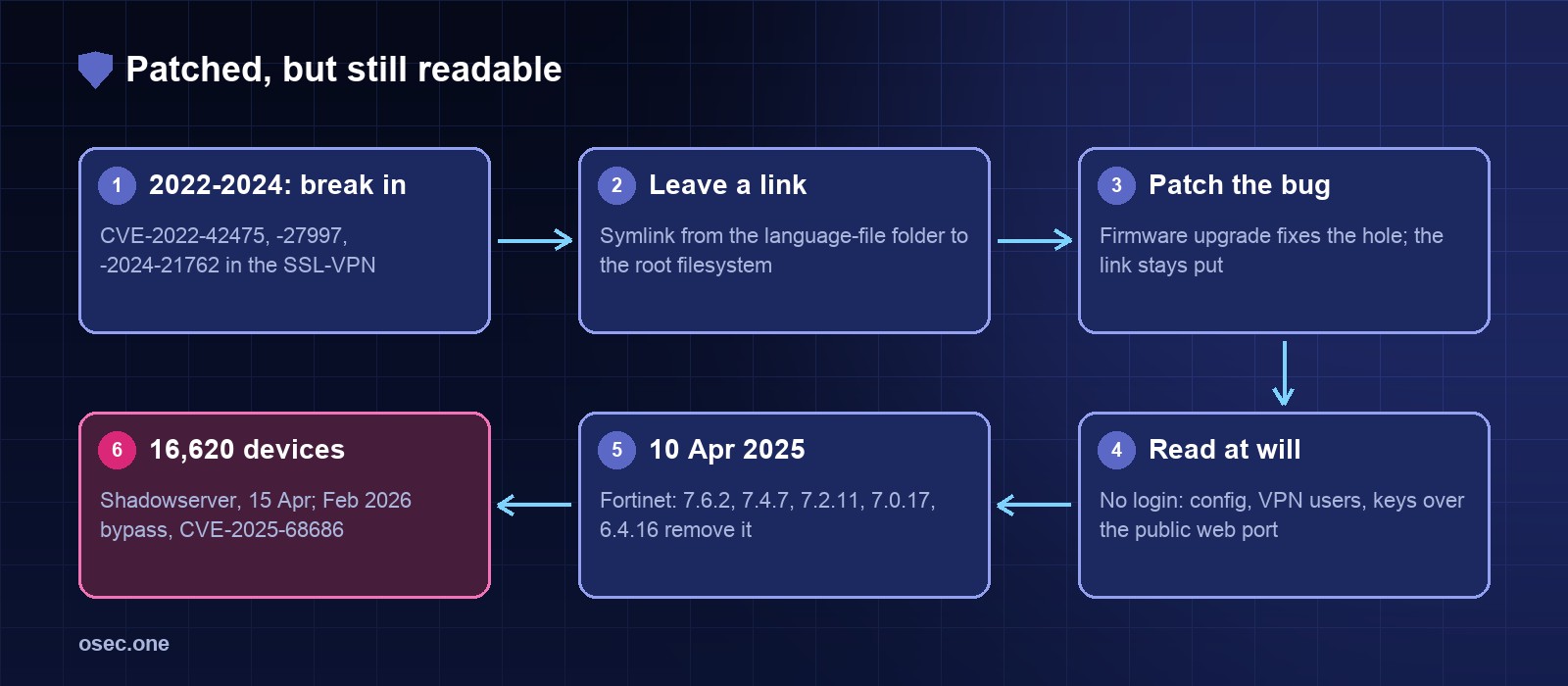
The timeline
Step 1: three ways in through the VPN portal
All three entry bugs sit in sslvpnd, the process behind the FortiGate's SSL-VPN web portal, and all three let a remote attacker with no account run code on the firewall with a crafted HTTP request. Fortinet and NIST both score each one 9.8:
Each of these was exploited, in some cases before a patch existed. That part is familiar. What made this campaign different is what the attackers did once they had code running: they planned for the day the owner patched.
Step 2: a link in a folder nobody watches
The SSL-VPN portal serves its interface text from language files so it can show the login page in the visitor's language. Those files are fetched before anyone signs in, because the login page needs them. The attacker created a symbolic link in that folder, on the user filesystem, pointing at the root filesystem. Fortinet's own words: the link was made "in a folder used for serving language files of the SSL-VPN", and because the change was on the user filesystem it "avoided detection".
The effect is a read-only window. The portal's web server follows the link like any other file, so a request for a "language file" at the right path returns whatever the link points to. CERT.at spelled out who could use it: the files "are accessible without authentication, allowing anyone knowing the location to gain read-only access to the file system, including the full device configuration". Fortinet has not published the path, and neither will we.
Step 3: the patch closes the hole, not the window
A firmware upgrade replaces the operating system image and fixes the vulnerable code. It keeps the user filesystem, because that is where a device's settings and customisations live; nobody wants to rebuild a firewall on every update. So the upgrade fixed the bug the attacker came in through and kept the link the attacker left. Fortinet: "this symbolic link may have been left behind" even after the upgrade.
Work out what that means for an owner who did everything on time:
Over that period the attacker never needed to break in again, never logged in and never ran anything on the box. They read files. Nothing in a normal admin login log shows that.
Step 4: what read-only access to a firewall is worth
"Read-only" sounds harmless until you list what a FortiGate's files hold. The Canadian Cyber Centre's alert says it plainly: attackers "could access sensitive files, including credentials and key material". On a typical small-office firewall that is:
That is why every agency's advice in April 2025 started with credentials, not firmware: the attacker may already hold copies of everything the firewall knows, and upgrading changes none of it.
Step 5: April 2025, and how many were still open
Fortinet's response came in three parts: an AV/IPS signature that flags and deletes the link (on 7.4, 7.2, 7.0 and 6.4, where the engine is licensed and enabled); new firmware, 7.6.2, 7.4.7, 7.2.11, 7.0.17 and 6.4.16, that removes it and changes the SSL-VPN UI so it no longer serves such links; and direct notices to customers it could identify. Devices that never had SSL-VPN enabled were not affected.
Shadowserver started reporting affected devices to network owners the same week. Its count on 15 April 2025, by region:
Fortinet said the activity was "not targeted to a specific region or industry": this was a broad sweep of every vulnerable portal the attackers could reach, then a quiet foothold left on each.
Step 6: February 2026, the fix gets bypassed
On 10 February 2026 Fortinet published FG-IR-25-934 (CVE-2025-68686, CVSS 5.9): with crafted HTTP requests, a remote unauthenticated attacker could get around the patch that blocks the symlink, on a device that had already been compromised at filesystem level. It credits Peter Gabaldon of ITRESIT. The fixed versions tell you how far the April 2025 releases were trusted:
So an owner who upgraded a 7.2 box to 7.2.11 in April 2025, exactly as advised, had removed the link but was still on a branch where the protection could be bypassed, and had no fixed 7.2 release to move to. At the time of the advisory Fortinet listed it as not exploited; CISA's catalog has listed it as known exploited since July 2026. The rule that comes out of this: a firmware version that "removes the attacker's file" is a clean-up step, not proof that the device was ever clean.
Step 7: the SSL-VPN itself is going away
FortiOS 7.6.3 removed SSL-VPN tunnel mode entirely; Fortinet's release notes point owners to IPsec VPN, which can run over TCP 443. The web-only mode survives as "Agentless VPN", off by default and removed from small, low-memory models (40F, 60F, 61F). Tunnel settings are not carried over by the upgrade, so expect to rebuild the remote-access setup by hand. CERT.at gave the same advice in April 2025: plan the move away from SSL-VPN, given its record.
Why patching didn't mean clean: the same lesson three times
Each time, a fix for the way in did nothing about what was already done. Related reading: Citrix Bleed 2023, where patching didn't log attackers out, and Ivanti Connect Secure 2024, two chained zero-days on the VPN gateway.
What breaks each step
If you run a FortiGate with SSL-VPN on (or ever had it on)
1. Get to a fixed branch, not just a newer build. 7.6.2+ or 7.4.7+ covers both the April 2025 clean-up and the 2026 bypass. On 7.2, 7.0 or 6.4 there is no fixed release; plan the jump (Fortinet's upgrade-path tool lists the steps).
2. Keep AV/IPS licensed, enabled and updating. That is what deletes the link on older branches, and it carries the virtual patch for the bypass.
3. Treat the configuration as read. Fortinet: "Treat all configuration as potentially compromised." Reset admin, local and VPN user passwords; change the LDAP bind account; rotate RADIUS shared secrets and IPsec pre-shared keys; replace certificates and revoke the old ones.
4. If you suspect it was compromised, rebuild. Fortinet's recovery steps: save logs and config, disconnect, wipe the flash and do a clean TFTP install of firmware with a verified SHA-512, format the log disk, then restore a configuration you have checked line by line (or build a new one).
5. Take admin off the internet. No admin access on internet-facing interfaces, trusted hosts only, admin work over a separate network, two-factor for every admin.
6. Shrink the portal. If nobody needs the SSL-VPN, turn it off. If they do, restrict it to known address ranges and start the move to IPsec before an upgrade to 7.6.3 does it for you.
For any internet-facing appliance
1. Ask "was it entered?" separately from "is it patched?". After any exploited bug on an edge device, check for files, accounts and settings you didn't create, and read the vendor's post-exploitation notes, not just the fix version.
2. Know which of your devices are on CISA's list. The KEV catalog is free and changes most weeks; a new entry for a product you run is the signal to check, not just to schedule an update.
3. Keep secrets off the box where you can. A firewall that authenticates VPN users against a directory hands an attacker that directory's bind account. Fewer stored secrets means less to replace on the bad day.
osec Scan looks for exposed login pages on a host (Fortinet's SSL-VPN portal is one of the 12 products it recognises) and lists the flaws CISA's catalog says are being exploited for each. Tick the products you run and it emails you once when a new one is listed.
Every password a gateway stores is one more thing to rotate after a breach. For your own web apps, osec Auth signs people in with an email code, Google or Apple: no passwords kept, no OAuth setup on your side, free.
Add passwordless sign-inSources: Fortinet PSIRT: Analysis of Threat Actor Activity (10 April 2025); Fortinet: Recommended steps in case of a compromised FortiGate; FortiGuard FG-IR-25-934: SSL-VPN symlink persistence patch bypass (10 February 2026); CERT.at: Multiple FortiGate devices compromised with a persistent read-only access (16 April 2025); Canadian Centre for Cyber Security AL25-005 (14 April 2025); NCSC New Zealand advisory; The Hacker News: Fortinet warns attackers retain FortiGate access post-patching (Shadowserver counts by region, CERT-FR, CISA); Cybersecurity Dive: 14K Fortinet devices compromised; CISA Known Exploited Vulnerabilities catalog (JSON feed, version 2026.10.21); NVD entries for CVE-2022-42475, CVE-2023-27997, CVE-2024-21762 and CVE-2025-68686; Fortinet community: changes on SSL VPN modes starting from 7.6.3.