In October 2023 three security teams, at 1Password, BeyondTrust and Cloudflare, each saw someone using a live session in their own Okta admin console. None of them had lost a password or an MFA device. The sessions had come from HAR files their administrators had uploaded to Okta's support portal while working on ordinary support tickets.
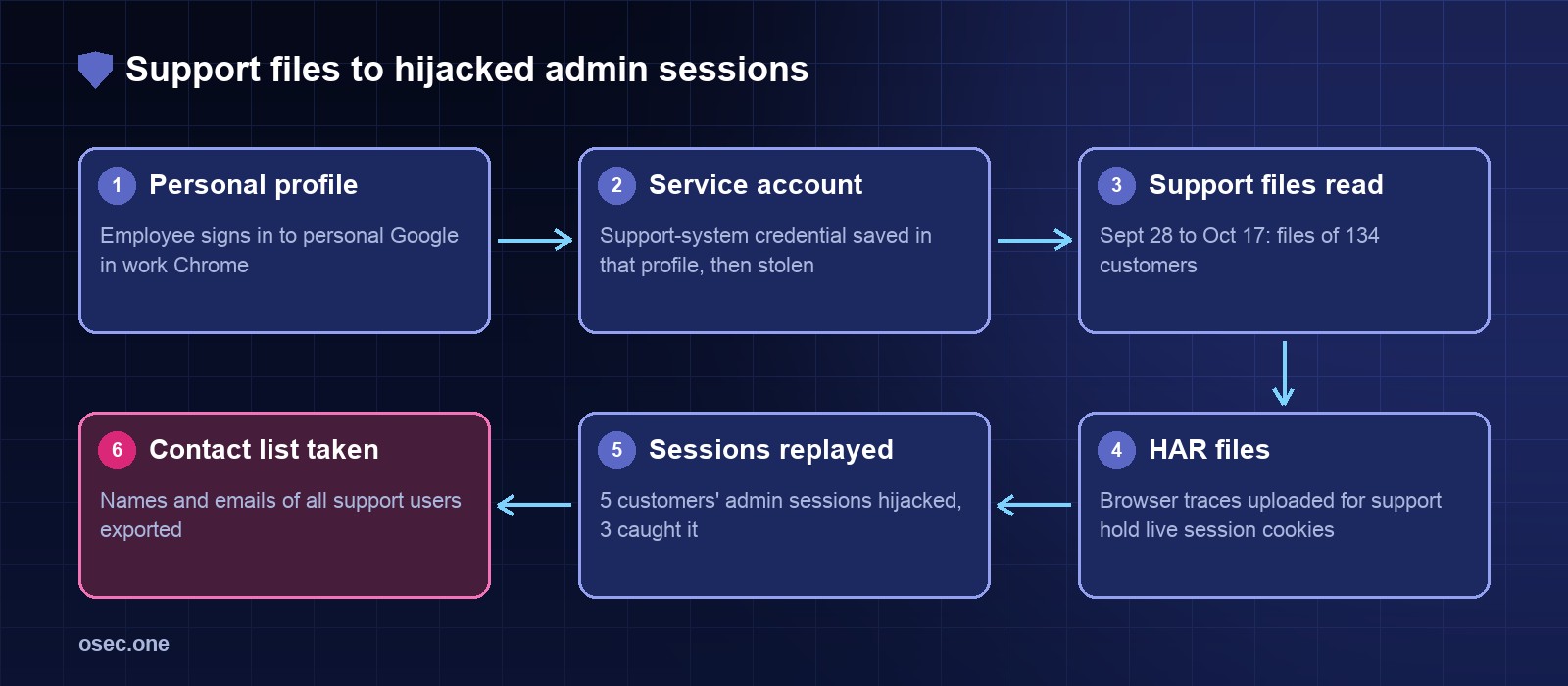
An attacker had been inside Okta's customer support system from 28 September to 17 October 2023, opened files belonging to 134 customers and replayed session tokens from those files to hijack the sessions of 5 customers. A month later Okta found that the same attacker had also exported the names and email addresses of all its customer support users. Here is how it happened, why it took weeks to see, and what breaks each step.
What a HAR file is, and why support teams want one
A HAR (HTTP Archive) file is a JSON record of everything a browser tab sent and received: every URL, request and response header, cookie, form body and response. You make one from the browser's developer tools (Network tab, Export HAR). Support teams ask for them because they show exactly what failed, without a screen share.
They also show exactly what a server needs to recognise you. A HAR recorded while signed in to an admin console holds the session cookie for that console. Anyone who loads that cookie into a browser before it expires is signed in as you, and no password or MFA prompt appears, because sign-in already happened.
A HAR file recorded while you're signed in is a copy of your session. Treat it like a password.
Step 1: a work password in a personal browser profile
Okta's root cause analysis says an employee had signed in to their personal Google profile in Chrome on an Okta-managed laptop. The username and password of a service account for the support system were saved in that profile, so they synced to the employee's personal Google account. Okta judged that the most likely way the credential got out was a compromise of that personal Google account or a personal device.
The service account had permission to view and update customer support cases. It was a shared, non-human login, so it wasn't tied to one person's MFA or one person's habits.
Step 2: reading support files for three weeks
With that login the attacker opened support cases and downloaded attached files, many of them HAR files uploaded at Okta's own request. Okta's first internal searches didn't find this. In its words, viewing a file attached to a case normally logs a case event, but opening a file directly from the system's Files tab, as the attacker did, wrote an entirely different log event with a different record ID. The investigation looked for the first kind and missed the second for 14 days.
Step 3: replaying sessions, within minutes
1Password, 29 September
An IT team member had uploaded a HAR file to Okta support at Okta's request. In the early hours of 29 September someone used that same Okta session to open 1Password's Okta admin portal, tried to reach the IT employee's dashboard and requested a report of all administrative users. Both were blocked, and 1Password's security team picked up the activity the same day.
BeyondTrust, 2 October
A BeyondTrust Okta administrator uploaded a HAR file for a support case. Within 30 minutes an attacker used the session cookie from it. The admin console was off-limits: BeyondTrust's policy only allowed admin console access from managed devices running Okta Verify, and the admin account used FIDO2. The attacker's other attempts (the main dashboard, an admin API report) were denied or caught. BeyondTrust reported the incident to Okta that day. By its account it took 17 days before Okta confirmed a breach.
Cloudflare, 18 October
Cloudflare's team detected activity from a session token taken from a support ticket a Cloudflare employee had created, and found two employee accounts in its Okta tenant affected. They contained it, reported no customer data or systems impacted, and contacted Okta before Okta contacted them.
Okta disclosed the breach on 20 October 2023 and published its root cause analysis on 3 November.
Step 4: the report nobody counted at first
On 29 November 2023 Okta revised the scope. Re-examining what the attacker did, it found the attacker had run and downloaded a report listing all users of its customer support system. For the vast majority the report held just a full name and email address; for some it also held phone number, username, company and role. All Workforce Identity Cloud and Customer Identity customers were affected, except government environments (FedRAMP High and DoD IL4) that used a separate support system. Many of those users are Okta administrators, so Okta warned them to expect targeted phishing.
What Okta changed
• Disabled the compromised service account.
• Blocked personal Google profiles in Chrome on Okta-managed laptops (Chrome Enterprise policy).
• Added detection and monitoring rules for the support system.
• Shipped session binding by network location for admin sessions: if an admin session's network changes, the admin must sign in again.
Cloudflare published an open-source HAR sanitizer soon after, and since Chrome 130 DevTools exports a sanitized HAR by default, without Cookie, Set-Cookie and Authorization headers. Both help. Neither removes everything: tokens also travel in URLs (?code=, ?stateToken=), in JSON bodies and in form posts.
Controls that break each step
Keep work credentials out of personal profiles
• Block sign-in to personal browser profiles on managed devices, and turn off password saving for work accounts, or allow only a managed password manager.
• Give service accounts the narrowest scope, rotate them, and alert on their use from new networks. Better, replace shared logins with named accounts behind SSO and MFA.
Make support files harmless
• Sanitize every HAR on your own machine before it leaves. Chrome 130 and later exports a sanitized HAR by default (DevTools → Network → Export HAR (sanitized)), without Cookie, Set-Cookie and Authorization headers. Don't paste a raw HAR into any website to clean it, ours included: the file holds live sessions. For tokens in URLs and bodies, Cloudflare's open-source har-sanitizer runs locally.
• Record the HAR in a fresh session, then sign out when you're done: that ends the session the original file held. Delete the original.
• If you run a support desk: sanitize uploads on arrival, keep attachments for days rather than years, and log every file access in one place.
Make a stolen cookie worth less
• Bind admin sessions to the device or network they started on, and keep admin sessions short.
• Restrict admin consoles to managed devices, as BeyondTrust did. That one policy stopped the cookie at the door.
• Ask for fresh MFA (ideally a FIDO2 key or passkey) before sensitive admin actions such as creating users, API tokens or reports.
See it sooner
• Alert when one session appears from two IP addresses or countries, and when admin reports or API tokens are created.
• Check that every way of reading data is logged under an event you actually query. Okta's 14-day gap was a logging gap.
• Treat a customer's report of suspicious activity as an incident until proven otherwise.
The lesson
No software flaw was needed here. A password synced to a personal account opened a support system, and the support system held what amounted to customers' signed-in browsers. The customers that caught it quickly were the ones whose admin sessions were tied to managed devices and hardware keys, and who watched their own logs. If you run sign-in for your own site, the same idea applies at small scale: fewer long-lived secrets, and sessions that can be ended. Related reading: how Tycoon2FA kits steal session cookies after MFA, and how help-desk resets opened MGM and Caesars.
osec.one gives your site email-code, Google and Apple sign-in with per-email and per-IP limits, so there are no passwords to save in the wrong browser profile. Free to start.
Add passwordless loginSources: Okta: Unauthorized access to Okta's support case management system, root cause and remediation (Nov 2023); Okta: Tracking unauthorized access to Okta's support system (Oct 2023); BeyondTrust: Okta support unit breach; Cloudflare: How Cloudflare mitigated yet another Okta compromise; Help Net Security: 1Password also affected by Okta support system breach; KrebsOnSecurity: Okta breach affected all customer support users (Nov 2023); Cloudflare HAR sanitizer on GitHub; Chrome 130+ sanitized HAR export (Duende docs).