On 4 June 2025, Google's Threat Intelligence Group described a data-theft campaign that never touched a Salesforce vulnerability. The group it calls UNC6040 phoned employees, posed as IT support, and talked them into connecting an attacker-controlled copy of Salesforce's own Data Loader to the company's org. Google's words: the attackers "relied on manipulating end users, not exploiting any vulnerability inherent to Salesforce."
The theft itself was quick. The pressure came later: Google saw extortion arrive "several months after the initial intrusion", from a second cluster it tracks as UNC6240, with a bitcoin demand and a 72-hour deadline. This article walks through the call, what each step needs from the victim, a worked count from one Salesforce-linked disclosure (Qantas, 5.7 million customers), and the controls that break each step.
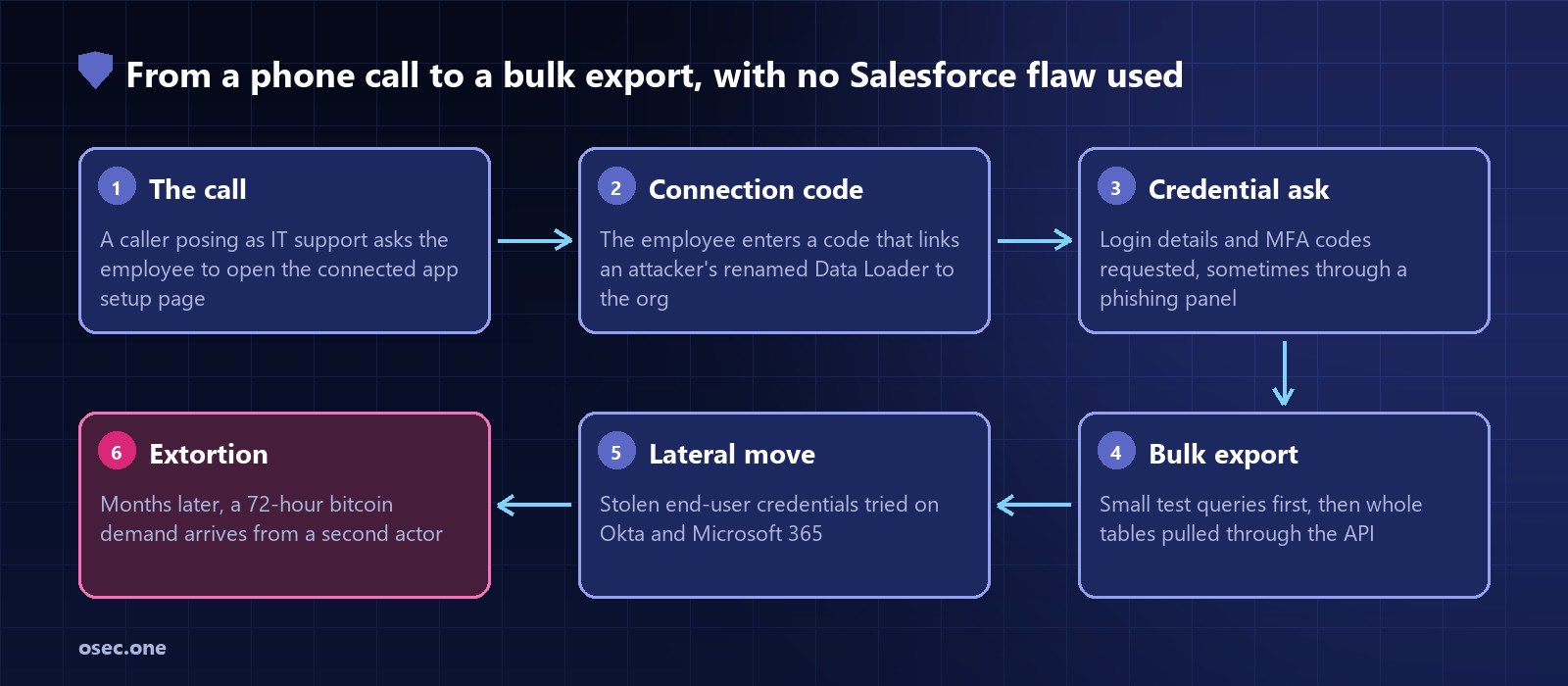
The call, step by step
Everything below is from Google's 4 June 2025 write-up (updated 5 and 8 August), described defensively and without any tooling detail.
1. The pretext. The caller poses as IT support, often to staff at English-speaking branches of multinational companies. The story is a Salesforce problem that needs the employee's help.
2. The connected app page. The employee is guided to Salesforce's connected app setup page to approve a version of Data Loader that carries a different name or branding. Google's example name is "My Ticket Portal", chosen to match the call.
3. The connection code. The employee is persuaded to open the connect setup page and enter a "connection code". That single entry links the attacker's app to the victim's org.
4. Credentials and MFA codes. In some calls the actor also asked for login details and MFA codes, and on the same infrastructure ran an Okta phishing panel that victims were sent to during the call.
5. The export. Data leaves "immediately". One actor pulled small chunks and got only about 10% of the data before access was revoked; another ran many small test queries, then scaled up to whole tables.
6. The move sideways. With harvested end-user credentials, the actor tried to reach other cloud platforms "such as Okta and Microsoft 365".
7. Months later: the demand. UNC6240 contacted victims by call or email, claimed to be ShinyHunters, and demanded bitcoin within 72 hours.
Notice what is missing: no exploit, no malware on a laptop, no stolen password in the first step. The employee does the authorising. That is why a login page, however strong, was not the control that failed.
What changed after June
| Date | Source | What was added |
|---|---|---|
| 4 June 2025 | Google Threat Intelligence | First write-up: Data Loader lookalike, connection code, Mullvad VPN addresses, extortion lag |
| Aug 2025 update | Group moved from Data Loader to custom Python-script apps, collection automated over TOR, malicious apps registered from compromised accounts at unrelated organisations instead of webmail trials | |
| 30 Sep 2025 | Hardening guide: identity, SaaS settings, logging; says the malicious connected app tactic remains prevalent | |
| 21 Nov 2025 update | Adds programmatic credential protections after the Salesforce advisory on Gainsight apps |
The August change matters for defenders: if you only watch for an app called Data Loader, a script app registered from a hijacked third-party account walks past that rule. The control has to be "which apps may connect at all", not "which names look suspicious".
A worked count: what one Salesforce-linked disclosure looked like
Qantas confirmed on 9 July 2025 that a cyberattack on one of its vendors affected 5.7 million customers; reports at the time linked it to a Salesforce-hosted customer-service system. Qantas has not attributed it to any group, and Google does not name Qantas, so treat it as an example of scale for this kind of customer-data store, not as a confirmed UNC6040 victim. Qantas's own breakdown, as reported by Cybersecurity Dive:
| Record group | Count | Fields |
|---|---|---|
| Names and email addresses | about 4.0 million | Name, email |
| ... of which also had a frequent-flyer number | 2.8 million | Name, email, frequent-flyer number |
| Other records | 1.7 million | Some mix of date of birth, phone number, gender, meal preference |
| Total customers affected | 5.7 million | = 4.0 + 1.7 (the 2.8 million is inside the 4.0 million, not added again) |
Qantas said credit card numbers, passport details and other financial information were not in the data. That is the pattern to expect from a CRM: contact and loyalty fields, not payment data. They are still enough for convincing follow-up calls, which is the same weapon used in step 1 above, aimed at the customers this time.
Which control breaks which step
Google's June post lists five controls and its October guide expands them. Mapped to the steps above:
| Step | Control that breaks it | Where |
|---|---|---|
| 2. Approve an unknown app | Deny by default: only allowlisted connected apps for admin-approved users; restrict "Customize Application" and "Manage Connected Apps" | Salesforce setup |
| 3. Enter the connection code | Staff rule: IT never phones to ask you to connect an app; hang up and call back | Policy and training |
| 4. Hand over login and MFA code | Phishing-resistant MFA (FIDO2 keys for privileged users); a code is something you never read out | Identity provider |
| 5. Bulk export | Remove "API Enabled" from everyone who does not need it; login IP ranges enforced on every request; Event Monitoring and Transaction Security policies for bulk exports | Salesforce setup, Shield |
| 6. Reuse elsewhere | SSO with device trust; automated response to risky sign-ins | Identity provider |
| The call itself | Out-of-band verification by call-back or manager approval; reject date of birth, last four of SSN and similar as proof of identity | Help desk process |
A one-hour check for a small Salesforce org
1. List connected apps. In Setup, open connected apps and OAuth usage. Write down every app, who authorised it and when. Anything you cannot explain gets revoked, and its sessions with it.
2. Turn on the deny-by-default API setting. Google names "For admin-approved users, limit API access to only allowed connected apps". Add back only the apps you listed.
3. Count who has "API Enabled". Remove it from profiles that never run integrations or exports.
4. Set login IP ranges on profiles and enable enforcement on every request.
5. Write the call rule and send it to all staff: IT will never phone you to approve an app or read out a code; hang up and call back on the number in the directory.
6. Check the last 90 days of logs: large API exports by a user who does not normally run them, and connected apps registered recently.
Related cases on this site: MGM and Caesars 2023: when the help desk resets MFA for the attacker and, for the OAuth side, Salesloft Drift 2025: OAuth tokens from a chatbot integration opened hundreds of Salesforce orgs. Here the app was approved by a person on the phone; there the token was stolen from a vendor. The control, an allowlist of apps, is the same.
A vishing call tries to get one-time codes read out loud. On the sign-in pages you run yourself, osec Login Protection counts wrong codes and emails per account, so a guessed code gets few tries. It will not stop a person who is persuaded to approve an app inside Salesforce; that needs the settings above.
See Login ProtectionSources
• Google Threat Intelligence Group, The Cost of a Call: From Voice Phishing to Data Extortion (4 June 2025, updated 5 and 8 August): https://cloud.google.com/blog/topics/threat-intelligence/voice-phishing-data-extortion
• Google, Proactive hardening recommendations against UNC6040 (30 September 2025, updated 21 November): https://cloud.google.com/blog/topics/threat-intelligence/unc6040-proactive-hardening-recommendations
• Cybersecurity Dive, Qantas confirms 5.7 million customers affected (9 July 2025): https://www.cybersecuritydive.com/news/qantas-cyberattack-57-million-customers/752571/
• BleepingComputer, Google: Hackers target Salesforce accounts in data extortion attacks: https://www.bleepingcomputer.com/news/security/google-hackers-target-salesforce-accounts-in-data-extortion-attacks/