On 18 July 2025, security researchers detected active zero-day exploitation against on-premises Microsoft SharePoint Server deployments worldwide. The exploit chain, quickly named ToolShell, chained an authentication bypass (CVE-2025-53771) with an insecure deserialization remote code execution flaw (CVE-2025-53770, CVSS 9.8). Within hours, attackers were sending single unauthenticated HTTP requests to internet-facing SharePoint servers, running arbitrary commands under the IIS worker process, and dropping webshells like <code>spinstall0.aspx</code>.
Two days later, on 20 July 2025, Microsoft issued out-of-band security updates, and CISA ordered federal agencies to remediate within 24 hours. But many security teams that installed the patch on time discovered a nasty surprise days later: attackers were still executing commands on their servers. The reason was cryptographic: ToolShell attackers stole the ASP.NET MachineKey (ValidationKey and DecryptionKey) from the SharePoint farm configuration database. With those keys in hand, attackers did not need the patched entry flaw anymore; they could forge encrypted ASP.NET __VIEWSTATE payloads against any normal page on the site. Patching the software fixed the front door, but left the master key in the attacker's pocket.
The dated timeline
| Date | Event | Source |
|---|---|---|
| May 2025 | Researchers demonstrate initial SharePoint deserialization chains (CVE-2025-49704, CVE-2025-49706) at Pwn2Own Berlin; Microsoft issues early patches | Zero Day Initiative, Microsoft |
| 18 July 2025 | Eye Security identifies active zero-day attacks in the wild bypassing prior patches via ToolPane.aspx (ToolShell chain) | Eye Security, SANS ISC |
| 19 July 2025 | Microsoft publicly confirms active zero-day exploitation of CVE-2025-53770 and CVE-2025-53771; assigns CVSS 9.8 (Critical) | MSRC Advisory |
| 20 July 2025 | CISA adds CVE-2025-53770 to the Known Exploited Vulnerabilities (KEV) Catalog; sets mandatory federal deadline for 21 July | CISA KEV Catalog |
| 20 July 2025 | Microsoft releases emergency out-of-band updates for SharePoint Server Subscription Edition and SharePoint Server 2019 | Microsoft |
| 21 July 2025 | Microsoft releases emergency update for SharePoint Server 2016; mass automated scanning detected globally | Microsoft, The Shadowserver Foundation |
| 22 to 24 July 2025 | Threat intelligence teams report persistent web shells and harvested MachineKey values being reused post-patch | Palo Alto Networks Unit 42, Vectra, Eye Security |
| August 2025 | Shadowserver reports hundreds of vulnerable or persistently backdoored SharePoint instances remaining visible online | The Shadowserver Foundation |
Dates and milestones are gathered from advisories by Microsoft, CISA, Eye Security, and The Shadowserver Foundation. While SharePoint Online (Microsoft 365) was not vulnerable due to managed multi-tenant architecture and restricted legacy layouts, on-premises SharePoint 2016, 2019, and Subscription Edition faced immediate automated weaponization.
The numbers: exposure, speed, and recovery window
| Metric | Count / Duration | Why it matters |
|---|---|---|
| Internet-facing on-prem SharePoint servers | ~8,200 to 10,500 | Public IP addresses exposing SharePoint endpoints (Shadowserver and Shodan global scans, July 2025) |
| Time from wild discovery to mass scanning | < 24 hours | Automated botnets began probing /_layouts/15/ToolPane.aspx immediately after public disclosure |
| CVSS base score | 9.8 (Critical) | Unauthenticated, remote network access, low complexity, full compromise of confidentiality, integrity, and availability |
| CISA KEV compliance window | 24 hours | One of the fastest mandatory remediation turnarounds issued by CISA in 2025 | Farm servers affected per stolen key | 100% of farm web apps | MachineKey is shared farm-wide across all IIS nodes in the SharePoint configuration database |
| Mandatory mitigation steps required | 3 distinct operations | 1) Binary patch, 2) PowerShell machine key rotation, 3) Farm-wide IIS process recycle |
The numbers show why ToolShell was so devastating for enterprise infrastructure: SharePoint servers rarely sit on isolated testing subnets; they sit directly integrated with Active Directory, corporate documents, intranet portals, and service accounts holding elevated domain privileges.
How the ToolShell chain worked, step by step
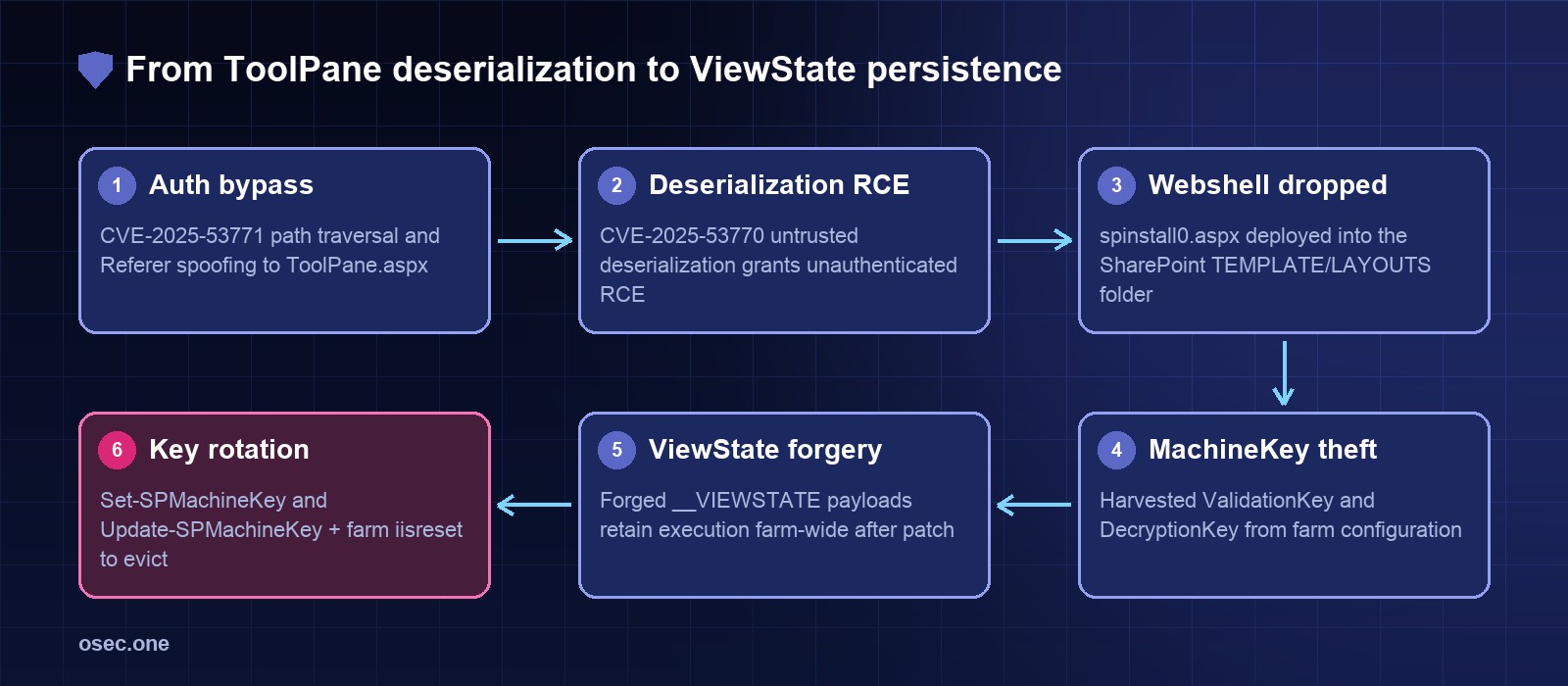
1. Unauthenticated entry via Referer spoofing and path traversal (CVE-2025-53771). Microsoft SharePoint protects internal administrative and layout pages under /_layouts/15/. However, attackers discovered that sending an HTTP request with specific path traversal segments or manipulating the Referer header to point to unauthenticated endpoints (such as SignOut.aspx) tricked SharePoint's authentication filter into treating the inbound request to ToolPane.aspx as an unauthenticated utility call that did not require domain login credentials.
2. Untrusted deserialization in ToolPane (CVE-2025-53770). The ToolPane.aspx page is part of SharePoint's web part customization framework. When requested, it processed user-supplied parameters through an insecure deserialization handler. An attacker who passed a serialized .NETT object (crafted via known gadget chains like TypeConfuseDelegate or TextFormattingRunProperties) triggered immediate code execution within the context of the IIS worker process (w3wp.exe), running with the permissions of the SharePoint application pool service account.
3. Dropping the webshell (spinstall0.aspx). Once execution was achieved, the first action observed in forensic investigations was dropping a small, highly obfuscated ASPX webshell into the SharePoint layouts directory: <code>C:\Program Files\Common Files\microsoft shared\Web Server Extensions\15\TEMPLATE\LAYOUTS\spinstall0.aspx</code> (or under the 16 directory for modern editions). Because the LAYOUTS virtual directory is mapped across every web application in IIS, dropping one file made it instantly accessible across all portal URLs on the server.
4. Harvesting the ASP.NET MachineKey. The dropped webshell or secondary PowerShell commands did not stop at searching for documents. Instead, threat actors queried the SharePoint Configuration Database (SPFarm.Local) or inspected the decrypted web.config memory structures to extract the farm's cryptographic keys: the ASP.NET ValidationKey and DecryptionKey.
5. Persistent code execution through forged ViewState. In ASP.NET, pages preserve state across postbacks using the hidden __VIEWSTATE field. To prevent tampering, the server signs the ViewState using the ValidationKey (often HMAC-SHA256) and optionally encrypts it using the DecryptionKey (AES). With the stolen machine keys, an attacker can generate arbitrary serialized .NET payloads, sign them with the stolen ValidationKey, and send them as an ordinary HTTP POST request with __VIEWSTATE to any ASPX page on the server. The server deserializes the payload, validates the cryptographic signature, and executes the attacker's code without triggering any authentication failure.
Why applying Microsoft's patch was only half the job
Most software patches fix a bug in executable binary files (DLLs or scripts). When administrators installed the July 2025 updates (e.g. KB5002754 or cumulative security packages), Microsoft's installer successfully updated the binaries for ToolPane.aspx and blocked the unauthenticated deserialization vector.
However, the patch did not touch the farm's configuration database or regenerate the cryptographic keys already saved there. If an attacker had already compromised the machine keys before the patch was applied, the attacker no longer needed ToolPane.aspx. They could simply send forged __VIEWSTATE requests to default.aspx, login.aspx, or any public SharePoint page. The server would inspect the signature, confirm it matched the ValidationKey in its active configuration, and execute the serialized payload. This is why dozens of organizations that patched on day one remained persistently compromised.
Artefacts to search for
| Location | What to search for | Indicator significance |
|---|---|---|
...\TEMPLATE\LAYOUTS\ | spinstall0.aspx, help0.aspx, error0.aspx, or recently created .aspx / .ashx files | Primary webshells dropped during initial ToolShell exploitation |
| IIS Web Logs | HTTP POST requests to /_layouts/15/ToolPane.aspx with status 200 or 500 from untrusted IP addresses | Initial unauthenticated exploitation attempt |
| IIS Web Logs | Unusual referer headers containing SignOut.aspx or path traversal segments (/..;/) | Authentication bypass attempt (CVE-2025-53771) |
| IIS Web Logs | Large HTTP POST requests with __VIEWSTATE payloads to arbitrary pages with no preceding GET request | Post-patch persistence abusing stolen MachineKey |
| Windows Event Logs | Event ID 4688: w3wp.exe spawning powershell.exe, cmd.exe, whoami.exe, or certutil.exe | Post-exploitation command execution by the web service worker |
| SharePoint ULS Logs | Unexpected deserialization errors, TypeConfuseDelegate exceptions, or ViewState MAC verification failures | Exploit attempts or failed payload delivery |
The path to the SharePoint layouts directory depends on the installed version: <code>C:\Program Files\Common Files\microsoft shared\Web Server Extensions\15\TEMPLATE\LAYOUTS\</code> for SharePoint 2013/2016/2019, and the <code>16</code> directory for Subscription Edition.
The farm-wide recovery checklist: patch, rotate, reset, hunt
If you ran on-premises SharePoint in July 2025 or later, follow these four mandatory steps in exact order:
1. Apply the Microsoft Cumulative Update. Install the July 2025 (or latest) emergency security update across all servers in the farm. Verify build numbers in Central Administration > Servers in Farm, not merely from the Windows Update success dialog.
2. Rotate the MachineKey across all Web Applications. Open the SharePoint Management Shell as Administrator and force a rotation of the ASP.NET machine keys across all web applications in the farm. This invalidates any keys stolen prior to patching:
# Bulk rotate machine keys across all SharePoint web applications
Get-SPWebApplication | ForEach-Object {
    Write-Host "Rotating machine key for: $($_.Url)" -ForegroundColor Cyan
    Set-SPMachineKey -WebApplication $_
    Update-SPMachineKey -WebApplication $_
}
3. Recycle IIS Farm-Wide. The new machine keys will not take effect until the worker processes in memory are completely refreshed. Run <code>iisreset.exe</code> on every frontend and application server in the farm to sever active worker memory and terminate any running in-memory implants.
4. Hunt and Clean Web Shells. Inspect the file system for <code>spinstall0.aspx</code> and any modified files in the LAYOUTS and _app_bin folders. Compare timestamps against known deployment dates. If a web shell is discovered, assume the server account was used to query Active Directory and rotate service account passwords immediately.
5. Restrict Public Internet Access. On-premises SharePoint servers should never have administrative endpoints or collaborative team sites exposed directly to the public internet without an authenticating edge proxy, VPN, or zero-trust access gateway.
Controls that break each step
| Attack Step | Defensive Control | How to verify |
|---|---|---|
| ToolPane unauthenticated request | Web Application Firewall (WAF) rule blocking outside access to /_layouts/*/ToolPane.aspx | Send test probe from outside IP; WAF must return 403 Forbidden |
| Deserialization exploit execution | Emergency cumulative patch applied; AMSI (Antimalware Scan Interface) enabled for SharePoint | Confirm farm build version and verify AMSI logging in Defender |
| spinstall0.aspx webshell write | File integrity monitoring (FIM) on SharePoint TEMPLATE\LAYOUTS directories | Drop harmless test file into test layout folder; alert must trigger immediately |
| Process execution under w3wp.exe | Endpoint Detection and Response (EDR) rule blocking w3wp.exe from spawning shells | Attempt test command execution; EDR must terminate process tree |
| Post-patch ViewState persistence | Farm-wide machineKey rotation (Set-SPMachineKey) and IIS reset | Verify new keys in farm config and confirm old signed ViewStates fail MAC check |
The pattern seen in ToolShell echoes earlier gateway compromises: in Citrix Bleed, patching binaries failed to terminate stolen session tokens; in PAN-OS, administrative interfaces left on public IPs allowed unauthenticated code execution. To check what outside observers and potential attackers see in front of your public web services, the free osec site protection scan inspects edge responses, SSL certificates, and security headers to reveal whether your exposed tier is protected by a recognized WAF or sitting bare on the internet.
Key takeaways
1. Software patches do not fix stolen cryptographic secrets. When an unauthenticated RCE flaw allows an attacker to read configuration memory or databases, patching the binary is only step one; cryptographic keys must be rotated farm-wide.
2. ToolShell abused a legacy layout endpoint. Chaining an authentication bypass (CVE-2025-53771) with insecure deserialization (CVE-2025-53770) turned ToolPane.aspx into a one-request remote shell.
3. The spinstall0.aspx webshell was the calling card. Dropping ASPX files into the SharePoint LAYOUTS folder gave attackers immediate web access across all farm URLs.
4. ViewState forgery grants persistent invisible execution. Armed with a stolen ValidationKey, attackers do not need a zero-day; they can execute code through standard ASP.NET postback handling on any benign page.
5. SharePoint on-prem does not belong on the open internet. Protect enterprise collaboration portals behind MFA, VPNs, or authenticating edge layers.
Exposed enterprise portals and stolen credentials remain the number one entry vector for network breaches. osec.one provides modern, passwordless authentication with email OTP, Apple, and Google sign-in to eliminate stolen passwords and session replay.
Explore passwordless securitySources: Microsoft Security Response Center: Guidance on SharePoint Server Vulnerabilities CVE-2025-53770 and CVE-2025-53771; CISA Known Exploited Vulnerabilities Catalog: CVE-2025-53770; Eye Security: ToolShell zero-day exploitation of on-premises SharePoint; Palo Alto Networks Unit 42: Threat Brief on ToolShell SharePoint Campaign; SANS Internet Storm Center: Critical SharePoint Vulnerability CVE-2025-53770; The Shadowserver Foundation: Scanning and remediation tracking for CVE-2025-53770; Vectra AI: Technical analysis of SharePoint machine key theft and ViewState persistence. Metric counts and intervals are based on published vendor telemetry and incident response reports.