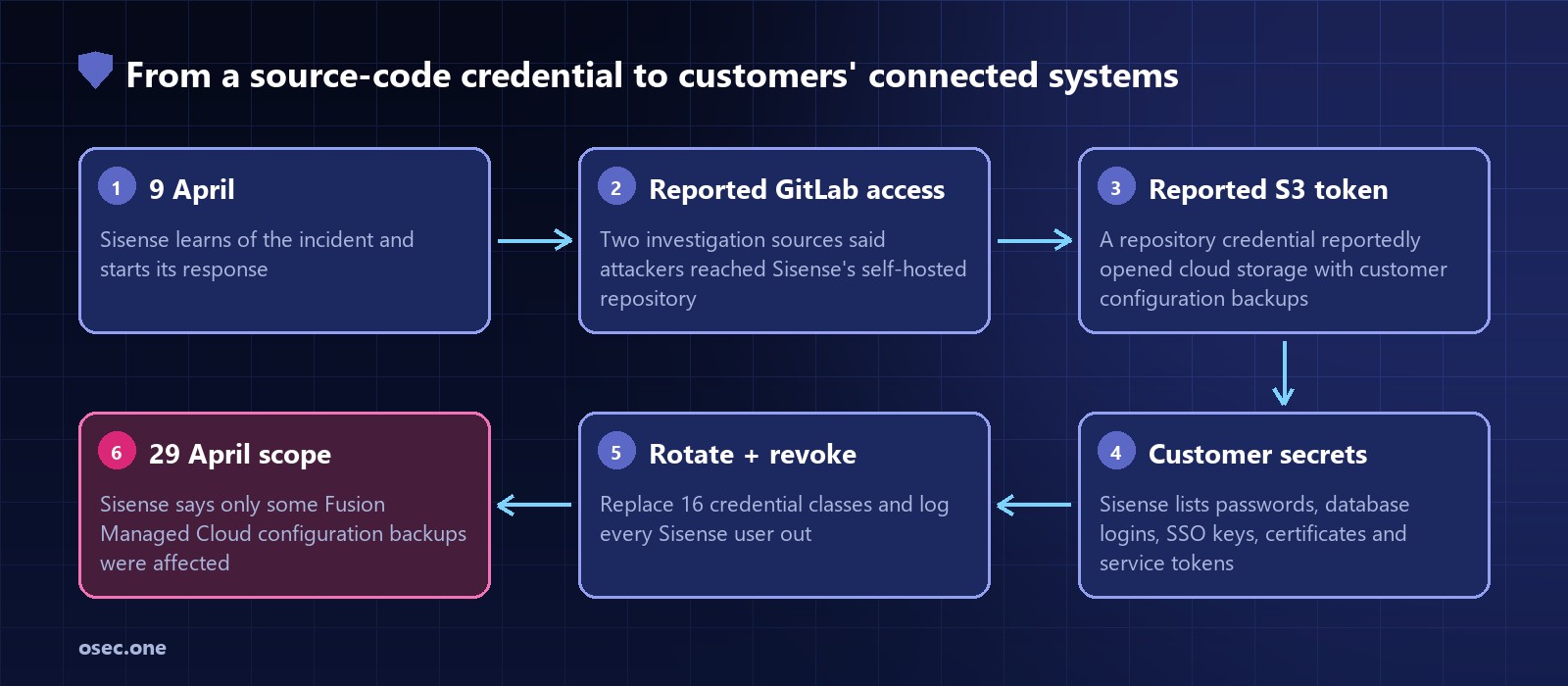
On 9 April 2024, the analytics company Sisense learned about a security incident. Two days later, CISA did something unusual for an incident with so little public detail: it told every Sisense customer to reset credentials and secrets exposed to, or used to access, Sisense services. Sisense's own follow-up turned that short warning into a long job: passwords, database logins, SSO keys, certificates and service tokens all had to move.
This is also a case where the public story changed. The first reports described a broad supply-chain emergency. Sisense's 29 April account narrowed the confirmed impact to incremental configuration backups for some Sisense Fusion Managed Cloud customers. It said Fusion on-premises and Sisense CDT/Periscope were not affected. The exact number of affected customers has never been published.
Confirmed, reported, and still unknown
| Claim | Public support | Confidence |
|---|---|---|
| Sisense learned of the incident on 9 April | Sisense CEO's 29 April account | Confirmed |
| All customers were notified in the first 24 hours | Sisense | Confirmed |
| CISA urged customers to reset credentials and investigate suspicious use | CISA alert, 11 April | Confirmed |
| Attackers first reached a self-hosted GitLab repository, then used a stored credential to reach S3 | Two sources close to the investigation, reported by KrebsOnSecurity | Reported, not confirmed by Sisense |
| Several terabytes and millions of tokens/passwords/certificates were copied | The same two sources | Reported, no public audit count |
| Affected information was in incremental configuration backups for some Fusion Managed Cloud customers | Sisense, 29 April | Confirmed |
| Fusion on-premises and CDT/Periscope were unaffected | Sisense, 29 April | Confirmed |
| Exact customer count and first-entry date | No public figure | Unknown |
Krebs reported that Sisense had more than 1,000 customers. That is company scale, not a breach count. Sisense said only a subset of Managed Cloud customers was potentially affected, without saying how many. Treating 1,000 as the victim count would be wrong.
Why an analytics backup can become a key ring
A dashboard is not just charts. It connects to databases, directories, Git repositories, email servers and identity providers. To refresh data without a person typing a password each time, it keeps connection strings, tokens or certificates. A configuration backup can therefore hold the map and the keys to systems outside the analytics platform.
That is why changing the Sisense admin password alone was not enough. Sisense's 11 April customer instructions named the credentials used inside the product and the credentials Sisense used to reach other products.
The 16 credential classes, counted
The count below groups Sisense's customer checklist by distinct credential or session class. It does not count the same item twice when Sisense repeated it for SSO and non-SSO setups.
| # | Credential or state to replace | Where the new value also has to go |
|---|---|---|
| 1 | my.sisense.com password | Password manager and operators |
| 2 | Base Configuration Security secret (GUID/UUID) | Every component that validates it |
| 3 | Sisense application user passwords | Each application user |
| 4 | Existing Sisense sessions | Use logout_all; rotation without revocation leaves old sessions alive |
| 5 | SSO JWT shared secret | Sisense and the SSO handler |
| 6 | SAML x.509 certificate/key | Identity provider and Sisense SSO settings |
| 7 | OpenID/OIDC client secret | Identity provider and Sisense |
| 8 | Customer database account | Database and every Sisense connection using it |
| 9 | User Params secrets | The source system and Sisense parameters |
| 10 | Active Directory/LDAP sync account | Directory and Sisense sync configuration |
| 11 | Git HTTP credentials | Every Git project connected to Sisense |
| 12 | B2D connection credential | Update through the B2D connection API |
| 13 | Infusion Apps keys | App and Sisense |
| 14 | Web access tokens | Issuer and every consumer |
| 15 | Custom email server credentials | Mail server and Sisense |
| 16 | Secrets in custom-code notebooks | Secret store and notebook references |
The table deliberately counts session revocation as one of the 16. A new password does not necessarily kill an already issued session or token. Sisense explicitly told both SSO and non-SSO customers to log everyone out after changing their settings.
A rotation order that avoids reconnecting with the old key
1. Freeze edits and export an inventory. List every database, directory, Git project, mail server, identity provider, notebook and custom app connected to Sisense.
2. Preserve evidence first. Save Sisense, identity-provider, database and cloud audit logs before their retention windows roll over. Record unusual source addresses and token use from before 9 April.
3. Create the replacement at the source. Make the new database password, OIDC secret or token where it is issued. Keep the old value alive briefly if the service supports two active keys.
4. Update Sisense and test one connection. A green dashboard refresh is evidence that the new value works; it is not evidence the old one is dead.
5. Revoke the old value. Disable the old account secret, token or certificate and check the issuer's audit log for rejected use.
6. End sessions. Run the product-wide logout and invalidate browser or API sessions separately where the connected service requires it.
7. Repeat by blast radius. Start with database write accounts, directory sync and SSO signing material; finish with read-only feeds.
8. Watch for 30 days. Alert on old key IDs, failed authentication from new networks, unusual database exports and new SSO clients.
What one customer actually did
Mitratech documented a practical response in public. On 12 April it took its hosted Sisense servers offline and made analytics dashboards unavailable while it rotated credentials. On 15 April it said Sisense's information pointed to cloud customers and no evidence of affected on-premises installs. By 18 April, production remediation was complete and Sisense had told Mitratech it found no evidence those environments were affected. The company accepted several days of analytics disruption to avoid betting on an unverified boundary.
For the closest credential-rotation case on this site, see CircleCI 2023: a session cookie from an engineer's laptop, and every customer told to rotate every secret. For the source-code side, Dropbox 2022 shows how a fake CI login reached 130 repositories.
After a credential incident, check which login and admin surfaces are still public. osec Scan maps exposed services for a host without a DNS move; it cannot prove a token was stolen, but it gives the rotation team a concrete outside-in inventory to compare with its connection list.
Scan a hostSources
• Sisense, More on the April 2024 Security Incident (29 April 2024): https://www.sisense.com/blog/more-on-the-april-2024-security-incident/
• CISA, Compromise of Sisense Customer Data (11 April 2024): https://www.cisa.gov/news-events/alerts/2024/04/11/compromise-sisense-customer-data
• KrebsOnSecurity, Why CISA is Warning CISOs About a Breach at Sisense (11 April 2024; includes Sisense's detailed customer rotation message and clearly attributes the GitLab/S3 account to two sources): https://krebsonsecurity.com/2024/04/why-cisa-is-warning-cisos-about-a-breach-at-sisense/
• Mitratech, Impact of Sisense Security Advisory on Mitratech Products (updates 11-28 April 2024): https://success.mitratech.com/TeamConnect/Impact_of_Sisense_Security_Advisory_on_Mitratech_Products
• DocuSign, Sisense Security Incident Statement (17 April 2024): https://www.docusign.com/trust/alerts/sisense-security-incident-statement