Microsoft Threat Intelligence published the campaign on 13 February 2025, the same day Volexity described three Russian groups doing the same thing. By 2026 the trick had become a phishing kit sold on Telegram. This write-up walks through how the device code flow works, how Storm-2372 turned it into a sign-in for the attacker, how it moved from a token to a registered device, and the one Conditional Access setting that stops most of it.
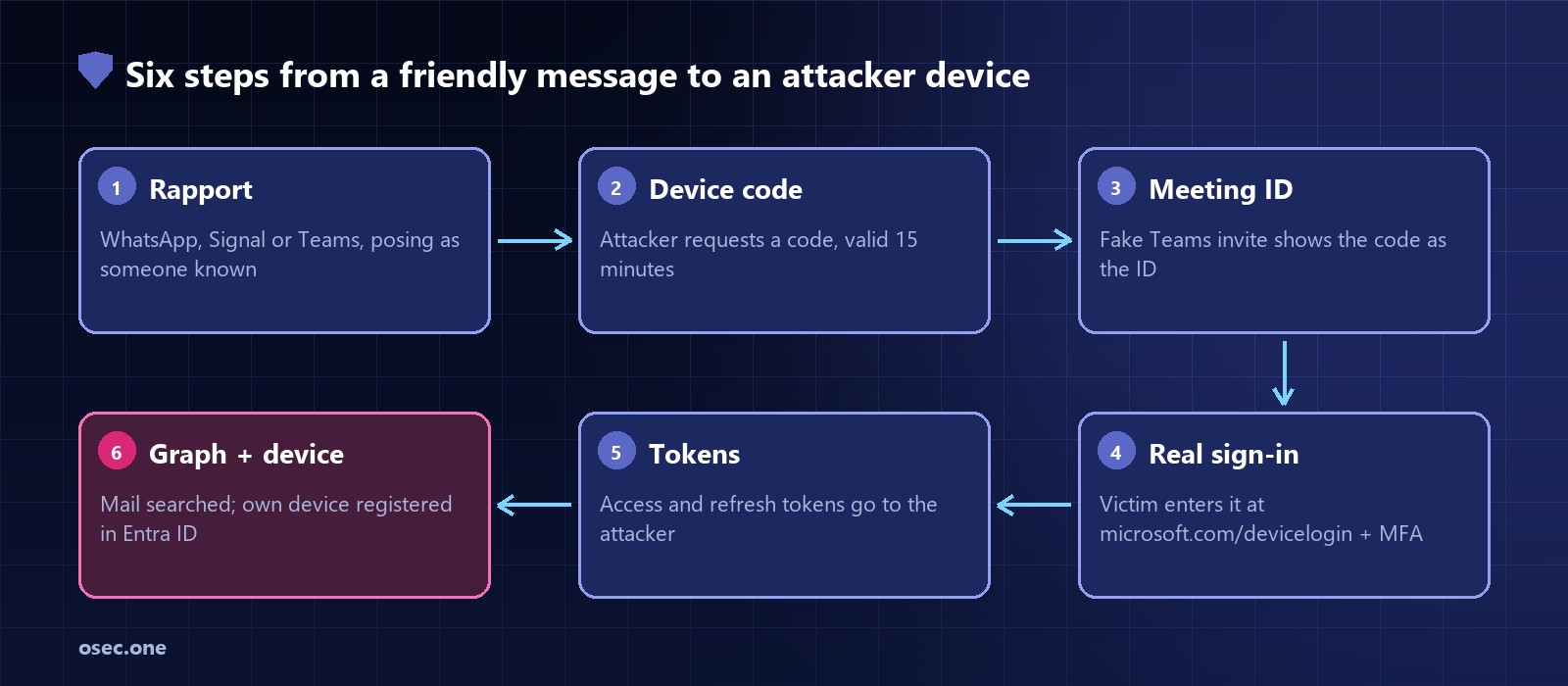
"},{"id":147935,"block_type":"screenshot","html":"Six steps from a friendly message to an attacker device in the victim's directory. Every page the victim saw was Microsoft's."},{"id":147936,"block_type":"heading_h2","html":"
Timeline
"},{"id":147937,"block_type":"html","html":"
\n
When
What happened
Source
\n
Aug 2019
RFC 8628 standardises the device authorization grant; section 5.4 warns about remote phishing
IETF
\n
Aug 2024
Storm-2372 device code phishing starts
Microsoft
\n
Early Sep 2024
Entra authentication-flow policies also start covering the Device Registration Service
Microsoft Learn
\n
Mid-Jan 2025
Volexity sees CozyLarch, UTA0304 and UTA0307 run the same play
Volexity
\n
13 Feb 2025
Microsoft and Volexity publish
Microsoft; Volexity
\n
14 Feb 2025
Microsoft update: Storm-2372 switched to the Microsoft Authentication Broker client to register devices
Microsoft
\n
Sep-Dec 2025
Proofpoint: device code phishing widespread; TA2723 kits SquarePhish2 and Graphish in October
Proofpoint
\n
Feb-Apr 2026
EvilTokens phishing-as-a-service on Telegram; about 7 near-identical kit variants in 10 days in April
Proofpoint
\n
31 Jul 2026
Microsoft update: Storm-2372 assessed as an initial-access sub-cluster of Midnight Blizzard
Device code sign-in exists for things without a keyboard or browser: a smart TV, a printer, a command-line tool on a server. The device can't show a sign-in page, so it asks someone else's browser to do it. RFC 8628 defines the exchange:
"},{"id":147940,"block_type":"paragraph","html":"
1. The device asks the identity provider for a code. It gets back a long device_code (kept secret on the device), a short user_code for a person to type, a verification_uri, an expires_in and a polling interval. 2. The device shows: "go to microsoft.com/devicelogin and enter the code". 3. The person signs in on their phone or laptop, enters the code and approves. 4. Meanwhile the device polls the token endpoint every interval seconds (5 by default). It hears authorization_pending until the person approves (or slow_down, which adds 5 seconds), then receives an access token and a refresh token.
"},{"id":147941,"block_type":"paragraph","html":"
Nothing in the flow ties the device to the person. Whoever requested the code gets the tokens. That's the design, and RFC 8628 section 5.4 says so: an attacker can start the flow on their own device and send the code to a victim, who then signs in for them.
Storm-2372 approached people over WhatsApp, Signal or Microsoft Teams, posing as a prominent person relevant to the target. Microsoft lists government, NGOs, IT services and technology, defence, telecoms, health, higher education and energy, across Europe, North America, Africa and the Middle East. The early messages asked for nothing. Volexity's cases show the same patience: UTA0304 posed as an official of Ukraine's Ministry of Defence on Signal, then moved the chat to an Element server the attacker ran; UTA0307 posed as a member of the European Parliament's foreign affairs committee.
Once the target agreed to a call, the attacker requested a fresh device code and sent a Teams meeting invite with it in place of the meeting ID. CozyLarch (which overlaps with APT29) built a fake State Department Teams chat called "Measuring Influence Operations" showing 37 members. The only link in the messages pointed at a real Microsoft domain, so link scanners and the person's own judgement both saw nothing wrong.
The victim went to microsoft.com/devicelogin, entered the code, typed their password and passed MFA. Every page was Microsoft's, over Microsoft's certificate. MFA did its job: it confirmed the right person was signing in. It just couldn't know the session would land on someone else's machine.
The attacker's script, polling all along, received an access token and a refresh token. Volexity notes that device codes are valid for 15 minutes, which is why the rapport mattered: the attacker generated the code only when the victim was ready to "join the meeting". At the RFC's default 5-second interval, one code allows up to 180 polls (15 × 60 / 5) before it expires. Later kits removed the timing problem altogether: Proofpoint's 2026 analysis found they generate the code at the moment the victim clicks.
With the tokens, Storm-2372 used Microsoft Graph to search the victim's mailbox for username, password, admin, teamviewer, anydesk, credentials, secret, ministry and gov, then sent matching mail out through Graph too.
Microsoft's 14 February update describes the escalation. Storm-2372 began requesting codes for the Microsoft Authentication Broker client. Its refresh token could be exchanged for a token to the Device Registration Service, which let the attacker register their own device in Entra ID and obtain a Primary Refresh Token: the long-lived credential a registered Windows device uses for single sign-on. Changing the password doesn't remove a registered device. The group also used proxies located near the targets so sign-in locations looked normal.
The direction is clear: a state-backed technique in 2024 became a commodity kit by 2026, and the 15-minute expiry stopped being a limit once kits fetched the code on click.
• "Train people to check the URL." The URL was microsoft.com. There was no fake page to spot. • "Turn on MFA." The victim passed MFA. Phishing-resistant methods like passkeys stop a fake page from relaying a sign-in, as in Tycoon2FA, but here the victim signed in on the genuine page and approved the code. • "Reset the password." Refresh tokens and a registered device with a Primary Refresh Token can outlive a password change. Sessions need revoking and the device removing. • "Block the phishing domain." There wasn't one. The infrastructure was a script polling Microsoft's token endpoint.
The sign-in fails; there is nothing for the attacker to collect
\n
Real need for device code (meeting-room devices, CLIs)
Scope the block: allow device code only for named users, devices or locations
The few legitimate uses keep working
\n
Refresh token reused
Since early Sep 2024 the same policy covers the Device Registration Service; blocked refresh tokens fail with AADSTS530036
The step from token to registered device fails
\n
Attacker device registered
Restrict who may register or join devices; review new registrations
No Primary Refresh Token for the attacker
\n
Graph mail searches
Sign-in risk policies with Continuous Access Evaluation; alert on mailbox searches for password-type words
Access is cut or noticed mid-session
\n
After a hit
revokeSignInSessions for the user, delete the attacker's device, review mail rules and app consents
Tokens and device stop working
\n
"},{"id":147962,"block_type":"paragraph","html":"
Microsoft Learn's steps for the block: at entra.microsoft.com, as at least Conditional Access Administrator, go to Entra ID > Conditional Access > Policies > New policy. Users: All users, exclude your emergency accounts. Target resources: All resources. Conditions > Authentication flows: Configure Yes, tick Device code flow. Grant: Block. Run it in Report-only first, check who would be affected, then switch it On. Volexity tested a policy blocking device code flow against this attack and it stopped it.
Microsoft published this hunting query for devices registered through the Device Registration Service. A device registered right after a device code sign-in, with an unfamiliar name or location, is the Storm-2372 pattern:
To see who uses device code sign-in at all before you block it, this query is ours, not Microsoft's, built on the field Volexity filters on (authenticationProtocol = deviceCode). Most organisations find a short list, and anyone on it who isn't running a meeting-room device or a CLI is worth a phone call:
"},{"id":147967,"block_type":"code","html":"
text
SigninLogs\n| where TimeGenerated > ago(30d)\n| where AuthenticationProtocol == "deviceCode"\n| summarize Signins = count(), Apps = make_set(AppDisplayName), IPs = make_set(IPAddress)\n by UserPrincipalName\n| order by Signins desc
"},{"id":147968,"block_type":"paragraph","html":"
Microsoft's post also has a Defender XDR query that joins a click on a device login URL to a sign-in error 50199 followed by a success.
Three ways past MFA, three different places the session leaks. Tycoon2FA sits a reverse proxy between the victim and the real login page and copies the session as it passes. Session cookie theft lifts the cookie from a browser after the sign-in. Device code phishing needs neither: the identity provider itself issues the tokens to the attacker, because the flow was built to sign in a device other than the one in your hand. Passkeys answer the first, device-bound sessions the second, and only turning the flow off answers the third.
"},{"id":147971,"block_type":"paragraph","html":"
For your own app the lesson is narrower: a sign-in should finish in the browser that asked for it. An email code entered in the page that requested it, or Google and Apple sign-in, has no "approve a code for another device" step to abuse. osec.one's passwordless sign-in works that way, with no OAuth setup on your side, and it's free. If you run code-based sign-in, Login Protection counts wrong codes per email, not just per IP.
"},{"id":147972,"block_type":"cta","html":"
Sign-ins with email codes, Google and Apple that finish in the browser that asked. No device flow to phish, no OAuth app to set up. Free.
Most phishing tries to get a password onto a fake page. Storm-2372 didn't need one. From August 2024 the group sent people a Microsoft Teams meeting invite whose "meeting ID" was really a device code. The victim typed it into Microsoft's own page, microsoft.com/devicelogin, signed in with their password and MFA as usual, and that real sign-in was handed to a device the attacker held. No fake site, no stolen password, no MFA prompt to bypass: the victim approved it.
\n
Ad
\n
Microsoft Threat Intelligence published the campaign on 13 February 2025, the same day Volexity described three Russian groups doing the same thing. By 2026 the trick had become a phishing kit sold on Telegram. This write-up walks through how the device code flow works, how Storm-2372 turned it into a sign-in for the attacker, how it moved from a token to a registered device, and the one Conditional Access setting that stops most of it.
\n
Six steps from a friendly message to an attacker device in the victim's directory. Every page the victim saw was Microsoft's.
\n
Timeline
\n
\n
When
What happened
Source
\n
Aug 2019
RFC 8628 standardises the device authorization grant; section 5.4 warns about remote phishing
IETF
\n
Aug 2024
Storm-2372 device code phishing starts
Microsoft
\n
Early Sep 2024
Entra authentication-flow policies also start covering the Device Registration Service
Microsoft Learn
\n
Mid-Jan 2025
Volexity sees CozyLarch, UTA0304 and UTA0307 run the same play
Volexity
\n
13 Feb 2025
Microsoft and Volexity publish
Microsoft; Volexity
\n
14 Feb 2025
Microsoft update: Storm-2372 switched to the Microsoft Authentication Broker client to register devices
Microsoft
\n
Sep-Dec 2025
Proofpoint: device code phishing widespread; TA2723 kits SquarePhish2 and Graphish in October
Proofpoint
\n
Feb-Apr 2026
EvilTokens phishing-as-a-service on Telegram; about 7 near-identical kit variants in 10 days in April
Proofpoint
\n
31 Jul 2026
Microsoft update: Storm-2372 assessed as an initial-access sub-cluster of Midnight Blizzard
Microsoft
\n
\n
The device code flow in one minute
\n
Device code sign-in exists for things without a keyboard or browser: a smart TV, a printer, a command-line tool on a server. The device can't show a sign-in page, so it asks someone else's browser to do it. RFC 8628 defines the exchange:
\n
1. The device asks the identity provider for a code. It gets back a long device_code (kept secret on the device), a short user_code for a person to type, a verification_uri, an expires_in and a polling interval. 2. The device shows: "go to microsoft.com/devicelogin and enter the code". 3. The person signs in on their phone or laptop, enters the code and approves. 4. Meanwhile the device polls the token endpoint every interval seconds (5 by default). It hears authorization_pending until the person approves (or slow_down, which adds 5 seconds), then receives an access token and a refresh token.
\n
Nothing in the flow ties the device to the person. Whoever requested the code gets the tokens. That's the design, and RFC 8628 section 5.4 says so: an attacker can start the flow on their own device and send the code to a victim, who then signs in for them.
\n
How the attack worked, step by step
\n
1. Rapport first, code later
\n
Storm-2372 approached people over WhatsApp, Signal or Microsoft Teams, posing as a prominent person relevant to the target. Microsoft lists government, NGOs, IT services and technology, defence, telecoms, health, higher education and energy, across Europe, North America, Africa and the Middle East. The early messages asked for nothing. Volexity's cases show the same patience: UTA0304 posed as an official of Ukraine's Ministry of Defence on Signal, then moved the chat to an Element server the attacker ran; UTA0307 posed as a member of the European Parliament's foreign affairs committee.
\n
2. The code arrives as a meeting ID
\n
Once the target agreed to a call, the attacker requested a fresh device code and sent a Teams meeting invite with it in place of the meeting ID. CozyLarch (which overlaps with APT29) built a fake State Department Teams chat called "Measuring Influence Operations" showing 37 members. The only link in the messages pointed at a real Microsoft domain, so link scanners and the person's own judgement both saw nothing wrong.
\n
3. The victim signs in, for real
\n
The victim went to microsoft.com/devicelogin, entered the code, typed their password and passed MFA. Every page was Microsoft's, over Microsoft's certificate. MFA did its job: it confirmed the right person was signing in. It just couldn't know the session would land on someone else's machine.
\n
4. Tokens to the attacker's device
\n
The attacker's script, polling all along, received an access token and a refresh token. Volexity notes that device codes are valid for 15 minutes, which is why the rapport mattered: the attacker generated the code only when the victim was ready to "join the meeting". At the RFC's default 5-second interval, one code allows up to 180 polls (15 × 60 / 5) before it expires. Later kits removed the timing problem altogether: Proofpoint's 2026 analysis found they generate the code at the moment the victim clicks.
\n
5. Mail searched through Graph
\n
With the tokens, Storm-2372 used Microsoft Graph to search the victim's mailbox for username, password, admin, teamviewer, anydesk, credentials, secret, ministry and gov, then sent matching mail out through Graph too.
\n
6. From a token to a registered device
\n
Microsoft's 14 February update describes the escalation. Storm-2372 began requesting codes for the Microsoft Authentication Broker client. Its refresh token could be exchanged for a token to the Device Registration Service, which let the attacker register their own device in Entra ID and obtain a Primary Refresh Token: the long-lived credential a registered Windows device uses for single sign-on. Changing the password doesn't remove a registered device. The group also used proxies located near the targets so sign-in locations looked normal.
\n
What came after Storm-2372
\n
\n
Group or kit
When
Lure
Source
\n
Storm-2372
Aug 2024 on
Fake Teams invite, code as meeting ID
Microsoft
\n
CozyLarch (APT29 overlap)
Jan-Feb 2025
Fake State Dept Teams chat, 37 members; 7 Gmail senders; about 12 US mobile carrier IPs as proxies
Volexity
\n
UTA0307
Jan-Feb 2025
Posed as a European Parliament member; Teams client ID; Mullvad VPN
Volexity
\n
UNK_AcademicFlare
Sep 2025 on
Compromised government and military accounts; OneDrive page on a Cloudflare Worker
The direction is clear: a state-backed technique in 2024 became a commodity kit by 2026, and the 15-minute expiry stopped being a limit once kits fetched the code on click.
\n
Why the usual answers fall short
\n
• "Train people to check the URL." The URL was microsoft.com. There was no fake page to spot. • "Turn on MFA." The victim passed MFA. Phishing-resistant methods like passkeys stop a fake page from relaying a sign-in, as in Tycoon2FA, but here the victim signed in on the genuine page and approved the code. • "Reset the password." Refresh tokens and a registered device with a Primary Refresh Token can outlive a password change. Sessions need revoking and the device removing. • "Block the phishing domain." There wasn't one. The infrastructure was a script polling Microsoft's token endpoint.
The sign-in fails; there is nothing for the attacker to collect
\n
Real need for device code (meeting-room devices, CLIs)
Scope the block: allow device code only for named users, devices or locations
The few legitimate uses keep working
\n
Refresh token reused
Since early Sep 2024 the same policy covers the Device Registration Service; blocked refresh tokens fail with AADSTS530036
The step from token to registered device fails
\n
Attacker device registered
Restrict who may register or join devices; review new registrations
No Primary Refresh Token for the attacker
\n
Graph mail searches
Sign-in risk policies with Continuous Access Evaluation; alert on mailbox searches for password-type words
Access is cut or noticed mid-session
\n
After a hit
revokeSignInSessions for the user, delete the attacker's device, review mail rules and app consents
Tokens and device stop working
\n
\n
Microsoft Learn's steps for the block: at entra.microsoft.com, as at least Conditional Access Administrator, go to Entra ID > Conditional Access > Policies > New policy. Users: All users, exclude your emergency accounts. Target resources: All resources. Conditions > Authentication flows: Configure Yes, tick Device code flow. Grant: Block. Run it in Report-only first, check who would be affected, then switch it On. Volexity tested a policy blocking device code flow against this attack and it stopped it.
\n
Hunting for it
\n
Microsoft published this hunting query for devices registered through the Device Registration Service. A device registered right after a device code sign-in, with an unfamiliar name or location, is the Storm-2372 pattern:
To see who uses device code sign-in at all before you block it, this query is ours, not Microsoft's, built on the field Volexity filters on (authenticationProtocol = deviceCode). Most organisations find a short list, and anyone on it who isn't running a meeting-room device or a CLI is worth a phone call:
\n
text
SigninLogs\n| where TimeGenerated > ago(30d)\n| where AuthenticationProtocol == "deviceCode"\n| summarize Signins = count(), Apps = make_set(AppDisplayName), IPs = make_set(IPAddress)\n by UserPrincipalName\n| order by Signins desc
\n
Microsoft's post also has a Defender XDR query that joins a click on a device login URL to a sign-in error 50199 followed by a success.
\n
How it compares with Tycoon2FA and cookie theft
\n
Three ways past MFA, three different places the session leaks. Tycoon2FA sits a reverse proxy between the victim and the real login page and copies the session as it passes. Session cookie theft lifts the cookie from a browser after the sign-in. Device code phishing needs neither: the identity provider itself issues the tokens to the attacker, because the flow was built to sign in a device other than the one in your hand. Passkeys answer the first, device-bound sessions the second, and only turning the flow off answers the third.
\n
For your own app the lesson is narrower: a sign-in should finish in the browser that asked for it. An email code entered in the page that requested it, or Google and Apple sign-in, has no "approve a code for another device" step to abuse. osec.one's passwordless sign-in works that way, with no OAuth setup on your side, and it's free. If you run code-based sign-in, Login Protection counts wrong codes per email, not just per IP.
\n
Sign-ins with email codes, Google and Apple that finish in the browser that asked. No device flow to phish, no OAuth app to set up. Free.
Storm-2372 2025: device code phishing that signed victims in for the attacker
Most phishing tries to get a password onto a fake page. Storm-2372 didn't need one. From August 2024 the group sent people a Microsoft Teams meeting invite whose "meeting ID" was really a device code. The victim typed it into Microsoft's own page, microsoft.com/devicelogin, signed in with their password and MFA as usual, and that real sign-in was handed to a device the attacker held. No fake site, no stolen password, no MFA prompt to bypass: the victim approved it.
Ad
Microsoft Threat Intelligence published the campaign on 13 February 2025, the same day Volexity described three Russian groups doing the same thing. By 2026 the trick had become a phishing kit sold on Telegram. This write-up walks through how the device code flow works, how Storm-2372 turned it into a sign-in for the attacker, how it moved from a token to a registered device, and the one Conditional Access setting that stops most of it.
Six steps from a friendly message to an attacker device in the victim's directory. Every page the victim saw was Microsoft's.
Timeline
When
What happened
Source
Aug 2019
RFC 8628 standardises the device authorization grant; section 5.4 warns about remote phishing
IETF
Aug 2024
Storm-2372 device code phishing starts
Microsoft
Early Sep 2024
Entra authentication-flow policies also start covering the Device Registration Service
Microsoft Learn
Mid-Jan 2025
Volexity sees CozyLarch, UTA0304 and UTA0307 run the same play
Volexity
13 Feb 2025
Microsoft and Volexity publish
Microsoft; Volexity
14 Feb 2025
Microsoft update: Storm-2372 switched to the Microsoft Authentication Broker client to register devices
Microsoft
Sep-Dec 2025
Proofpoint: device code phishing widespread; TA2723 kits SquarePhish2 and Graphish in October
Proofpoint
Feb-Apr 2026
EvilTokens phishing-as-a-service on Telegram; about 7 near-identical kit variants in 10 days in April
Proofpoint
31 Jul 2026
Microsoft update: Storm-2372 assessed as an initial-access sub-cluster of Midnight Blizzard
Microsoft
The device code flow in one minute
Device code sign-in exists for things without a keyboard or browser: a smart TV, a printer, a command-line tool on a server. The device can't show a sign-in page, so it asks someone else's browser to do it. RFC 8628 defines the exchange:
1. The device asks the identity provider for a code. It gets back a long device_code (kept secret on the device), a short user_code for a person to type, a verification_uri, an expires_in and a polling interval. 2. The device shows: "go to microsoft.com/devicelogin and enter the code". 3. The person signs in on their phone or laptop, enters the code and approves. 4. Meanwhile the device polls the token endpoint every interval seconds (5 by default). It hears authorization_pending until the person approves (or slow_down, which adds 5 seconds), then receives an access token and a refresh token.
Nothing in the flow ties the device to the person. Whoever requested the code gets the tokens. That's the design, and RFC 8628 section 5.4 says so: an attacker can start the flow on their own device and send the code to a victim, who then signs in for them.
How the attack worked, step by step
1. Rapport first, code later
Storm-2372 approached people over WhatsApp, Signal or Microsoft Teams, posing as a prominent person relevant to the target. Microsoft lists government, NGOs, IT services and technology, defence, telecoms, health, higher education and energy, across Europe, North America, Africa and the Middle East. The early messages asked for nothing. Volexity's cases show the same patience: UTA0304 posed as an official of Ukraine's Ministry of Defence on Signal, then moved the chat to an Element server the attacker ran; UTA0307 posed as a member of the European Parliament's foreign affairs committee.
2. The code arrives as a meeting ID
Once the target agreed to a call, the attacker requested a fresh device code and sent a Teams meeting invite with it in place of the meeting ID. CozyLarch (which overlaps with APT29) built a fake State Department Teams chat called "Measuring Influence Operations" showing 37 members. The only link in the messages pointed at a real Microsoft domain, so link scanners and the person's own judgement both saw nothing wrong.
3. The victim signs in, for real
The victim went to microsoft.com/devicelogin, entered the code, typed their password and passed MFA. Every page was Microsoft's, over Microsoft's certificate. MFA did its job: it confirmed the right person was signing in. It just couldn't know the session would land on someone else's machine.
4. Tokens to the attacker's device
The attacker's script, polling all along, received an access token and a refresh token. Volexity notes that device codes are valid for 15 minutes, which is why the rapport mattered: the attacker generated the code only when the victim was ready to "join the meeting". At the RFC's default 5-second interval, one code allows up to 180 polls (15 × 60 / 5) before it expires. Later kits removed the timing problem altogether: Proofpoint's 2026 analysis found they generate the code at the moment the victim clicks.
5. Mail searched through Graph
With the tokens, Storm-2372 used Microsoft Graph to search the victim's mailbox for username, password, admin, teamviewer, anydesk, credentials, secret, ministry and gov, then sent matching mail out through Graph too.
6. From a token to a registered device
Microsoft's 14 February update describes the escalation. Storm-2372 began requesting codes for the Microsoft Authentication Broker client. Its refresh token could be exchanged for a token to the Device Registration Service, which let the attacker register their own device in Entra ID and obtain a Primary Refresh Token: the long-lived credential a registered Windows device uses for single sign-on. Changing the password doesn't remove a registered device. The group also used proxies located near the targets so sign-in locations looked normal.
What came after Storm-2372
Group or kit
When
Lure
Source
Storm-2372
Aug 2024 on
Fake Teams invite, code as meeting ID
Microsoft
CozyLarch (APT29 overlap)
Jan-Feb 2025
Fake State Dept Teams chat, 37 members; 7 Gmail senders; about 12 US mobile carrier IPs as proxies
Volexity
UTA0307
Jan-Feb 2025
Posed as a European Parliament member; Teams client ID; Mullvad VPN
Volexity
UNK_AcademicFlare
Sep 2025 on
Compromised government and military accounts; OneDrive page on a Cloudflare Worker
The direction is clear: a state-backed technique in 2024 became a commodity kit by 2026, and the 15-minute expiry stopped being a limit once kits fetched the code on click.
Why the usual answers fall short
• "Train people to check the URL." The URL was microsoft.com. There was no fake page to spot. • "Turn on MFA." The victim passed MFA. Phishing-resistant methods like passkeys stop a fake page from relaying a sign-in, as in Tycoon2FA, but here the victim signed in on the genuine page and approved the code. • "Reset the password." Refresh tokens and a registered device with a Primary Refresh Token can outlive a password change. Sessions need revoking and the device removing. • "Block the phishing domain." There wasn't one. The infrastructure was a script polling Microsoft's token endpoint.
The sign-in fails; there is nothing for the attacker to collect
Real need for device code (meeting-room devices, CLIs)
Scope the block: allow device code only for named users, devices or locations
The few legitimate uses keep working
Refresh token reused
Since early Sep 2024 the same policy covers the Device Registration Service; blocked refresh tokens fail with AADSTS530036
The step from token to registered device fails
Attacker device registered
Restrict who may register or join devices; review new registrations
No Primary Refresh Token for the attacker
Graph mail searches
Sign-in risk policies with Continuous Access Evaluation; alert on mailbox searches for password-type words
Access is cut or noticed mid-session
After a hit
revokeSignInSessions for the user, delete the attacker's device, review mail rules and app consents
Tokens and device stop working
Microsoft Learn's steps for the block: at entra.microsoft.com, as at least Conditional Access Administrator, go to Entra ID > Conditional Access > Policies > New policy. Users: All users, exclude your emergency accounts. Target resources: All resources. Conditions > Authentication flows: Configure Yes, tick Device code flow. Grant: Block. Run it in Report-only first, check who would be affected, then switch it On. Volexity tested a policy blocking device code flow against this attack and it stopped it.
Hunting for it
Microsoft published this hunting query for devices registered through the Device Registration Service. A device registered right after a device code sign-in, with an unfamiliar name or location, is the Storm-2372 pattern:
To see who uses device code sign-in at all before you block it, this query is ours, not Microsoft's, built on the field Volexity filters on (authenticationProtocol = deviceCode). Most organisations find a short list, and anyone on it who isn't running a meeting-room device or a CLI is worth a phone call:
text
SigninLogs
| where TimeGenerated > ago(30d)
| where AuthenticationProtocol == "deviceCode"
| summarize Signins = count(), Apps = make_set(AppDisplayName), IPs = make_set(IPAddress)
    by UserPrincipalName
| order by Signins desc
Microsoft's post also has a Defender XDR query that joins a click on a device login URL to a sign-in error 50199 followed by a success.
How it compares with Tycoon2FA and cookie theft
Three ways past MFA, three different places the session leaks. Tycoon2FA sits a reverse proxy between the victim and the real login page and copies the session as it passes. Session cookie theft lifts the cookie from a browser after the sign-in. Device code phishing needs neither: the identity provider itself issues the tokens to the attacker, because the flow was built to sign in a device other than the one in your hand. Passkeys answer the first, device-bound sessions the second, and only turning the flow off answers the third.
For your own app the lesson is narrower: a sign-in should finish in the browser that asked for it. An email code entered in the page that requested it, or Google and Apple sign-in, has no "approve a code for another device" step to abuse. osec.one's passwordless sign-in works that way, with no OAuth setup on your side, and it's free. If you run code-based sign-in, Login Protection counts wrong codes per email, not just per IP.
Sign-ins with email codes, Google and Apple that finish in the browser that asked. No device flow to phish, no OAuth app to set up. Free.