Ticketmaster UK had a customer-support chat bot from a Spanish-American vendor, Inbenta Technologies. The bot's JavaScript was a custom module Inbenta wrote for Ticketmaster and served from Inbenta's own servers. It was loaded on many pages of the site, and on the payment page too.
From 10 February 2018 that module carried a card skimmer. It copied names, card numbers, expiry dates and CVVs as customers typed them. Banks started complaining in April. The bot was switched off on 23 June. The UK regulator later counted up to 9.4 million European customers potentially affected, about 1.5 million in the UK, and in November 2020 fined Ticketmaster £1.25 million. Ticketmaster itself first spoke of about 40,000 UK customers.
Our British Airways 2018 write-up covers a skimmer added to the site's own file. This one is different: the changed file belonged to a vendor, it did nothing for paying, and nobody at Ticketmaster had to make a mistake on the day. It's the case most small shops with a chat, analytics or review widget on checkout should read.
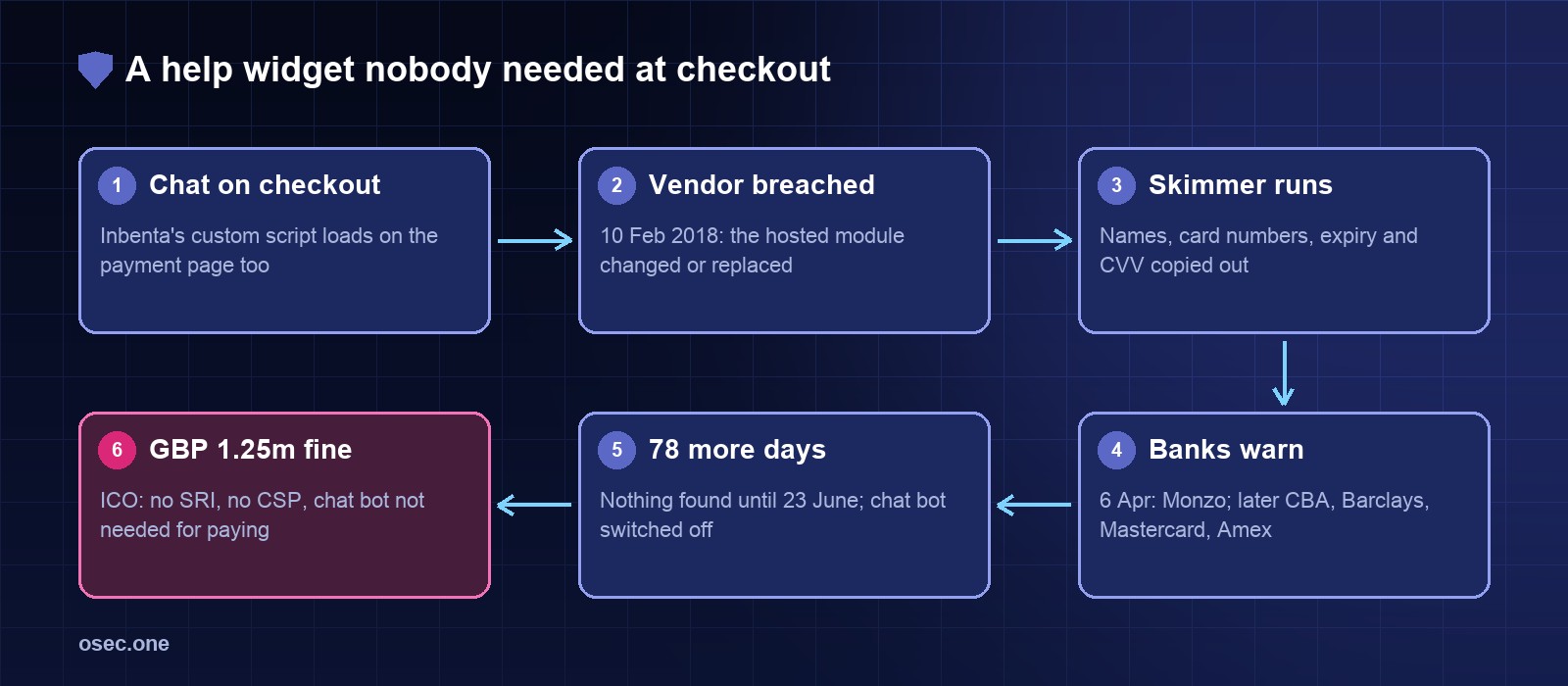
The timeline, from the regulator's notice
Step 1: a support widget on a page that takes cards
Chat bots, review badges, analytics and A/B testing tools are usually added once, site-wide, through a shared template. Nobody decides "put the chat bot on checkout"; it just ends up there. Inbenta said afterwards that the script had been put on the payment page without its knowledge and wasn't meant for it. Ticketmaster said the vendor's failings caused the breach. The regulator's view: "a chat bot is not strictly necessary for the service of taking a payment."
Any script on a page runs with the same rights as the page's own code. It can read every form field, watch every key press and send what it finds anywhere the browser is allowed to connect. A chat bot on checkout can read the card form exactly as well as the checkout's own code.
Step 2: the vendor's server, not Ticketmaster's
RiskIQ (now part of Microsoft) traced the attack to the Magecart groups. Its July 2018 report found that the attackers had breached Inbenta and either added to or wholly replaced the custom JavaScript module built for Ticketmaster. The same campaign hit other suppliers too: a module from SociaPlus was changed in the same way and ran on Ticketmaster's German, Australian and international sites. RiskIQ counted about 800 shops hit through third-party components.
That is the part a small site can't see from its own server. Your files are unchanged, your deploys are clean, your server logs look normal. The script is fetched by each visitor's browser from someone else's server, every time.
Step 3: 78 days of warnings
The skimmer would have been found much earlier if the warnings had been followed up. Monzo's fraud team spotted the pattern in a week: of about 50 customers reporting fraud, 70% had used Ticketmaster, against 0.8% of all its customers. That is an 87-to-1 ratio (70 / 0.8), and Monzo replaced about 6,000 cards. Ticketmaster's teams looked, found no breach, first scoped the response to the Australian site, and only searched every domain in June. The ICO said Ticketmaster failed to check the chat bot's integrity after the April reports.
BA and Ticketmaster side by side
The same lesson from both directions: what the browser receives on the payment page is what matters, whoever hosts it.
What the ICO said should have been there
• Subresource Integrity (SRI). The ICO called it "an appropriate measure with regard to the state of the art" and rejected the argument that the script was too dynamic for it.
• Content Security Policy (CSP), iframes or a local copy. If SRI wasn't used, the ICO expected those to be considered. Ticketmaster had no CSP before the breach.
• A risk assessment before putting third-party scripts on the payment page, and a layered approach given "the clear risk of third party scripts within a payment page".
• Vendor certificates are not a control. The ICO gave "little weight" to Inbenta's ISO 27001 certificate. Ticketmaster's last security vetting of Inbenta was in 2013, and the contract had no terms about the payment environment.
• PCI DSS. The ICO called Ticketmaster's breach of PCI DSS "negligent".
What PCI DSS asks for today: 6.4.3 and 11.6.1
PCI DSS 4.0 turned this exact case into two requirements, mandatory since 31 March 2025:
1. 6.4.3: every script on the payment page is listed, authorised, and has a written reason it's needed, and there's a way to check each one's integrity (SRI, a hash, a policy).
2. 11.6.1: a mechanism that alerts on unauthorised changes to the payment page's security headers and scripts as the browser receives them, run at least weekly (or at a frequency set by your risk analysis).
A chat bot fails 6.4.3 at the "why is this needed" step. If your card fields are in a payment provider's iframe or on its hosted page, the PCI SSC's January 2025 SAQ A update removed these two requirements for you but added that you must confirm your site is not open to script attacks that could reach that iframe. A script on the page can still swap the iframe for a fake form, which is what some CosmicSting skimmers did.
A payment page checklist for a small shop
1. List what loads on checkout. Open the payment page, DevTools, Network tab, filter by JS. Write down every domain. On a small shop it should be your own domain and your payment provider. Anything else needs a reason.
2. Remove what isn't for paying. Chat, heatmaps, review badges, social pixels and A/B tools come off the payment page. Most tag managers can exclude one path.
3. Pin what stays. For a script that must stay and doesn't change often, self-host a copy or add SRI. If the vendor's file changes every week (as a custom hosted module may), SRI will break it; that is a sign it doesn't belong on checkout.
4. Add a CSP for the payment path that names only the hosts you listed, in report-only mode first.
5. Collect the reports. A violation report is your 11.6.1-style alert: a new script domain, or a form posting somewhere new, shows up the day it happens.
6. Take bank alerts seriously. If a bank or card scheme says your site is a common point of purchase, check what your checkout page loads in a real browser that day, not only your server files.
The SRI hash for a self-hosted or pinned file:
And a starting CSP for a checkout that uses only your own scripts and Stripe (adjust the hosts to what you listed in step 1):
connect-src is the line that matters most against a skimmer: it limits where scripts on the page can send data. osec CSP Reports gives you a report endpoint and shows each new blocked host, so step 5 needs no server of your own; osec Scan lists the scripts and headers a page serves today.
See which scripts and headers your checkout page serves today, then watch for new ones with a CSP report endpoint. No DNS move, paste a header.
Try osec CSP ReportsSources: Stephenson Harwood: An analysis of the Monetary Penalty Notice issued by the ICO to Ticketmaster UK Limited; Debevoise: Five cybersecurity takeaways from the ICO's Ticketmaster fine; Cripps: Check your chat bots, lessons from Ticketmaster's £1.25m fine; Monzo: Protecting customers from the Ticketmaster breach (28 June 2018); CyberScoop: The Ticketmaster breach is worse than we thought (RiskIQ findings); Dark Reading: Ticketmaster breach part of massive payment card hacking campaign; PCI DSS v4.0.1 requirements 6.4.3 and 11.6.1, and the PCI SSC SAQ A revision of January 2025 (PCI SSC document library). BA figures from our British Airways 2018 write-up.