On 15 September 2022 Uber's security team found that an attacker had got into its internal systems. Within hours the intruder had posted a message to a company-wide Slack channel and changed Uber's internal OpenDNS settings so some internal sites showed a graphic image. Uber later said it believed the attacker was affiliated with Lapsus$, a group that had already breached Microsoft, Nvidia, Okta and others that year.
No vulnerability in Uber's software was needed. The intrusion rested on three ordinary weaknesses: a password already in criminal hands, an MFA method that a tired person could approve with one tap, and privileged credentials left in a script. Each one is common, and each one has a well-understood fix.
Step 1: a password that was already for sale
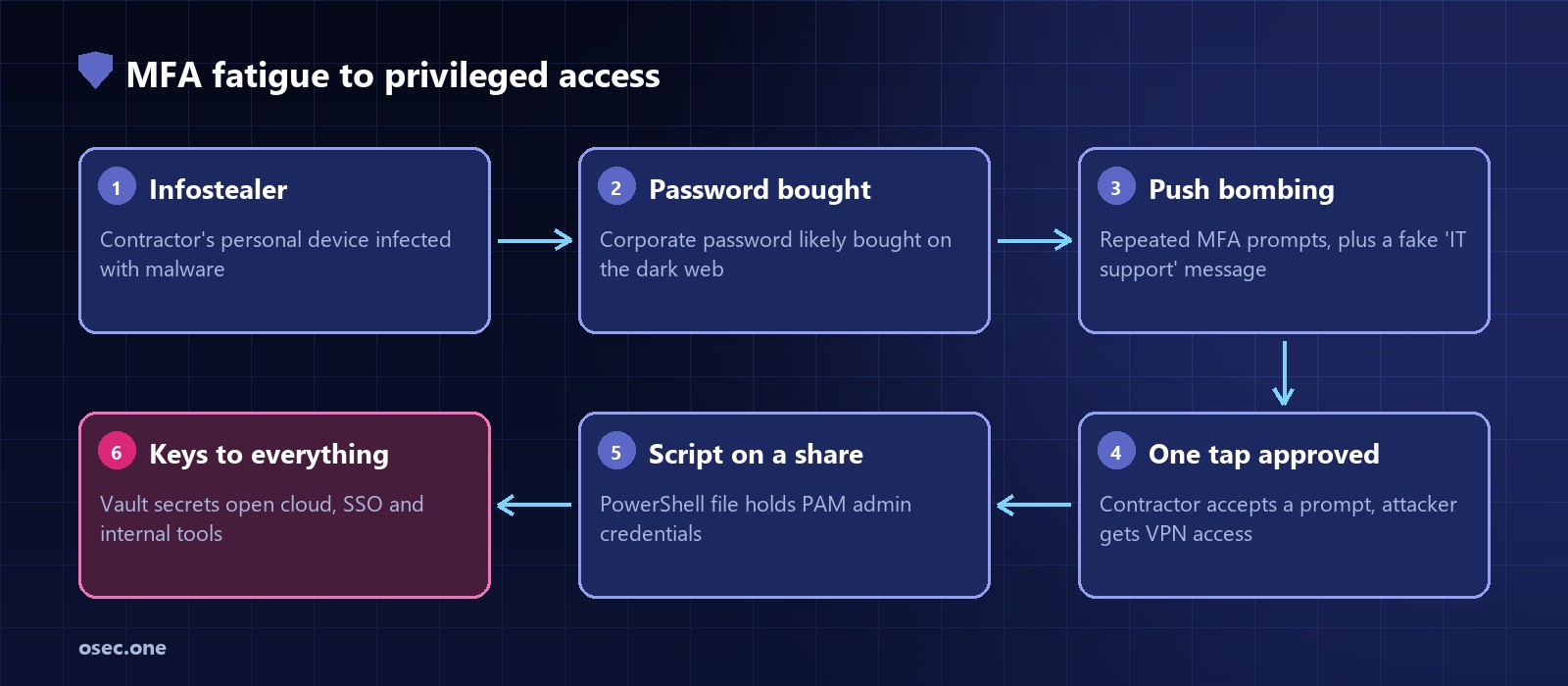
According to Uber, the contractor's personal device had been infected with malware, exposing their credentials, and it is likely the attacker bought the contractor's Uber corporate password on the dark web. This is the infostealer pattern: malware collects saved browser passwords and cookies, and the logs are sold in bulk. The victim usually has no idea, because nothing on their own account changes until someone uses it.
Step 2: push bombing
With the password in hand, the attacker tried to log in again and again. Each attempt sent a two-factor push notification to the contractor's phone. Uber's own account is plain: the contractor blocked the requests at first, but "eventually, however, the contractor accepted one".
The attacker, talking to journalists and researchers at the time, claimed to have spammed the push requests for over an hour and then messaged the contractor on WhatsApp pretending to be Uber IT support, saying the prompts would stop once one was accepted. That is the attacker's version, not Uber's, but it matches the technique CISA calls push bombing and lists among the methods of Lapsus$ and the later Scattered Spider group.
A push prompt that only asks "Approve?" proves that someone holding the phone pressed a button. It doesn't prove that they started the login.
Step 3: from one account to admin
The attacker said they logged in through the corporate VPN and scanned the intranet, where they found a PowerShell script on a network share containing administrator credentials for Thycotic, Uber's privileged access management (PAM) platform. A PAM vault holds the keys to everything else, so these credentials reportedly opened secrets for systems including Active Directory, Duo, OneLogin and AWS. Screenshots the attacker shared also showed access to the VMware vSphere console, the SentinelOne console and Uber's HackerOne bug bounty account.
Uber said the attacker accessed several employee accounts and gained elevated permissions to tools including G-Suite and Slack, downloaded some internal Slack messages and accessed an internal finance tool. It said it found no evidence that the attacker reached production systems, user accounts or sensitive user data such as card numbers.
How it was detected and contained
The attacker announced themselves on Slack, so detection was not subtle. Uber's response is a useful checklist for any account takeover:
• Blocked compromised or potentially compromised employee accounts.
• Disabled affected internal tools for a time.
• Rotated keys to many internal services.
• Locked the codebase so no new changes could be pushed.
• Required employees to re-authenticate and strengthened MFA policies.
• Added monitoring of the environment.
Controls that break each step
Against the stolen password
• Keep personal and corporate browsing apart: managed devices only for corporate logins, and no corporate passwords saved in personal browsers.
• Monitor infostealer log feeds and breached-credential services for your domains, and reset anything that appears.
• Better still, remove the reusable password from the login. A one-time code sent at sign-in, or sign-in with a platform account protected by a passkey, leaves nothing worth stealing from a browser store.
Against push bombing
• Number matching: the login screen shows a number that must be typed into the authenticator app. CISA published guidance on this in October 2022, and Microsoft enforced it for all Microsoft Authenticator push notifications from 8 May 2023.
• Show context in the prompt: app, location and device of the login.
• Rate limit MFA prompts and lock or alert after repeated denials. Ten rejected pushes in an hour is an incident, not noise.
• Move privileged users to phishing-resistant MFA (FIDO2 keys or passkeys), which has no approve button to wear down.
Against lateral movement
• Scan file shares and repositories for hard-coded secrets and treat any finding as already leaked.
• Require MFA and a separate admin identity for the PAM system itself, with alerts on any bulk secret retrieval.
• Give contractors only the network segments they need, rather than broad VPN access.
The lesson
MFA did its job for a while: the contractor rejected the first prompts. It failed because the design allowed unlimited retries with no context, and because the one approved login led to credentials that unlocked everything. Fix the prompt design, and make sure a single account never sits one script away from the keys to the company.
osec.one adds one-time-code and Apple/Google sign-in to your app or website, so there is no stored password for an infostealer to collect. Free to start.
Try passwordless logins