1. Open osec.one/tools/firmware-check. 2. Pick the product line and type the exact version your box runs (System → Dashboard, or the admin page footer). 3. Press Check version, read the result (how to read it: Is your FortiOS 7.2 still exposed?). 4. Under the result, in Watch this version: sign in (email code, Google or Apple, no password), then Watch daily.
"},{"id":146161,"block_type":"screenshot","html":"The result you save from: NetScaler 14.1-43.56 on 28 Oct 2026, 8 of 21 known-exploited CVEs apply."},{"id":146162,"block_type":"screenshot","html":"The box under every result. Signed in, the button reads Watch daily."},{"id":146163,"block_type":"subheading_h3","html":"
What saving does
"},{"id":146164,"block_type":"paragraph","html":"
• Saves product + version, not the device. One entry per product and version. • Baseline = what applies today. The 8 CVEs in the result above are known to you, so they never trigger an email. • Saving the same version again from a newer result moves the baseline to that result. • Up to 10 versions per account. The 11th says: remove one first. • Signed in, the box shows:Watching, last checked <date and time> UTC., later New since you saved it: CVE-…, and every other saved version with its count and a Remove link.
CISA adds a CVE for your product and your version is in NVD's affected range
Yes
A known-exploited CVE now covers your version
\n
A listed CVE was \"not mapped\"; NVD now maps versions and yours is inside
Yes
Same CVE, now known to cover you
\n
Two or more CVEs start applying in the same daily check
One email
Subject: \"2 known-exploited CVEs now apply to …\"
\n
A CVE that already applied when you saved it
No
Part of the baseline
\n
CISA adds a CVE whose range doesn't reach your version
No
Not in range
\n
Same CVE on the next day
No
One email per CVE, ever
\n
Your daily quota is used up that day
No, checked the next day
The box shows \"Skipped: the account's daily quota was used up\"
\n
"},{"id":146167,"block_type":"paragraph","html":"
• Timing: our copy of CISA's list refreshes daily; NVD rows are refreshed daily until NVD has analysed a CVE, then monthly; each saved version is judged about every 24 hours after that. • Database only: the daily judgement reads our KEV and NVD copies. No request to your device, none to NVD per watch.
"},{"id":146169,"block_type":"screenshot","html":"The watch email, rendered from the osec.tools mail code with the 28 Oct 2026 result: what a version saved before 4 Oct 2026 received for CVE-2026-88779."},{"id":146170,"block_type":"paragraph","html":"
1. Subject:osec.one watch · CVE-2026-88779 now applies to Citrix NetScaler ADC / Gateway 14.1-43.56. Filter on osec.one watch if you route these to a ticket queue. 2. First paragraph: your saved version is now inside the affected range of a CVE it wasn't covered by when you saved it. Cause: a new CISA entry or a new NVD mapping. 3. CVE line: the CVE id links to the vendor advisory, then the date CISA listed it. · used by ransomware groups is added when CISA marks it so. 4. Name: CISA's vulnerability name (here a memory-buffer bug in NetScaler). 5. Fix: the first fixed release on your branch (14.1-73.41 for 14.1). When the affected range runs past your branch it says No fix on your branch instead: you have to move branch. 6. Advisory note: the vendor advisory wins over NVD's ranges; a patch doesn't remove what an attacker left. 7. Link:See the full result opens the Firmware branch check with product and version filled in. Press Check version for today's full list. 8. Footer: one email per new CVE; the watch keeps running.
"},{"id":146171,"block_type":"screenshot","html":"The email link fills in the form; one click runs today's check."},{"id":146172,"block_type":"heading_h2","html":"
After an email: steps
"},{"id":146173,"block_type":"paragraph","html":"
1. Confirm the version on the box itself. A box upgraded since you saved it may already be out of range. 2. Open the vendor advisory from the CVE link. Check the fixed build for your exact branch and any mitigation for today. 3. Note the dates: CISA's listing date and the day your box first ran an affected build. Exploited before you patch = assume compromise until checked. 4. Export logs and config before any reset or upgrade. Upgrades and resets wipe evidence. 5. Run the target build through the check first (e.g. 14.1-73.41). Upgrade only to a build that comes back clean. 6. Upgrade. Then do the advisory's clean-up: for NetScaler memory leaks that means killing active sessions, as Citrix Bleed 2023 showed. 7. Move the watch: check the new version, Watch daily on it, Remove the old one.
• Worked example: NetScaler 14.1-43.56 saved on 1 Jan 2026. Baseline: CVE-2025-6543 and CVE-2025-7775 (2 applied then).
"},{"id":146176,"block_type":"html","html":"
\n
CISA listed
CVE
Fix on 14.1
Email
\n
2026-03-30
CVE-2026-3055
14.1-60.58
1
\n
2026-08-26
CVE-2026-8452
14.1-72.61
2
\n
2026-09-09
CVE-2026-19490
14.1-73.32
3
\n
2026-09-27
CVE-2026-88771 + CVE-2026-88772
14.1-73.37
4 (one email, two CVEs)
\n
2026-10-04
CVE-2026-88779
14.1-73.41
5
\n
"},{"id":146177,"block_type":"paragraph","html":"
• 5 emails in 10 months for a box that was never upgraded, each with the build that fixes everything so far. • Dates are CISA's listing dates. If NVD maps a CVE later, the email comes on the day of the mapping. • The 3 "not mapped" rows in this result are SD-WAN and older Citrix products under the same CISA name. If NVD never maps them to ADC versions, they never send.
• Cost: each saved version's daily check = 1 request on your account's quota. • Free accounts get 500 requests a day. 10 saved versions = 10 a day = 2% of the free quota. • Quota full that day: the version is skipped and tried again the next day; nothing is lost except one day. • Email goes to your account address. No other recipients. • 13 product lines: FortiOS, Ivanti Connect Secure, PAN-OS, Cisco ASA, NetScaler, SonicOS, SonicWall SMA, Exchange, MOVEit, GoAnywhere, CrushFTP, phpMyAdmin, Adminer. • Only known-exploited CVEs (CISA KEV). Other CVEs in the vendor's advisories are out of scope. • Want an email for any new KEV entry of a product, whatever the version? Tick the product on the osec Scan page (known-exploited watch).
"},{"id":146180,"block_type":"cta","html":"
Check the version your firewall or VPN gateway runs, then save it: one email when a known-exploited CVE starts covering it, with the fix on your branch. Free account, sign in with an email code, Google or Apple.
• A clean result is only true for today. CISA adds known-exploited CVEs every week; NVD maps which versions they cover days or weeks later. • Citrix NetScaler 14.1-43.56, checked on 28 Oct 2026: 8 known-exploited CVEs apply. 6 of them were added to CISA's list in 2026, the newest on 4 Oct 2026 (CVE-2026-88779). • A box nobody re-checks stays exposed from the day a CVE is listed to the day someone happens to look. • The watch re-checks for you: once a day, no account on the device, no agent, nothing sent to your firewall.
\n
Save a version in four steps
\n
Ad
\n
1. Open osec.one/tools/firmware-check. 2. Pick the product line and type the exact version your box runs (System → Dashboard, or the admin page footer). 3. Press Check version, read the result (how to read it: Is your FortiOS 7.2 still exposed?). 4. Under the result, in Watch this version: sign in (email code, Google or Apple, no password), then Watch daily.
\n
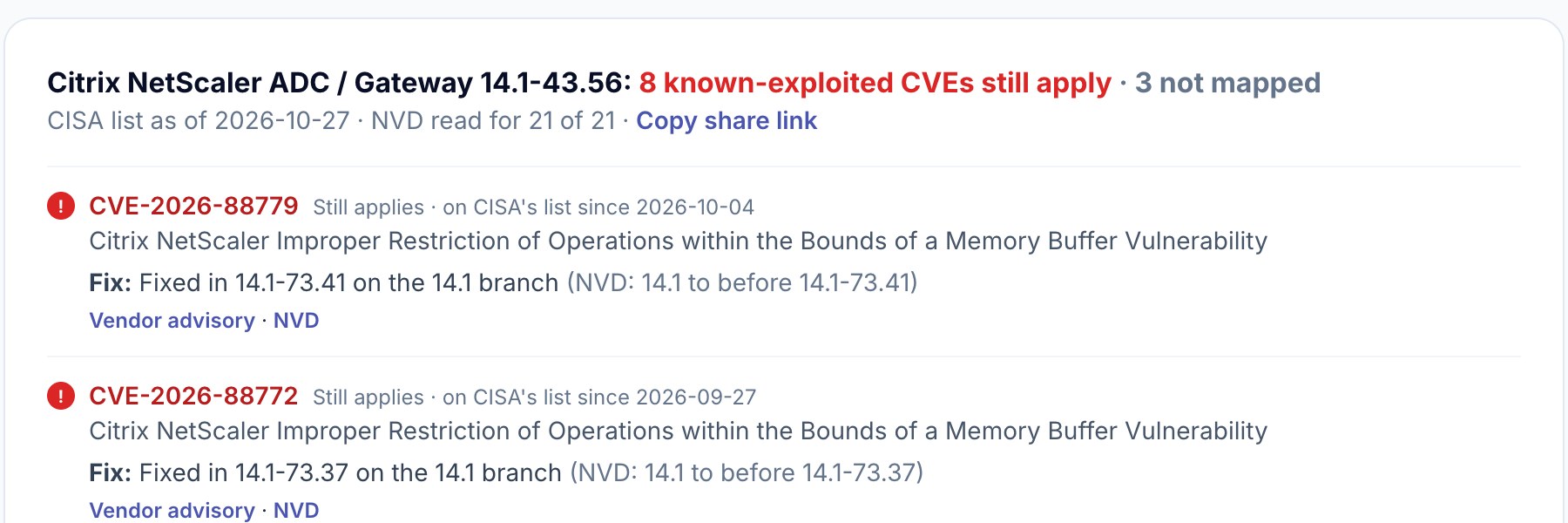
The result you save from: NetScaler 14.1-43.56 on 28 Oct 2026, 8 of 21 known-exploited CVEs apply.
\n
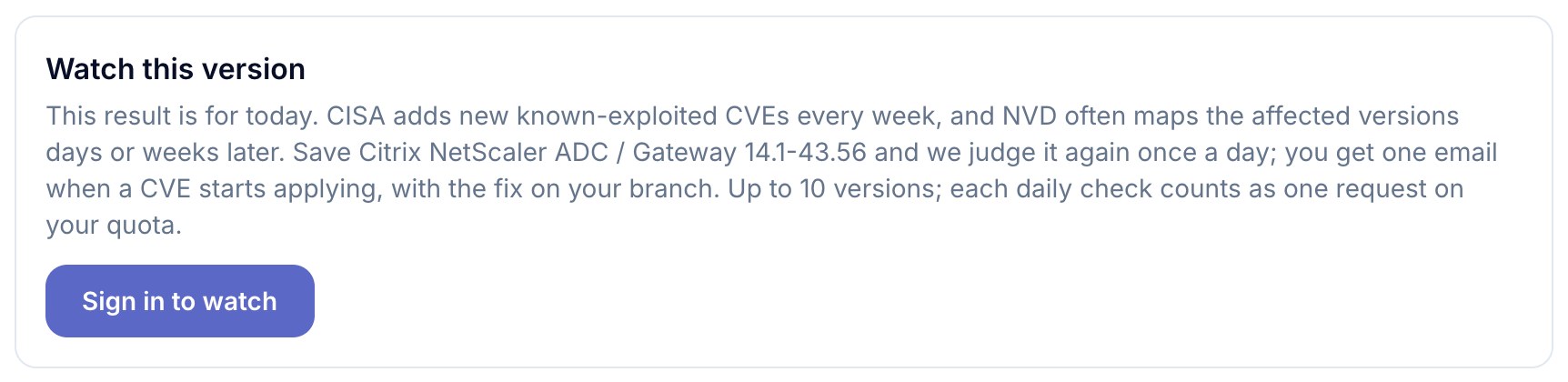
The box under every result. Signed in, the button reads Watch daily.
\n
What saving does
\n
• Saves product + version, not the device. One entry per product and version. • Baseline = what applies today. The 8 CVEs in the result above are known to you, so they never trigger an email. • Saving the same version again from a newer result moves the baseline to that result. • Up to 10 versions per account. The 11th says: remove one first. • Signed in, the box shows:Watching, last checked <date and time> UTC., later New since you saved it: CVE-…, and every other saved version with its count and a Remove link.
\n
What makes it send an email
\n
\n
Event
Email?
Why
\n
CISA adds a CVE for your product and your version is in NVD's affected range
Yes
A known-exploited CVE now covers your version
\n
A listed CVE was \"not mapped\"; NVD now maps versions and yours is inside
Yes
Same CVE, now known to cover you
\n
Two or more CVEs start applying in the same daily check
One email
Subject: \"2 known-exploited CVEs now apply to …\"
\n
A CVE that already applied when you saved it
No
Part of the baseline
\n
CISA adds a CVE whose range doesn't reach your version
No
Not in range
\n
Same CVE on the next day
No
One email per CVE, ever
\n
Your daily quota is used up that day
No, checked the next day
The box shows \"Skipped: the account's daily quota was used up\"
\n
\n
• Timing: our copy of CISA's list refreshes daily; NVD rows are refreshed daily until NVD has analysed a CVE, then monthly; each saved version is judged about every 24 hours after that. • Database only: the daily judgement reads our KEV and NVD copies. No request to your device, none to NVD per watch.
\n
The email, line by line
\n
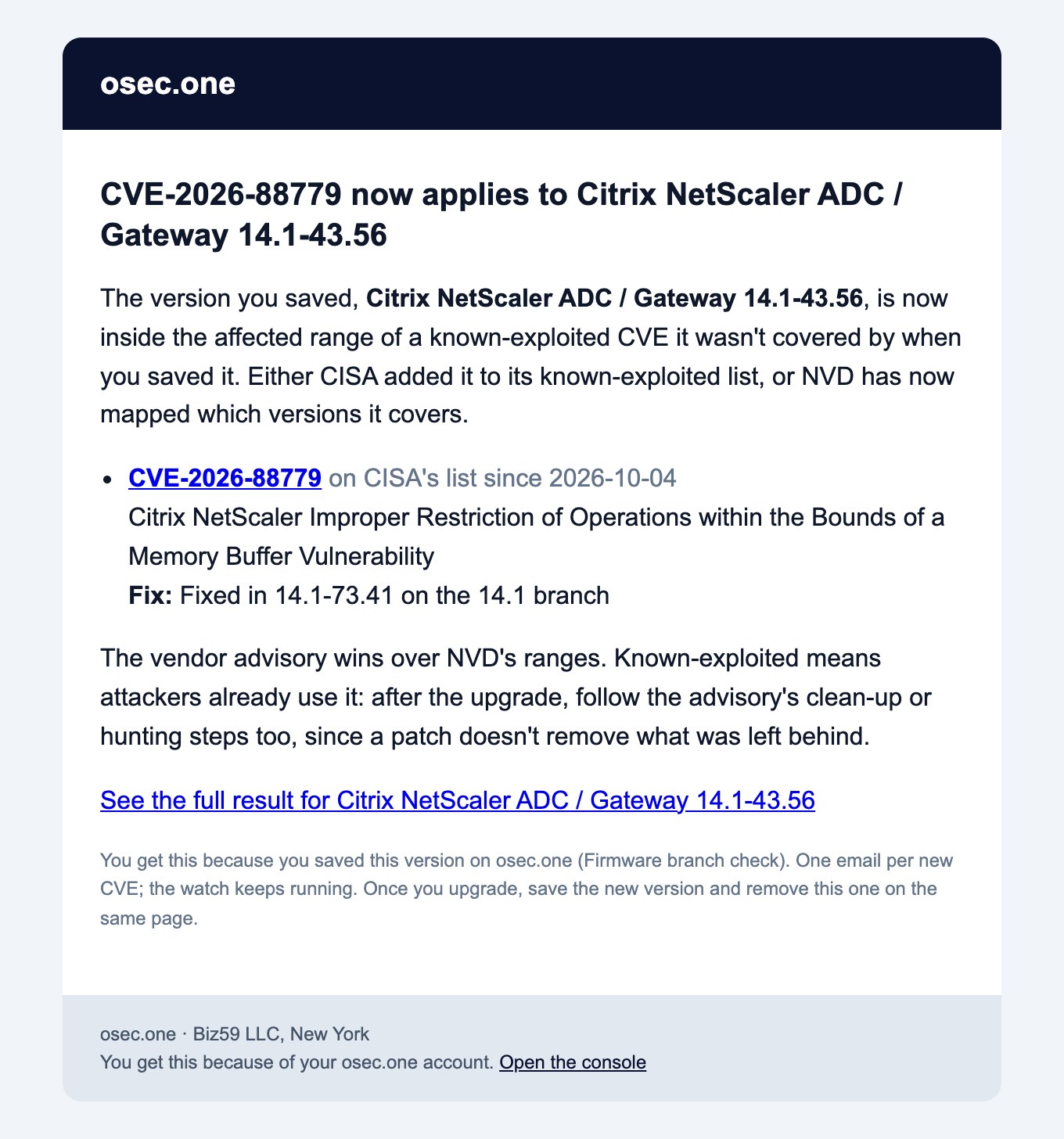
The watch email, rendered from the osec.tools mail code with the 28 Oct 2026 result: what a version saved before 4 Oct 2026 received for CVE-2026-88779.
\n
1. Subject:osec.one watch · CVE-2026-88779 now applies to Citrix NetScaler ADC / Gateway 14.1-43.56. Filter on osec.one watch if you route these to a ticket queue. 2. First paragraph: your saved version is now inside the affected range of a CVE it wasn't covered by when you saved it. Cause: a new CISA entry or a new NVD mapping. 3. CVE line: the CVE id links to the vendor advisory, then the date CISA listed it. · used by ransomware groups is added when CISA marks it so. 4. Name: CISA's vulnerability name (here a memory-buffer bug in NetScaler). 5. Fix: the first fixed release on your branch (14.1-73.41 for 14.1). When the affected range runs past your branch it says No fix on your branch instead: you have to move branch. 6. Advisory note: the vendor advisory wins over NVD's ranges; a patch doesn't remove what an attacker left. 7. Link:See the full result opens the Firmware branch check with product and version filled in. Press Check version for today's full list. 8. Footer: one email per new CVE; the watch keeps running.
\n
The email link fills in the form; one click runs today's check.
\n
After an email: steps
\n
1. Confirm the version on the box itself. A box upgraded since you saved it may already be out of range. 2. Open the vendor advisory from the CVE link. Check the fixed build for your exact branch and any mitigation for today. 3. Note the dates: CISA's listing date and the day your box first ran an affected build. Exploited before you patch = assume compromise until checked. 4. Export logs and config before any reset or upgrade. Upgrades and resets wipe evidence. 5. Run the target build through the check first (e.g. 14.1-73.41). Upgrade only to a build that comes back clean. 6. Upgrade. Then do the advisory's clean-up: for NetScaler memory leaks that means killing active sessions, as Citrix Bleed 2023 showed. 7. Move the watch: check the new version, Watch daily on it, Remove the old one.
\n
How many emails to expect
\n
• Worked example: NetScaler 14.1-43.56 saved on 1 Jan 2026. Baseline: CVE-2025-6543 and CVE-2025-7775 (2 applied then).
\n
\n
CISA listed
CVE
Fix on 14.1
Email
\n
2026-03-30
CVE-2026-3055
14.1-60.58
1
\n
2026-08-26
CVE-2026-8452
14.1-72.61
2
\n
2026-09-09
CVE-2026-19490
14.1-73.32
3
\n
2026-09-27
CVE-2026-88771 + CVE-2026-88772
14.1-73.37
4 (one email, two CVEs)
\n
2026-10-04
CVE-2026-88779
14.1-73.41
5
\n
\n
• 5 emails in 10 months for a box that was never upgraded, each with the build that fixes everything so far. • Dates are CISA's listing dates. If NVD maps a CVE later, the email comes on the day of the mapping. • The 3 "not mapped" rows in this result are SD-WAN and older Citrix products under the same CISA name. If NVD never maps them to ADC versions, they never send.
\n
Quota and limits
\n
• Cost: each saved version's daily check = 1 request on your account's quota. • Free accounts get 500 requests a day. 10 saved versions = 10 a day = 2% of the free quota. • Quota full that day: the version is skipped and tried again the next day; nothing is lost except one day. • Email goes to your account address. No other recipients. • 13 product lines: FortiOS, Ivanti Connect Secure, PAN-OS, Cisco ASA, NetScaler, SonicOS, SonicWall SMA, Exchange, MOVEit, GoAnywhere, CrushFTP, phpMyAdmin, Adminer. • Only known-exploited CVEs (CISA KEV). Other CVEs in the vendor's advisories are out of scope. • Want an email for any new KEV entry of a product, whatever the version? Tick the product on the osec Scan page (known-exploited watch).
\n
Check the version your firewall or VPN gateway runs, then save it: one email when a known-exploited CVE starts covering it, with the fix on your branch. Free account, sign in with an email code, Google or Apple.
Watch your firewall's version: a Firmware version watch email, read line by line
Why watch a version
• A clean result is only true for today. CISA adds known-exploited CVEs every week; NVD maps which versions they cover days or weeks later. • Citrix NetScaler 14.1-43.56, checked on 28 Oct 2026: 8 known-exploited CVEs apply. 6 of them were added to CISA's list in 2026, the newest on 4 Oct 2026 (CVE-2026-88779). • A box nobody re-checks stays exposed from the day a CVE is listed to the day someone happens to look. • The watch re-checks for you: once a day, no account on the device, no agent, nothing sent to your firewall.
Save a version in four steps
Ad
1. Open osec.one/tools/firmware-check. 2. Pick the product line and type the exact version your box runs (System → Dashboard, or the admin page footer). 3. Press Check version, read the result (how to read it: Is your FortiOS 7.2 still exposed?). 4. Under the result, in Watch this version: sign in (email code, Google or Apple, no password), then Watch daily.
The result you save from: NetScaler 14.1-43.56 on 28 Oct 2026, 8 of 21 known-exploited CVEs apply.
The box under every result. Signed in, the button reads Watch daily.
What saving does
• Saves product + version, not the device. One entry per product and version. • Baseline = what applies today. The 8 CVEs in the result above are known to you, so they never trigger an email. • Saving the same version again from a newer result moves the baseline to that result. • Up to 10 versions per account. The 11th says: remove one first. • Signed in, the box shows:Watching, last checked <date and time> UTC., later New since you saved it: CVE-…, and every other saved version with its count and a Remove link.
What makes it send an email
Event
Email?
Why
CISA adds a CVE for your product and your version is in NVD's affected range
Yes
A known-exploited CVE now covers your version
A listed CVE was "not mapped"; NVD now maps versions and yours is inside
Yes
Same CVE, now known to cover you
Two or more CVEs start applying in the same daily check
One email
Subject: "2 known-exploited CVEs now apply to …"
A CVE that already applied when you saved it
No
Part of the baseline
CISA adds a CVE whose range doesn't reach your version
No
Not in range
Same CVE on the next day
No
One email per CVE, ever
Your daily quota is used up that day
No, checked the next day
The box shows "Skipped: the account's daily quota was used up"
• Timing: our copy of CISA's list refreshes daily; NVD rows are refreshed daily until NVD has analysed a CVE, then monthly; each saved version is judged about every 24 hours after that. • Database only: the daily judgement reads our KEV and NVD copies. No request to your device, none to NVD per watch.
The email, line by line
The watch email, rendered from the osec.tools mail code with the 28 Oct 2026 result: what a version saved before 4 Oct 2026 received for CVE-2026-88779.
1. Subject:osec.one watch · CVE-2026-88779 now applies to Citrix NetScaler ADC / Gateway 14.1-43.56. Filter on osec.one watch if you route these to a ticket queue. 2. First paragraph: your saved version is now inside the affected range of a CVE it wasn't covered by when you saved it. Cause: a new CISA entry or a new NVD mapping. 3. CVE line: the CVE id links to the vendor advisory, then the date CISA listed it. · used by ransomware groups is added when CISA marks it so. 4. Name: CISA's vulnerability name (here a memory-buffer bug in NetScaler). 5. Fix: the first fixed release on your branch (14.1-73.41 for 14.1). When the affected range runs past your branch it says No fix on your branch instead: you have to move branch. 6. Advisory note: the vendor advisory wins over NVD's ranges; a patch doesn't remove what an attacker left. 7. Link:See the full result opens the Firmware branch check with product and version filled in. Press Check version for today's full list. 8. Footer: one email per new CVE; the watch keeps running.
The email link fills in the form; one click runs today's check.
After an email: steps
1. Confirm the version on the box itself. A box upgraded since you saved it may already be out of range. 2. Open the vendor advisory from the CVE link. Check the fixed build for your exact branch and any mitigation for today. 3. Note the dates: CISA's listing date and the day your box first ran an affected build. Exploited before you patch = assume compromise until checked. 4. Export logs and config before any reset or upgrade. Upgrades and resets wipe evidence. 5. Run the target build through the check first (e.g. 14.1-73.41). Upgrade only to a build that comes back clean. 6. Upgrade. Then do the advisory's clean-up: for NetScaler memory leaks that means killing active sessions, as Citrix Bleed 2023 showed. 7. Move the watch: check the new version, Watch daily on it, Remove the old one.
How many emails to expect
• Worked example: NetScaler 14.1-43.56 saved on 1 Jan 2026. Baseline: CVE-2025-6543 and CVE-2025-7775 (2 applied then).
CISA listed
CVE
Fix on 14.1
Email
2026-03-30
CVE-2026-3055
14.1-60.58
1
2026-08-26
CVE-2026-8452
14.1-72.61
2
2026-09-09
CVE-2026-19490
14.1-73.32
3
2026-09-27
CVE-2026-88771 + CVE-2026-88772
14.1-73.37
4 (one email, two CVEs)
2026-10-04
CVE-2026-88779
14.1-73.41
5
• 5 emails in 10 months for a box that was never upgraded, each with the build that fixes everything so far. • Dates are CISA's listing dates. If NVD maps a CVE later, the email comes on the day of the mapping. • The 3 "not mapped" rows in this result are SD-WAN and older Citrix products under the same CISA name. If NVD never maps them to ADC versions, they never send.
Quota and limits
• Cost: each saved version's daily check = 1 request on your account's quota. • Free accounts get 500 requests a day. 10 saved versions = 10 a day = 2% of the free quota. • Quota full that day: the version is skipped and tried again the next day; nothing is lost except one day. • Email goes to your account address. No other recipients. • 13 product lines: FortiOS, Ivanti Connect Secure, PAN-OS, Cisco ASA, NetScaler, SonicOS, SonicWall SMA, Exchange, MOVEit, GoAnywhere, CrushFTP, phpMyAdmin, Adminer. • Only known-exploited CVEs (CISA KEV). Other CVEs in the vendor's advisories are out of scope. • Want an email for any new KEV entry of a product, whatever the version? Tick the product on the osec Scan page (known-exploited watch).
Check the version your firewall or VPN gateway runs, then save it: one email when a known-exploited CVE starts covering it, with the fix on your branch. Free account, sign in with an email code, Google or Apple.