Why bother
• FortiOS 7.2 is out of support. Engineering support ended 31 Mar 2025; end of support was 30 Sep 2026. No more 7.2 fixes of any kind.
• CVE-2025-68686 (Fortinet FG-IR-25-934, published 10 Feb 2026): the SSL-VPN symlink an attacker left behind could still be read after the April 2025 clean-up. Fortinet's fix table: 7.6.0–7.6.1 → 7.6.2, 7.4.0–7.4.6 → 7.4.7, 7.2: all versions → "migrate to a fixed release" (same for 7.0 and 6.4).
• On CISA's known-exploited list since 27 Jul 2026.
• So 7.2.11, the release that removed the 2025 symlink, still has a known-exploited CVE with no 7.2 fix. "We're on the latest 7.2" doesn't close it.
• The same trap exists on other edge boxes: Ivanti ships fixes as R-builds (22.7R2.6), PAN-OS as hotfix builds per maintenance release (10.2.9-h16). The Firmware branch check reads all three.
Run it in four steps
1. Open osec.one/tools/firmware-check.
2. Pick the product line (13: FortiOS, Ivanti Connect Secure, PAN-OS, Cisco ASA, NetScaler, SonicOS, SonicWall SMA, Exchange, MOVEit, GoAnywhere, CrushFTP, phpMyAdmin, Adminer).
3. Type the exact version from the device: 7.2.11, 22.7R2.5, 10.2.9-h1, 9.16.4.57, 14.1-43.56, 2019 CU14. A product name in front is fine (FortiOS 7.2.11).
4. Click Check version. Copy the share link to send the result to whoever owns the box.

• Free, no account; 20 checks a day per IP for guests.
• Public input only: a product name and a version number. The check never connects to your firewall.
• Data: our daily copy of CISA's known-exploited (KEV) catalog, and NVD's affected-version data (CPE ranges and exact build lists) for each of those CVEs.
What each line means
| Mark | Label | What it means | What to do |
|---|---|---|---|
| Red ! | Still applies · Fix: … | Your version is inside NVD's affected range, and the fixed release is on your branch | Update to that release or later on the same branch, then the clean-up steps below |
| Red ! | Still applies · No fix on your branch | The affected range runs past the last release of your branch | Move to another branch; the line names the first fixed release there |
| Red ! | Still applies · listed by NVD as an affected build | Vendors with exact-build lists (Ivanti, PAN-OS, Cisco): your exact build is on the list | Open the vendor advisory: it names the fixed build for your train |
| Amber ? | Not listed, but older than a listed build | Your build isn't on NVD's list, but a newer build on your branch is | Treat as affected until the advisory says otherwise |
| Grey ? | NVD hasn't mapped versions | NVD has no versions for this product on that CVE (new, or about another product) | Read the advisory; for new CVEs, watch the version (below) |
| Green ✓ | Not in the affected range | Outside every range NVD gives | Nothing for this CVE; hidden by default, one click shows them |
FortiOS 7.2.11: no fix on your branch
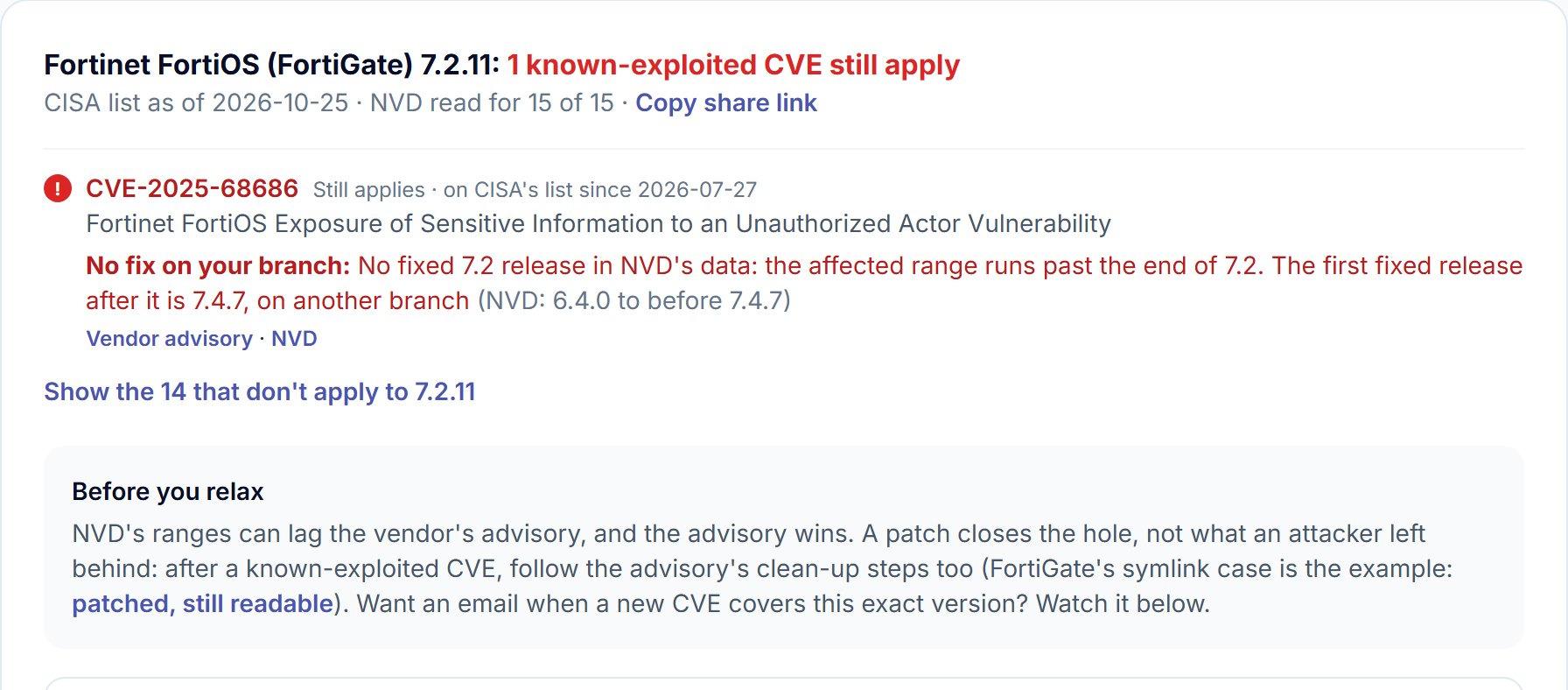
• Headline: 1 of the 15 FortiOS CVEs on CISA's list (as of 25 Oct 2026) still applies.
• NVD range: 6.4.0 to before 7.4.7. The range runs straight through 7.2, so the check says No fix on your branch and names 7.4.7 as the first fixed release.
• Matches Fortinet's advisory: 7.2 all versions, migrate. The advisory wins whenever the two differ.
• Who it hits: units that had SSL-VPN enabled (Fortinet: never enabled = not affected). Fortinet also shipped an IPS virtual patch (FG-VD-60389.0day, FMWP db 26.033) for boxes that can't move yet.
Steps to get off 7.2
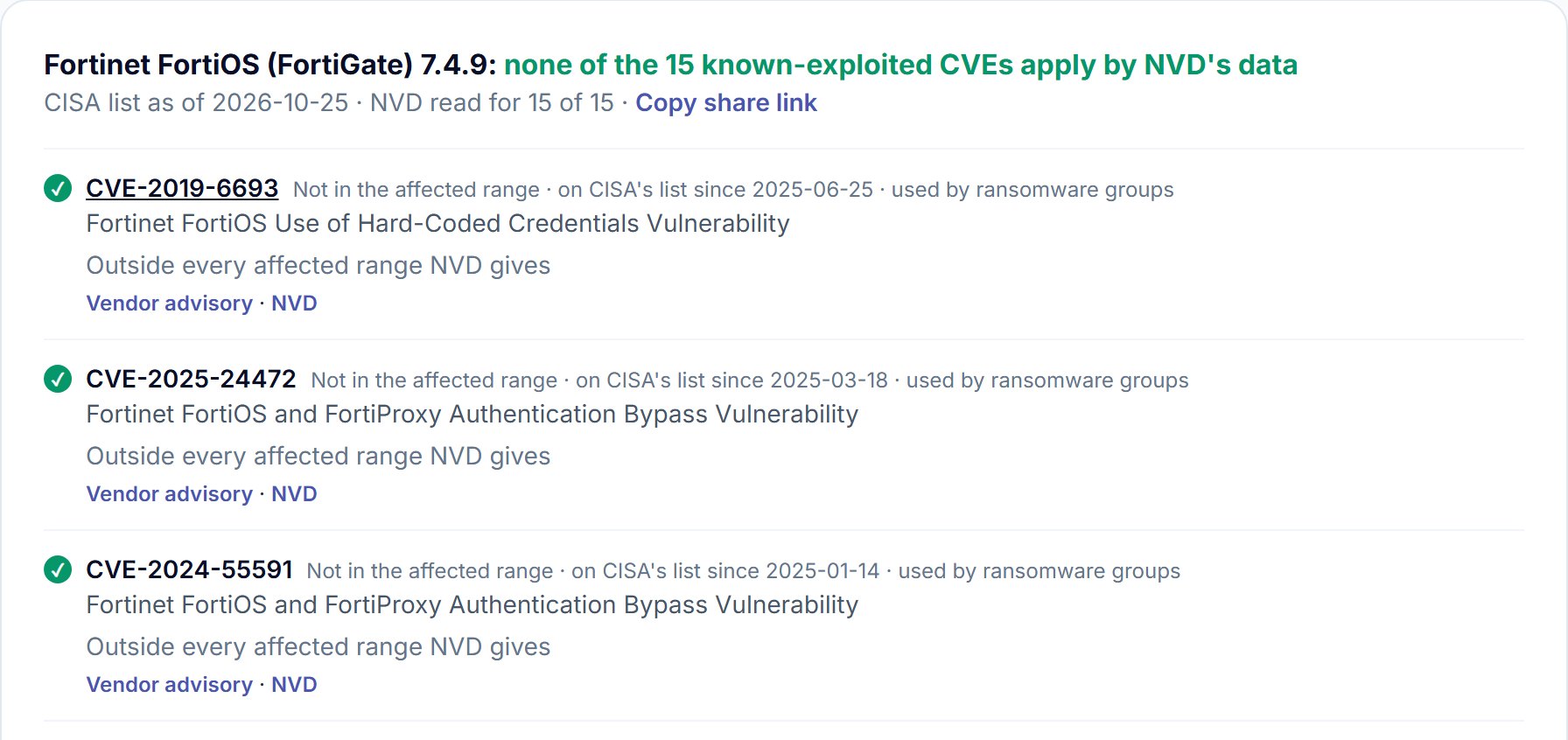
1. Pick the target first: run the check again with the 7.4 or 7.6 build you plan to install. 7.4.9 came back with 0 of 15 on 26 Oct 2026.
2. Use Fortinet's upgrade path tool for your model: 7.2 → 7.4 goes through set intermediate builds, not one jump.
3. Back up the config and note the build before each step.
4. Upgrade, then run the clean-up list for FortiOS below. Upgrading removes the symlink; it doesn't undo what was read through it.
5. Save the new version with Watch this version so the next KEV entry for 7.4.x reaches you by email.
Ivanti R-builds: the fix is a later build
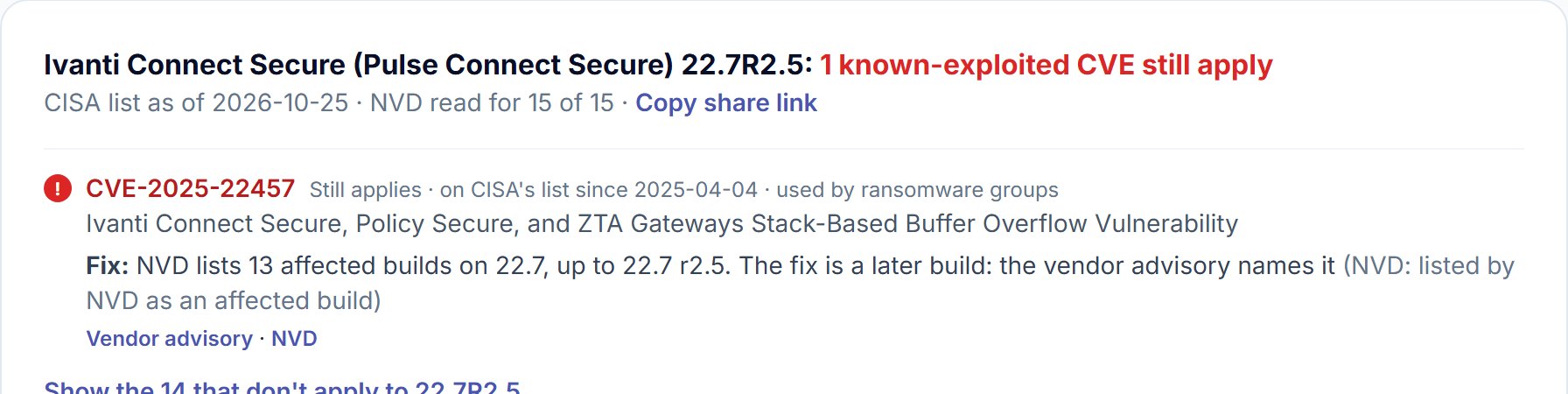
• Reading the version: 22.7R2.5 = release 22.7, maintenance release R2, build 5.
• Exact builds, not ranges: NVD lists 13 affected 22.7 builds for CVE-2025-22457, up to 22.7R2.5. The check can't infer the fix from a list, so it says "a later build" and links the advisory.
• The fixed build: 22.7R2.6 (released 11 Feb 2025; exploitation seen from March 2025, on CISA's list since 4 Apr 2025).
• Checked: 22.7R2.6 came back 0 of 15 on 26 Oct 2026.
• Ransomware flag: "used by ransomware groups" comes straight from CISA's catalog. Those rows sort first within each colour.
PAN-OS hotfix builds: one fix per maintenance release
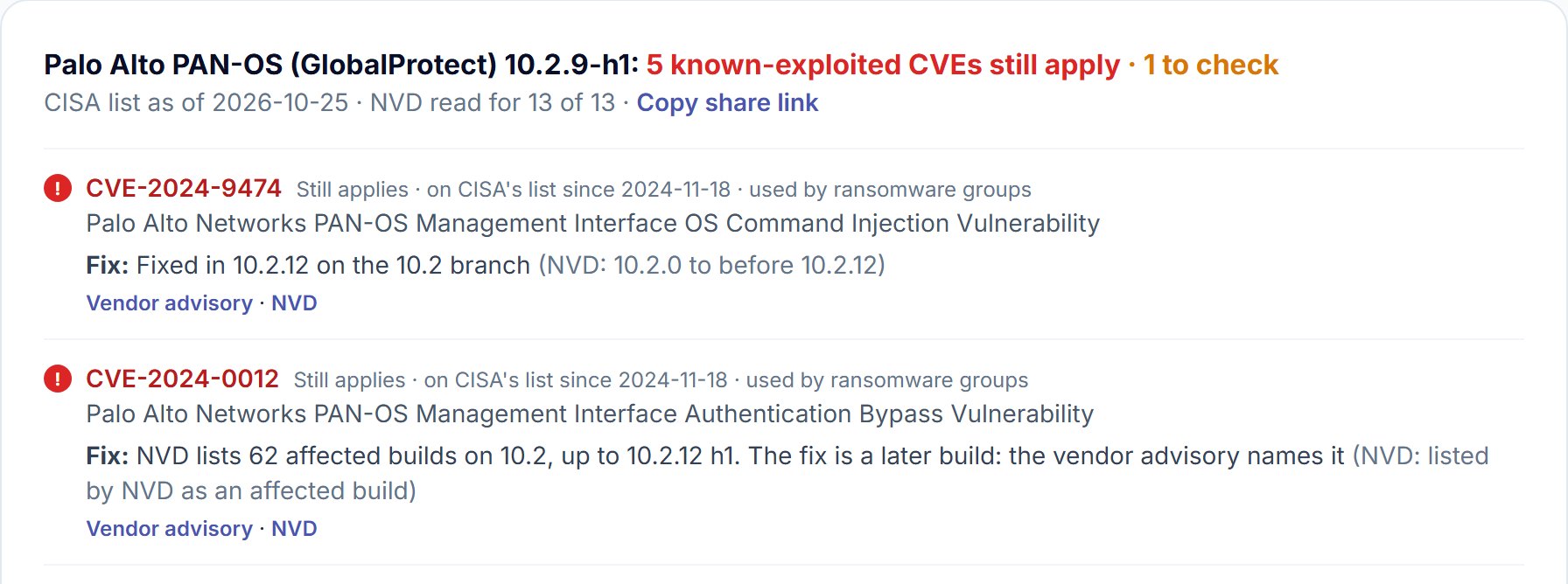
• Reading the version: 10.2.9-h1 = feature release 10.2, maintenance release 9, hotfix 1.
• Palo Alto fixes each maintenance release separately. For CVE-2024-0012 the advisory lists a fixed hotfix for every 10.2 train: 10.2.0-h4, 10.2.1-h3 … 10.2.9-h16 … 10.2.12-h2. On 10.2.9-h1 the smallest jump is to 10.2.9-h16, not to 10.2.12.
• NVD's range can be coarser than the advisory: for CVE-2024-9474 NVD says "before 10.2.12". Open its advisory for the hotfix on your train before you plan the change window.
• Already closed: 10.2.9-h1 is a fixed build for CVE-2024-3400 (the GlobalProtect command injection of April 2024), so 3400 sits in the 7 that don't apply.
• Checked: 10.2.13-h3 still had 3 apply on 26 Oct 2026 (CVE-2026-0257, CVE-2026-0300, CVE-2026-0322). Newer isn't the same as clean.
Amber: older than a listed build

• What it means: NVD lists affected builds one by one and yours isn't among them, but a newer build on the same branch is.
• Usually: the list only covers maintenance releases still supported when the CVE came out. Old isn't the same as safe.
• Do: treat it as affected until the vendor advisory says the build is not affected.
Grey: not mapped
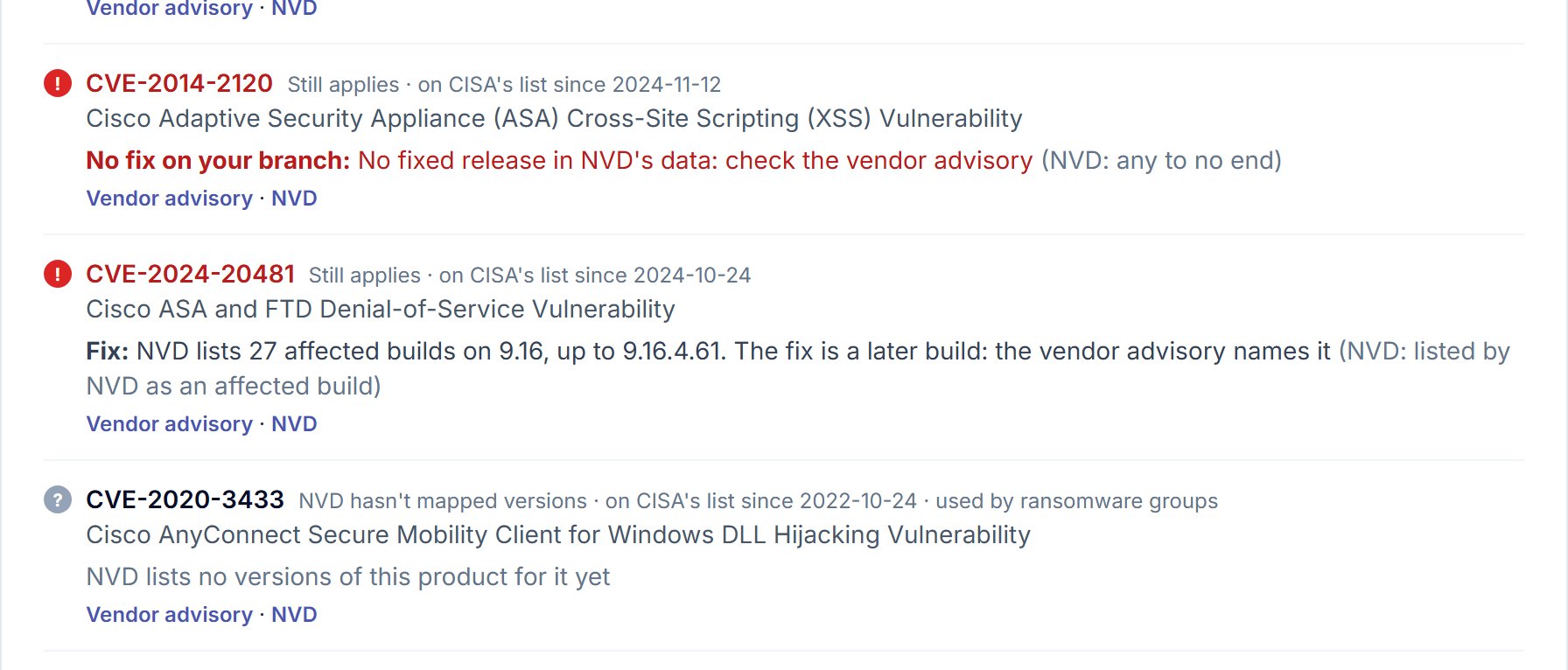
• New CVE: NVD usually maps versions days or weeks after CISA adds it. The line then says "NVD status: Received" or "Awaiting Analysis".
• Another product under the same name: CVE-2020-3433 and CVE-2020-3153 are AnyConnect client bugs for Windows. KEV files them under Cisco; NVD maps them to the client, not to ASA software. Nothing to do on the firewall; update the clients.
• Red with "any to no end" (CVE-2014-2120 on ASA): NVD has no end to the range. The advisory names the fixed release.
• Totals from the same day: Cisco ASA 9.16.4.57 = 5 apply, 2 not mapped, 9 don't (16 on the list).
Seven versions, checked on 26 Oct 2026
| Version | Still applies | KEV entries |
|---|---|---|
| FortiOS 7.2.11 | 1 (no fix on 7.2) | 15 |
| FortiOS 7.4.9 | 0 | 15 |
| Ivanti ICS 22.7R2.5 | 1 | 15 |
| Ivanti ICS 22.7R2.6 | 0 | 15 |
| PAN-OS 10.2.9-h1 | 5, plus 1 to check | 13 |
| PAN-OS 10.2.13-h3 | 3 | 13 |
| Cisco ASA 9.16.4.57 | 5, plus 2 not mapped | 16 |
• CISA list as of 25 Oct 2026; NVD data read for every entry in each product.
• Same day, NetScaler 14.1-43.56 had 8 apply, from CVE-2025-6543 (fixed in 14.1-47.46) to CVE-2026-88779 (fixed in 14.1-73.41).
The clean-up a patch doesn't do
• Every vendor below says it in its own words: the update closes the hole, it doesn't remove what an attacker left or took.
• Preserve evidence first (config export, logs, a forensic image if you'll investigate). Resets wipe it.
| Product | Case | Clean-up after the update |
|---|---|---|
| FortiOS | SSL-VPN symlink (Apr 2025), CVE-2025-68686 | Upgrade to 7.4.7+ / 7.6.2+ (removes the symlink); treat the config as read: reset admin, local user and VPN passwords, rotate pre-shared keys and certificates the config held; review admin accounts |
| Ivanti Connect Secure | CVE-2025-22457 (CISA steps) | Run the external Integrity Checker Tool; factory reset (virtual: from a known clean image); reset the admin enable password, stored API keys and local user passwords; revoke and reissue certificates; domain accounts touched: reset passwords twice, revoke Kerberos tickets and cloud tokens |
| PAN-OS | CVE-2024-3400 (Palo Alto's levels) | Probe only: update. Files copied out (e.g. running-config.xml): update + private data reset. Interactive commands run: update + factory reset |
Steps for any box that had a known-exploited CVE
1. Write down the build and the date it was installed; compare with the CVE's KEV date.
2. If the box ran an affected build after that date, assume the config was read.
3. Export logs and config before any reset.
4. Update to the fixed build (check it first with the Firmware branch check).
5. Run the vendor's integrity check or reset level for that case.
6. Rotate every secret the box held: admin and local passwords, VPN pre-shared keys, LDAP/RADIUS bind accounts, API keys, certificates.
7. Check admin accounts and sessions for ones you don't know. Session cookies and tokens survive a patch (Citrix Bleed).
8. Watch the new version so the next entry reaches you.
Watch this version
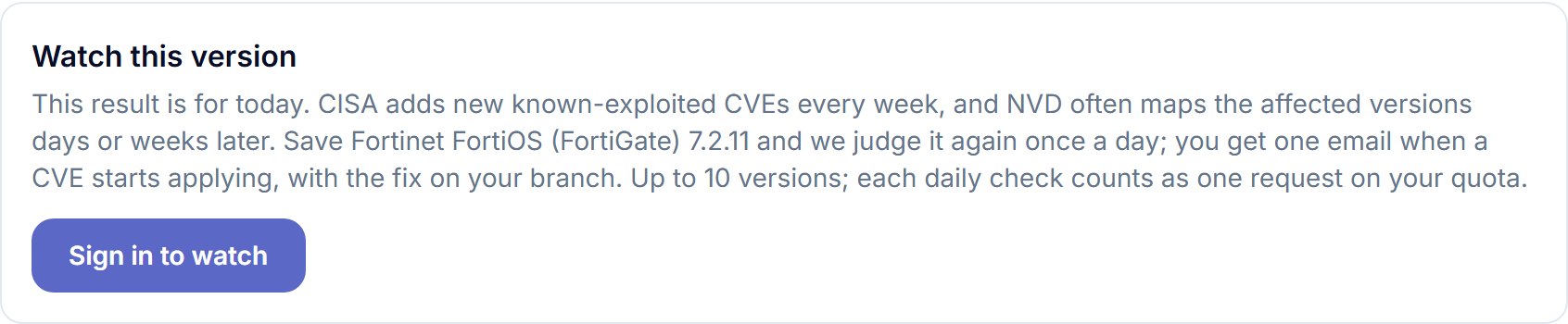
• What it does: judges the saved product + version again once a day and emails once per CVE that starts applying (new KEV entry or a new NVD mapping), with the fix on your branch.
• Baseline: the CVEs that apply when you save it. Saving again after an upgrade moves the baseline.
• Limits: up to 10 versions per account; each daily check counts as one request on your osec quota.
• Sign-in: email code, Google or Apple. No password to set.
Good to know
• The vendor advisory wins. NVD's ranges can lag or be coarser; every row links both.
• FIPS / NDcPP builds are ignored (a separate firmware line).
• SonicWall is split in two (SonicOS firewalls, SMA 100/1000) because KEV lists both under one name.
• Only known-exploited CVEs. A clean result means no KEV entry applies, not that the build has no CVEs.
• Why these boxes: they're what ransomware groups scan for first (Ivanti 2024, FortiGate symlink).
• Which product sits in front of a domain? The free Site protection scan shows the firewall or CDN it sees.
Pick your firewall, VPN gateway or file-transfer server, type the version it runs, and see every known-exploited CVE that still applies, with the fix on your branch or a plain "no fix on this branch". Free, no account.
Check your versionSources
• Fortinet PSIRT, FG-IR-25-934 (CVE-2025-68686), published 10 Feb 2026, updated 12 Mar 2026: https://fortiguard.fortinet.com/psirt/FG-IR-25-934
• NVD, CVE-2025-68686: https://nvd.nist.gov/vuln/detail/CVE-2025-68686
• Fortinet PSIRT blog, analysis of threat actor activity (symlink persistence), 10 Apr 2025: https://www.fortinet.com/blog/psirt-blogs/analysis-of-threat-actor-activity
• FortiOS lifecycle (7.2: end of engineering support 31 Mar 2025, end of support 30 Sep 2026): https://endoflife.date/fortios
• CISA, mitigation instructions for CVE-2025-22457: https://www.cisa.gov/cisa-mitigation-instructions-cve-2025-22457
• Palo Alto Networks, CVE-2024-0012 advisory (fixed hotfix per 10.2 train): https://security.paloaltonetworks.com/CVE-2024-0012
• Palo Alto Networks, CVE-2024-3400 advisory and remediation levels: https://security.paloaltonetworks.com/CVE-2024-3400
• CISA Known Exploited Vulnerabilities catalog: https://www.cisa.gov/known-exploited-vulnerabilities-catalog
• Results: osec Firmware branch check runs on 26 Oct 2026 (CISA list as of 25 Oct 2026).