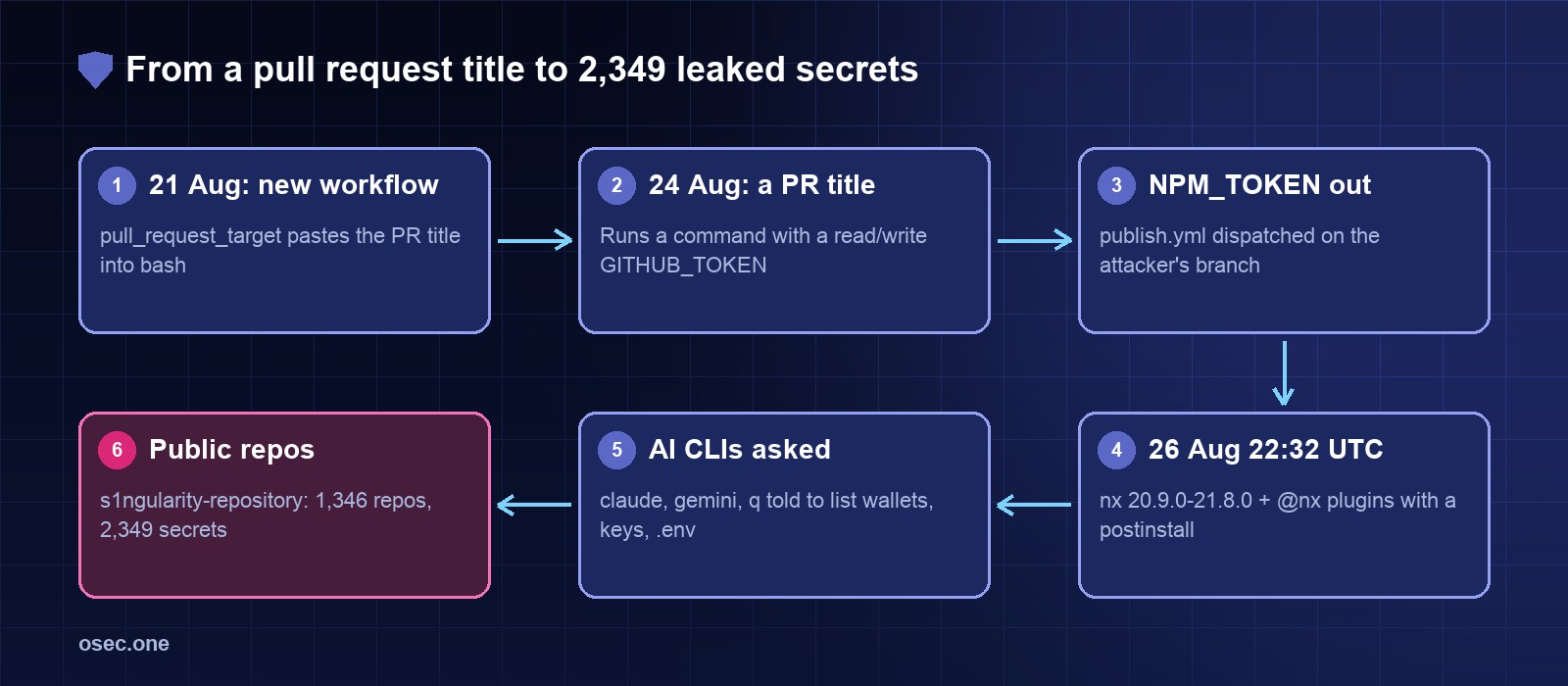
The npm token that made all this possible came out of Nx's own GitHub Actions. Five days earlier a workflow had been added that pasted the title of a pull request into a bash script. This is the full chain, step by step, with the control that breaks each step, and our own test of what npm 12's new install-script approval changes.
Nx s1ngularity (2025, times UTC; Nx advisory GHSA-cxm3-wv7p-598c, converted from EDT)\n\n21 Aug 20:31 PR #32458 merged: pr-title-validation.yml, on pull_request_target,\n PR title interpolated into a bash step\n22 Aug 02:48 a post on X says the workflow can be injected\n22 Aug 19:45 Nx reverts it on master (PR #32486); older branches keep the file\n24 Aug 20:50 attacker commit changes publish.yml to send the npm token to a webhook\n24 Aug 21:04 a PR with a crafted title triggers the title check\n24 Aug 21:11 publish.yml run from the attacker's branch; run and branch later deleted\n26 Aug 22:32 nx + @nx/devkit, js, workspace, node, eslint 21.5.0; @nx/key, @nx/enterprise-cloud 3.2.0\n26 Aug 22:39 nx + 4 plugins 20.9.0\n26 Aug 23:54 nx 20.10.0 and 21.6.0\n27 Aug 00:16 nx 20.11.0 00:17 nx 21.7.0 00:37 nx 21.8.0 and 20.12.0\n27 Aug 00:30 GitHub issue #32522 opened by a user\n27 Aug 02:44 npm removes the nx versions and the publish tokens (about 4 h 12 min)\n27 Aug ~09:00 GitHub disables the attackers' s1ngularity-repository repos\n27 Aug 10:20 remaining @nx plugin versions removed (about 12 h for some)\n27 Aug 15:57 Nx moves every package to trusted publishing + 2FA, no npm tokens in CI\n28 Aug 16:00 second wave: stolen GitHub tokens flip victims' PRIVATE repos to public\n to 29 Aug 02:00\n01 Sep GitHub Security Lab (GHSL-2025-111) finds the workflow still on\n branches 21.4.x and website-21; fixed the same day
Step 1: a pull request title inside a shell script
"},{"id":147024,"block_type":"paragraph","html":"
The new workflow checked that PR titles followed the project's commit convention. It ran on pull_request_target, which exists so that workflows can comment on or label pull requests from forks: it runs in the context of the base repository, with its secrets and a GITHUB_TOKEN that can write, and it uses the workflow file from the target branch. The title went into the script through a ${{ github.event.pull_request.title }} expression. GitHub expands those expressions before the shell sees the script, so the title became part of the code. A title with a command substitution in it ran as a command.
"},{"id":147025,"block_type":"paragraph","html":"
The shape of the problem, and of the fix, is the same in every repo:
"},{"id":147026,"block_type":"code","html":"
yaml
# Risky: outsider-controlled text pasted into the script\non: pull_request_target\njobs:\n title:\n runs-on: ubuntu-latest\n steps:\n - run: ./check-title.sh "${{ github.event.pull_request.title }}"\n\n# Safer: no secrets, read-only token, the title passed as data\non: pull_request # forks get no secrets and a read-only token\npermissions:\n contents: read\njobs:\n title:\n runs-on: ubuntu-latest\n steps:\n - env:\n TITLE: ${{ github.event.pull_request.title }}\n run: ./check-title.sh "$TITLE" # the shell reads a variable, not code
"},{"id":147027,"block_type":"paragraph","html":"
A title check needs no secrets and no write access at all, so plain pull_request is enough. The env-variable form matters on its own too: the expression is expanded into an environment variable, and bash treats the value as a string.
Someone posted on X that the workflow could be injected the morning after it was merged, and Nx reverted it that evening. That fixed master. But pull_request_target runs the workflow file from the branch the PR targets, and Nx had release and website branches that still carried the old file. A PR aimed at one of those branches ran the vulnerable version. GitHub Security Lab still found it on two branches on 1 September, a week after the attack.
"},{"id":147030,"block_type":"paragraph","html":"
Control: when you remove a risky workflow, remove it from every branch that accepts pull requests, or delete stale branches. A repo setting is the stronger fix: require approval before workflows run for outside contributors (Settings → Actions → General → Fork pull request workflows), which is what Nx turned on.
The GITHUB_TOKEN in that run had read and write permissions, because the repository was older than February 2023, when GitHub made read-only the default for new repos, and nobody had changed the setting. A write token can push a branch and start other workflows. Nx's publish.yml had a workflow_dispatch trigger and the NPM_TOKEN secret. The attacker changed publish.yml on their own branch to post the token to a webhook, dispatched it, got the token, then deleted the branch and the run.
"},{"id":147033,"block_type":"paragraph","html":"
Controls: set the default workflow permissions to read (Settings → Actions → General → Workflow permissions), and give each workflow a permissions: block with only what it needs. Put publishing secrets in a GitHub environment with required reviewers and a deployment-branch rule (main and release tags only), so a dispatched run from any other branch never sees them. Better still, have no npm token at all (step 4).
With the token the attacker published a postinstall hook into the most-used packages. Because nx is installed by npx create-nx-workspace, by CI on every lockfile update, and by the Nx Console VS Code extension (versions 18.6.30 to 18.65.1 installed nx@latest to check the version), many people ran it without typing an install command at all.
Controls: npm trusted publishing replaces the long-lived token with a short OIDC credential that only a named workflow file in a named repo can get, so there is nothing to steal from secrets. With a lock file and npm ci, a project only gets a new nx when someone updates the lock file, not on the next install. And a cooldown before you take new versions (Renovate minimumReleaseAge: "3 days", pnpm minimumReleaseAge) would have skipped all of these: npm pulled the nx versions in about four hours.
telemetry.js ran on Linux and macOS only. It read environment variables, the GitHub token from gh auth token, and npm credentials from ~/.npmrc. Then it checked for AI coding CLIs and, if it found one, ran it with its permission prompts turned off: claude --dangerously-skip-permissions, gemini --yolo, q --trust-all-tools. The prompt asked the agent to search the disk for wallet files (MetaMask, Electrum, Ledger, Trezor, Exodus, Phantom and others), keystores, .env files and SSH keys and write the paths to /tmp/inventory.txt.
"},{"id":147040,"block_type":"paragraph","html":"
Wiz's follow-up gives the result of that idea: about half of the victims had an AI CLI installed, almost a quarter of the Claude runs were refused, and the AI-driven search succeeded in under a quarter of cases. GitGuardian counted 366 systems where the AI step was tried and 95 that produced inventory.txt. The plain token theft did most of the damage. Finally it appended sudo shutdown -h 0 to ~/.bashrc and ~/.zshrc, so every new terminal tried to power the machine off.
"},{"id":147041,"block_type":"paragraph","html":"
Controls: don't run an install with tokens loaded in the shell (CI jobs that install dependencies don't need the publish or cloud credentials; give those to a later step only). On a laptop, keep the GitHub CLI token scoped and short-lived, and don't leave AI agents configured to skip permission prompts by default.
Step 6: the victim's own GitHub account as the drop box
"},{"id":147043,"block_type":"paragraph","html":"
The script used the stolen GitHub token to create a public repo called s1ngularity-repository (later -0, -1) in the victim's account and uploaded results.b64, base64-encoded several times over. No attacker server was needed, and traffic to github.com looks normal from any developer machine or runner.
"},{"id":147044,"block_type":"code","html":"
text
What leaked (counts from the two firms that tracked it)\nGitGuardian, 27-29 Aug 2025\n repos named s1ngularity-repository seen 1,346 (nearly 1,400 public at the peak)\n repos with secrets (00:32-15:36 UTC, 27 Aug) 1,079\n distinct secrets 2,349 (over 1,100 still valid when counted)\n most common types GitHub, npm, AWS, OpenAI\n infected systems on macOS 85%\nWiz, 3 Sep 2025\n users with secrets leaked (phase 1) 1,700+\n GitHub tokens still valid on 28 Aug ~90% (about 5% after GitHub's revocation sweep)\n npm tokens still valid 40%+ (about 100)
On 28 August, two days after the publish, the attackers used the GitHub tokens that were still valid to rename victims' private repositories to s1ngularity-repository- plus five random characters and make them public. By 14:00 UTC on 29 August Wiz counted over 5,500 repos from over 400 users and organisations; its later total was 6,700+ private repos from at least 480 accounts. This is why rotation has to be immediate: a token that leaked on day one was still opening private code on day three.
"},{"id":147047,"block_type":"paragraph","html":"
Controls: fine-grained GitHub tokens scoped to the repos a person works on, with an expiry; an organisation policy that blocks members from changing repository visibility to public; and the GitHub audit log alert for repo.access (visibility changes).
Step Control Effort\n1 PR title pasted into bash pull_request (not _target) for checks; pass 10 min per workflow\n outsider text through env:, never ${{ }}\n2 revert only on master fix every branch that takes PRs; require 5 min (setting)\n approval for outside contributors' runs\n3 write token -> publish secret default token read-only; per-job permissions; 15 min\n publish secrets in an environment with\n reviewers + branch rule\n4 stolen npm token publishes trusted publishing (OIDC), no NPM_TOKEN; 30 min\n lock file + npm ci; 3-day release cooldown\n5 postinstall runs on install npm 12 / pnpm 10 block dependency scripts 0 (default) to 10 min\n unless approved, per version (our test)\n6 tokens in the install shell no long-lived tokens in env during installs; ongoing\n AI agents without skip-permission flags\n7 private repos flipped public fine-grained expiring tokens; block visibility 10 min (org policy)\n changes for members
Our test: does a dependency's postinstall still run?
"},{"id":147051,"block_type":"paragraph","html":"
Step 5 is where npm itself has changed since 2025. We packed a one-file package whose postinstall writes a marker file, and installed it into an empty project with each package manager (Node 22, 23 October 2026):
"},{"id":147052,"block_type":"code","html":"
text
Package manager Dependency postinstall What it printed\nnpm 10.9.9 ran nothing\nnpm 11.21.1 ran "install scripts not yet covered by allowScripts"\nnpm 12.2.1 BLOCKED "install scripts blocked because they are not\n covered by allowScripts"\npnpm 10.34.8 BLOCKED (pnpm 10 only builds onlyBuiltDependencies)
"},{"id":147053,"block_type":"paragraph","html":"
npm 12 skips the script, warns, and the install still succeeds. To allow a package you approve it and npm writes the decision into package.json. With a real package that needs its postinstall:
"},{"id":147054,"block_type":"code","html":"
bash
$ npm install esbuild@0.25.0\nnpm warn install-scripts 1 package had install scripts blocked because they are not covered by allowScripts:\nnpm warn install-scripts esbuild@0.25.0 (postinstall: node install.js)\n$ npm install-scripts approve esbuild\nApproved esbuild:\n added esbuild@0.25.0\n$ grep -A2 allowScripts package.json\n "allowScripts": { "esbuild@0.25.0": true } # committed with the code\n$ npm install esbuild@0.25.1\nnpm warn install-scripts esbuild@0.25.1 (postinstall: node install.js) # blocked again
"},{"id":147055,"block_type":"paragraph","html":"
The approval is pinned to the version: when esbuild 0.25.1 arrived, its script was blocked again until someone approved it. That is exactly the property that stops an s1ngularity-style release. Had the malicious nx versions arrived in a project on npm 12 or pnpm 10, telemetry.js would not have run: nx doesn't need an install script, so it would never be on the list, and even a package you had approved for a native build (esbuild, sharp, an SQLite binding) would have needed a fresh approval for the new version. Keep the review honest: look at what a new version's script does before approving it, rather than approving everything a dependency update touches. If your CI image still ships npm 10, npm ci --ignore-scripts plus an explicit npm rebuild <pkg> for the few packages that need it gives the same effect today.
1. Check package-lock.json / pnpm-lock.yaml and global installs for the versions above; check VS Code for Nx Console 18.6.30 to 18.65.1 in that window. 2. Look in your GitHub account and organisations for repos named s1ngularity-repository* and for private repos that became public; the org audit log shows repo.access events. 3. Rotate everything the machine or runner could read: GitHub tokens (gh auth refresh or revoke under Settings → Applications), npm tokens, cloud keys in env and dotfiles, SSH keys, and move wallet funds if a wallet file was on the disk. 4. Remove the sudo shutdown -h 0 line from ~/.bashrc and ~/.zshrc. 5. Reinstall from a clean lock file with nx 21.4.1 or a later clean release, and check npm audit signatures shows provenance for nx.
Nothing here needed a zero-day. A workflow added for tidiness, an old default for the token, and a long-lived publish secret were enough to put a stealer on millions of weekly installs. The same pattern, outsider text inside a privileged workflow, is how Ultralytics' release was poisoned in 2024, and the stolen-token half is what made Shai-Hulud spread a few weeks later. Our guide to reading a Workflow risk check shows the Nx file before the fix: it comes back with two danger findings.
"},{"id":147060,"block_type":"cta","html":"
Paste a public GitHub repo and get every workflow and composite action checked for pull_request_target checkouts, outsider text in run: steps, write-all tokens and unpinned actions, with the fix for each. Free.
On the evening of 26 August 2025 (UTC), eight versions of nx, the monorepo build tool with 4 to 6 million weekly downloads, went up on npm with a postinstall script nobody at Nx wrote. For about four hours anyone who installed one on Linux or macOS ran telemetry.js, which collected GitHub and npm tokens, looked for wallets and keys, and, new for a supply-chain attack, asked whatever AI coding CLI was on the machine (Claude Code, Gemini CLI, Amazon Q) to go and find more. The loot went into public GitHub repos named s1ngularity-repository, created with the victim's own token.
\n
Ad
\n
The npm token that made all this possible came out of Nx's own GitHub Actions. Five days earlier a workflow had been added that pasted the title of a pull request into a bash script. This is the full chain, step by step, with the control that breaks each step, and our own test of what npm 12's new install-script approval changes.
\n
\n
The timeline
\n
text
Nx s1ngularity (2025, times UTC; Nx advisory GHSA-cxm3-wv7p-598c, converted from EDT)\n\n21 Aug 20:31 PR #32458 merged: pr-title-validation.yml, on pull_request_target,\n PR title interpolated into a bash step\n22 Aug 02:48 a post on X says the workflow can be injected\n22 Aug 19:45 Nx reverts it on master (PR #32486); older branches keep the file\n24 Aug 20:50 attacker commit changes publish.yml to send the npm token to a webhook\n24 Aug 21:04 a PR with a crafted title triggers the title check\n24 Aug 21:11 publish.yml run from the attacker's branch; run and branch later deleted\n26 Aug 22:32 nx + @nx/devkit, js, workspace, node, eslint 21.5.0; @nx/key, @nx/enterprise-cloud 3.2.0\n26 Aug 22:39 nx + 4 plugins 20.9.0\n26 Aug 23:54 nx 20.10.0 and 21.6.0\n27 Aug 00:16 nx 20.11.0 00:17 nx 21.7.0 00:37 nx 21.8.0 and 20.12.0\n27 Aug 00:30 GitHub issue #32522 opened by a user\n27 Aug 02:44 npm removes the nx versions and the publish tokens (about 4 h 12 min)\n27 Aug ~09:00 GitHub disables the attackers' s1ngularity-repository repos\n27 Aug 10:20 remaining @nx plugin versions removed (about 12 h for some)\n27 Aug 15:57 Nx moves every package to trusted publishing + 2FA, no npm tokens in CI\n28 Aug 16:00 second wave: stolen GitHub tokens flip victims' PRIVATE repos to public\n to 29 Aug 02:00\n01 Sep GitHub Security Lab (GHSL-2025-111) finds the workflow still on\n branches 21.4.x and website-21; fixed the same day
\n
Step 1: a pull request title inside a shell script
\n
The new workflow checked that PR titles followed the project's commit convention. It ran on pull_request_target, which exists so that workflows can comment on or label pull requests from forks: it runs in the context of the base repository, with its secrets and a GITHUB_TOKEN that can write, and it uses the workflow file from the target branch. The title went into the script through a ${{ github.event.pull_request.title }} expression. GitHub expands those expressions before the shell sees the script, so the title became part of the code. A title with a command substitution in it ran as a command.
\n
The shape of the problem, and of the fix, is the same in every repo:
\n
yaml
# Risky: outsider-controlled text pasted into the script\non: pull_request_target\njobs:\n title:\n runs-on: ubuntu-latest\n steps:\n - run: ./check-title.sh "${{ github.event.pull_request.title }}"\n\n# Safer: no secrets, read-only token, the title passed as data\non: pull_request # forks get no secrets and a read-only token\npermissions:\n contents: read\njobs:\n title:\n runs-on: ubuntu-latest\n steps:\n - env:\n TITLE: ${{ github.event.pull_request.title }}\n run: ./check-title.sh "$TITLE" # the shell reads a variable, not code
\n
A title check needs no secrets and no write access at all, so plain pull_request is enough. The env-variable form matters on its own too: the expression is expanded into an environment variable, and bash treats the value as a string.
\n
Step 2: the revert that didn't close it
\n
Someone posted on X that the workflow could be injected the morning after it was merged, and Nx reverted it that evening. That fixed master. But pull_request_target runs the workflow file from the branch the PR targets, and Nx had release and website branches that still carried the old file. A PR aimed at one of those branches ran the vulnerable version. GitHub Security Lab still found it on two branches on 1 September, a week after the attack.
\n
Control: when you remove a risky workflow, remove it from every branch that accepts pull requests, or delete stale branches. A repo setting is the stronger fix: require approval before workflows run for outside contributors (Settings → Actions → General → Fork pull request workflows), which is what Nx turned on.
\n
Step 3: from a write token to the npm token
\n
The GITHUB_TOKEN in that run had read and write permissions, because the repository was older than February 2023, when GitHub made read-only the default for new repos, and nobody had changed the setting. A write token can push a branch and start other workflows. Nx's publish.yml had a workflow_dispatch trigger and the NPM_TOKEN secret. The attacker changed publish.yml on their own branch to post the token to a webhook, dispatched it, got the token, then deleted the branch and the run.
\n
Controls: set the default workflow permissions to read (Settings → Actions → General → Workflow permissions), and give each workflow a permissions: block with only what it needs. Put publishing secrets in a GitHub environment with required reviewers and a deployment-branch rule (main and release tags only), so a dispatched run from any other branch never sees them. Better still, have no npm token at all (step 4).
\n
Step 4: eight nx versions and a postinstall
\n
With the token the attacker published a postinstall hook into the most-used packages. Because nx is installed by npx create-nx-workspace, by CI on every lockfile update, and by the Nx Console VS Code extension (versions 18.6.30 to 18.65.1 installed nx@latest to check the version), many people ran it without typing an install command at all.
Controls: npm trusted publishing replaces the long-lived token with a short OIDC credential that only a named workflow file in a named repo can get, so there is nothing to steal from secrets. With a lock file and npm ci, a project only gets a new nx when someone updates the lock file, not on the next install. And a cooldown before you take new versions (Renovate minimumReleaseAge: "3 days", pnpm minimumReleaseAge) would have skipped all of these: npm pulled the nx versions in about four hours.
\n
Step 5: the payload asked the AI to look
\n
telemetry.js ran on Linux and macOS only. It read environment variables, the GitHub token from gh auth token, and npm credentials from ~/.npmrc. Then it checked for AI coding CLIs and, if it found one, ran it with its permission prompts turned off: claude --dangerously-skip-permissions, gemini --yolo, q --trust-all-tools. The prompt asked the agent to search the disk for wallet files (MetaMask, Electrum, Ledger, Trezor, Exodus, Phantom and others), keystores, .env files and SSH keys and write the paths to /tmp/inventory.txt.
\n
Wiz's follow-up gives the result of that idea: about half of the victims had an AI CLI installed, almost a quarter of the Claude runs were refused, and the AI-driven search succeeded in under a quarter of cases. GitGuardian counted 366 systems where the AI step was tried and 95 that produced inventory.txt. The plain token theft did most of the damage. Finally it appended sudo shutdown -h 0 to ~/.bashrc and ~/.zshrc, so every new terminal tried to power the machine off.
\n
Controls: don't run an install with tokens loaded in the shell (CI jobs that install dependencies don't need the publish or cloud credentials; give those to a later step only). On a laptop, keep the GitHub CLI token scoped and short-lived, and don't leave AI agents configured to skip permission prompts by default.
\n
Step 6: the victim's own GitHub account as the drop box
\n
The script used the stolen GitHub token to create a public repo called s1ngularity-repository (later -0, -1) in the victim's account and uploaded results.b64, base64-encoded several times over. No attacker server was needed, and traffic to github.com looks normal from any developer machine or runner.
\n
text
What leaked (counts from the two firms that tracked it)\nGitGuardian, 27-29 Aug 2025\n repos named s1ngularity-repository seen 1,346 (nearly 1,400 public at the peak)\n repos with secrets (00:32-15:36 UTC, 27 Aug) 1,079\n distinct secrets 2,349 (over 1,100 still valid when counted)\n most common types GitHub, npm, AWS, OpenAI\n infected systems on macOS 85%\nWiz, 3 Sep 2025\n users with secrets leaked (phase 1) 1,700+\n GitHub tokens still valid on 28 Aug ~90% (about 5% after GitHub's revocation sweep)\n npm tokens still valid 40%+ (about 100)
\n
Step 7: private repos made public
\n
On 28 August, two days after the publish, the attackers used the GitHub tokens that were still valid to rename victims' private repositories to s1ngularity-repository- plus five random characters and make them public. By 14:00 UTC on 29 August Wiz counted over 5,500 repos from over 400 users and organisations; its later total was 6,700+ private repos from at least 480 accounts. This is why rotation has to be immediate: a token that leaked on day one was still opening private code on day three.
\n
Controls: fine-grained GitHub tokens scoped to the repos a person works on, with an expiry; an organisation policy that blocks members from changing repository visibility to public; and the GitHub audit log alert for repo.access (visibility changes).
\n
What breaks each step
\n
text
Step Control Effort\n1 PR title pasted into bash pull_request (not _target) for checks; pass 10 min per workflow\n outsider text through env:, never ${{ }}\n2 revert only on master fix every branch that takes PRs; require 5 min (setting)\n approval for outside contributors' runs\n3 write token -> publish secret default token read-only; per-job permissions; 15 min\n publish secrets in an environment with\n reviewers + branch rule\n4 stolen npm token publishes trusted publishing (OIDC), no NPM_TOKEN; 30 min\n lock file + npm ci; 3-day release cooldown\n5 postinstall runs on install npm 12 / pnpm 10 block dependency scripts 0 (default) to 10 min\n unless approved, per version (our test)\n6 tokens in the install shell no long-lived tokens in env during installs; ongoing\n AI agents without skip-permission flags\n7 private repos flipped public fine-grained expiring tokens; block visibility 10 min (org policy)\n changes for members
\n
Our test: does a dependency's postinstall still run?
\n
Step 5 is where npm itself has changed since 2025. We packed a one-file package whose postinstall writes a marker file, and installed it into an empty project with each package manager (Node 22, 23 October 2026):
\n
text
Package manager Dependency postinstall What it printed\nnpm 10.9.9 ran nothing\nnpm 11.21.1 ran "install scripts not yet covered by allowScripts"\nnpm 12.2.1 BLOCKED "install scripts blocked because they are not\n covered by allowScripts"\npnpm 10.34.8 BLOCKED (pnpm 10 only builds onlyBuiltDependencies)
\n
npm 12 skips the script, warns, and the install still succeeds. To allow a package you approve it and npm writes the decision into package.json. With a real package that needs its postinstall:
\n
bash
$ npm install esbuild@0.25.0\nnpm warn install-scripts 1 package had install scripts blocked because they are not covered by allowScripts:\nnpm warn install-scripts esbuild@0.25.0 (postinstall: node install.js)\n$ npm install-scripts approve esbuild\nApproved esbuild:\n added esbuild@0.25.0\n$ grep -A2 allowScripts package.json\n "allowScripts": { "esbuild@0.25.0": true } # committed with the code\n$ npm install esbuild@0.25.1\nnpm warn install-scripts esbuild@0.25.1 (postinstall: node install.js) # blocked again
\n
The approval is pinned to the version: when esbuild 0.25.1 arrived, its script was blocked again until someone approved it. That is exactly the property that stops an s1ngularity-style release. Had the malicious nx versions arrived in a project on npm 12 or pnpm 10, telemetry.js would not have run: nx doesn't need an install script, so it would never be on the list, and even a package you had approved for a native build (esbuild, sharp, an SQLite binding) would have needed a fresh approval for the new version. Keep the review honest: look at what a new version's script does before approving it, rather than approving everything a dependency update touches. If your CI image still ships npm 10, npm ci --ignore-scripts plus an explicit npm rebuild <pkg> for the few packages that need it gives the same effect today.
\n
If you installed nx between 26 and 27 August 2025
\n
1. Check package-lock.json / pnpm-lock.yaml and global installs for the versions above; check VS Code for Nx Console 18.6.30 to 18.65.1 in that window. 2. Look in your GitHub account and organisations for repos named s1ngularity-repository* and for private repos that became public; the org audit log shows repo.access events. 3. Rotate everything the machine or runner could read: GitHub tokens (gh auth refresh or revoke under Settings → Applications), npm tokens, cloud keys in env and dotfiles, SSH keys, and move wallet funds if a wallet file was on the disk. 4. Remove the sudo shutdown -h 0 line from ~/.bashrc and ~/.zshrc. 5. Reinstall from a clean lock file with nx 21.4.1 or a later clean release, and check npm audit signatures shows provenance for nx.
\n
Why this one matters for small teams
\n
Nothing here needed a zero-day. A workflow added for tidiness, an old default for the token, and a long-lived publish secret were enough to put a stealer on millions of weekly installs. The same pattern, outsider text inside a privileged workflow, is how Ultralytics' release was poisoned in 2024, and the stolen-token half is what made Shai-Hulud spread a few weeks later. Our guide to reading a Workflow risk check shows the Nx file before the fix: it comes back with two danger findings.
\n
Paste a public GitHub repo and get every workflow and composite action checked for pull_request_target checkouts, outsider text in run: steps, write-all tokens and unpinned actions, with the fix for each. Free.
Nx s1ngularity 2025: a workflow injection that published malicious npm packages and used AI command-line tools to hunt secrets
On the evening of 26 August 2025 (UTC), eight versions of nx, the monorepo build tool with 4 to 6 million weekly downloads, went up on npm with a postinstall script nobody at Nx wrote. For about four hours anyone who installed one on Linux or macOS ran telemetry.js, which collected GitHub and npm tokens, looked for wallets and keys, and, new for a supply-chain attack, asked whatever AI coding CLI was on the machine (Claude Code, Gemini CLI, Amazon Q) to go and find more. The loot went into public GitHub repos named s1ngularity-repository, created with the victim's own token.
Ad
The npm token that made all this possible came out of Nx's own GitHub Actions. Five days earlier a workflow had been added that pasted the title of a pull request into a bash script. This is the full chain, step by step, with the control that breaks each step, and our own test of what npm 12's new install-script approval changes.
The timeline
text
Nx s1ngularity (2025, times UTC; Nx advisory GHSA-cxm3-wv7p-598c, converted from EDT)

21 Aug 20:31  PR #32458 merged: pr-title-validation.yml, on pull_request_target,
              PR title interpolated into a bash step
22 Aug 02:48  a post on X says the workflow can be injected
22 Aug 19:45  Nx reverts it on master (PR #32486); older branches keep the file
24 Aug 20:50  attacker commit changes publish.yml to send the npm token to a webhook
24 Aug 21:04  a PR with a crafted title triggers the title check
24 Aug 21:11  publish.yml run from the attacker's branch; run and branch later deleted
26 Aug 22:32  nx + @nx/devkit, js, workspace, node, eslint 21.5.0; @nx/key, @nx/enterprise-cloud 3.2.0
26 Aug 22:39  nx + 4 plugins 20.9.0
26 Aug 23:54  nx 20.10.0 and 21.6.0
27 Aug 00:16  nx 20.11.0       00:17  nx 21.7.0       00:37  nx 21.8.0 and 20.12.0
27 Aug 00:30  GitHub issue #32522 opened by a user
27 Aug 02:44  npm removes the nx versions and the publish tokens (about 4 h 12 min)
27 Aug ~09:00 GitHub disables the attackers' s1ngularity-repository repos
27 Aug 10:20  remaining @nx plugin versions removed (about 12 h for some)
27 Aug 15:57  Nx moves every package to trusted publishing + 2FA, no npm tokens in CI
28 Aug 16:00  second wave: stolen GitHub tokens flip victims' PRIVATE repos to public
  to 29 Aug 02:00
01 Sep        GitHub Security Lab (GHSL-2025-111) finds the workflow still on
              branches 21.4.x and website-21; fixed the same day
Step 1: a pull request title inside a shell script
The new workflow checked that PR titles followed the project's commit convention. It ran on pull_request_target, which exists so that workflows can comment on or label pull requests from forks: it runs in the context of the base repository, with its secrets and a GITHUB_TOKEN that can write, and it uses the workflow file from the target branch. The title went into the script through a ${{ github.event.pull_request.title }} expression. GitHub expands those expressions before the shell sees the script, so the title became part of the code. A title with a command substitution in it ran as a command.
The shape of the problem, and of the fix, is the same in every repo:
yaml
# Risky: outsider-controlled text pasted into the script
on: pull_request_target
jobs:
  title:
    runs-on: ubuntu-latest
    steps:
      - run: ./check-title.sh "${{ github.event.pull_request.title }}"

# Safer: no secrets, read-only token, the title passed as data
on: pull_request            # forks get no secrets and a read-only token
permissions:
  contents: read
jobs:
  title:
    runs-on: ubuntu-latest
    steps:
      - env:
          TITLE: ${{ github.event.pull_request.title }}
        run: ./check-title.sh "$TITLE"   # the shell reads a variable, not code
A title check needs no secrets and no write access at all, so plain pull_request is enough. The env-variable form matters on its own too: the expression is expanded into an environment variable, and bash treats the value as a string.
Step 2: the revert that didn't close it
Someone posted on X that the workflow could be injected the morning after it was merged, and Nx reverted it that evening. That fixed master. But pull_request_target runs the workflow file from the branch the PR targets, and Nx had release and website branches that still carried the old file. A PR aimed at one of those branches ran the vulnerable version. GitHub Security Lab still found it on two branches on 1 September, a week after the attack.
Control: when you remove a risky workflow, remove it from every branch that accepts pull requests, or delete stale branches. A repo setting is the stronger fix: require approval before workflows run for outside contributors (Settings → Actions → General → Fork pull request workflows), which is what Nx turned on.
Step 3: from a write token to the npm token
The GITHUB_TOKEN in that run had read and write permissions, because the repository was older than February 2023, when GitHub made read-only the default for new repos, and nobody had changed the setting. A write token can push a branch and start other workflows. Nx's publish.yml had a workflow_dispatch trigger and the NPM_TOKEN secret. The attacker changed publish.yml on their own branch to post the token to a webhook, dispatched it, got the token, then deleted the branch and the run.
Controls: set the default workflow permissions to read (Settings → Actions → General → Workflow permissions), and give each workflow a permissions: block with only what it needs. Put publishing secrets in a GitHub environment with required reviewers and a deployment-branch rule (main and release tags only), so a dispatched run from any other branch never sees them. Better still, have no npm token at all (step 4).
Step 4: eight nx versions and a postinstall
With the token the attacker published a postinstall hook into the most-used packages. Because nx is installed by npx create-nx-workspace, by CI on every lockfile update, and by the Nx Console VS Code extension (versions 18.6.30 to 18.65.1 installed nx@latest to check the version), many people ran it without typing an install command at all.
Controls: npm trusted publishing replaces the long-lived token with a short OIDC credential that only a named workflow file in a named repo can get, so there is nothing to steal from secrets. With a lock file and npm ci, a project only gets a new nx when someone updates the lock file, not on the next install. And a cooldown before you take new versions (Renovate minimumReleaseAge: "3 days", pnpm minimumReleaseAge) would have skipped all of these: npm pulled the nx versions in about four hours.
Step 5: the payload asked the AI to look
telemetry.js ran on Linux and macOS only. It read environment variables, the GitHub token from gh auth token, and npm credentials from ~/.npmrc. Then it checked for AI coding CLIs and, if it found one, ran it with its permission prompts turned off: claude --dangerously-skip-permissions, gemini --yolo, q --trust-all-tools. The prompt asked the agent to search the disk for wallet files (MetaMask, Electrum, Ledger, Trezor, Exodus, Phantom and others), keystores, .env files and SSH keys and write the paths to /tmp/inventory.txt.
Wiz's follow-up gives the result of that idea: about half of the victims had an AI CLI installed, almost a quarter of the Claude runs were refused, and the AI-driven search succeeded in under a quarter of cases. GitGuardian counted 366 systems where the AI step was tried and 95 that produced inventory.txt. The plain token theft did most of the damage. Finally it appended sudo shutdown -h 0 to ~/.bashrc and ~/.zshrc, so every new terminal tried to power the machine off.
Controls: don't run an install with tokens loaded in the shell (CI jobs that install dependencies don't need the publish or cloud credentials; give those to a later step only). On a laptop, keep the GitHub CLI token scoped and short-lived, and don't leave AI agents configured to skip permission prompts by default.
Step 6: the victim's own GitHub account as the drop box
The script used the stolen GitHub token to create a public repo called s1ngularity-repository (later -0, -1) in the victim's account and uploaded results.b64, base64-encoded several times over. No attacker server was needed, and traffic to github.com looks normal from any developer machine or runner.
text
What leaked (counts from the two firms that tracked it)
GitGuardian, 27-29 Aug 2025
  repos named s1ngularity-repository seen      1,346  (nearly 1,400 public at the peak)
  repos with secrets (00:32-15:36 UTC, 27 Aug)  1,079
  distinct secrets                              2,349  (over 1,100 still valid when counted)
  most common types                             GitHub, npm, AWS, OpenAI
  infected systems on macOS                     85%
Wiz, 3 Sep 2025
  users with secrets leaked (phase 1)           1,700+
  GitHub tokens still valid on 28 Aug           ~90%  (about 5% after GitHub's revocation sweep)
  npm tokens still valid                        40%+  (about 100)
Step 7: private repos made public
On 28 August, two days after the publish, the attackers used the GitHub tokens that were still valid to rename victims' private repositories to s1ngularity-repository- plus five random characters and make them public. By 14:00 UTC on 29 August Wiz counted over 5,500 repos from over 400 users and organisations; its later total was 6,700+ private repos from at least 480 accounts. This is why rotation has to be immediate: a token that leaked on day one was still opening private code on day three.
Controls: fine-grained GitHub tokens scoped to the repos a person works on, with an expiry; an organisation policy that blocks members from changing repository visibility to public; and the GitHub audit log alert for repo.access (visibility changes).
What breaks each step
text
Step                              Control                                        Effort
1 PR title pasted into bash        pull_request (not _target) for checks; pass     10 min per workflow
                                   outsider text through env:, never ${{ }}
2 revert only on master            fix every branch that takes PRs; require        5 min (setting)
                                   approval for outside contributors' runs
3 write token -> publish secret    default token read-only; per-job permissions;   15 min
                                   publish secrets in an environment with
                                   reviewers + branch rule
4 stolen npm token publishes       trusted publishing (OIDC), no NPM_TOKEN;        30 min
                                   lock file + npm ci; 3-day release cooldown
5 postinstall runs on install      npm 12 / pnpm 10 block dependency scripts        0 (default) to 10 min
                                   unless approved, per version (our test)
6 tokens in the install shell      no long-lived tokens in env during installs;     ongoing
                                   AI agents without skip-permission flags
7 private repos flipped public     fine-grained expiring tokens; block visibility   10 min (org policy)
                                   changes for members
Our test: does a dependency's postinstall still run?
Step 5 is where npm itself has changed since 2025. We packed a one-file package whose postinstall writes a marker file, and installed it into an empty project with each package manager (Node 22, 23 October 2026):
text
Package manager      Dependency postinstall      What it printed
npm 10.9.9           ran                         nothing
npm 11.21.1          ran                         "install scripts not yet covered by allowScripts"
npm 12.2.1           BLOCKED                     "install scripts blocked because they are not
                                                  covered by allowScripts"
pnpm 10.34.8         BLOCKED                     (pnpm 10 only builds onlyBuiltDependencies)
npm 12 skips the script, warns, and the install still succeeds. To allow a package you approve it and npm writes the decision into package.json. With a real package that needs its postinstall:
bash
$ npm install esbuild@0.25.0
npm warn install-scripts 1 package had install scripts blocked because they are not covered by allowScripts:
npm warn install-scripts   esbuild@0.25.0 (postinstall: node install.js)
$ npm install-scripts approve esbuild
Approved esbuild:
  added esbuild@0.25.0
$ grep -A2 allowScripts package.json
  "allowScripts": { "esbuild@0.25.0": true }        # committed with the code
$ npm install esbuild@0.25.1
npm warn install-scripts   esbuild@0.25.1 (postinstall: node install.js)   # blocked again
The approval is pinned to the version: when esbuild 0.25.1 arrived, its script was blocked again until someone approved it. That is exactly the property that stops an s1ngularity-style release. Had the malicious nx versions arrived in a project on npm 12 or pnpm 10, telemetry.js would not have run: nx doesn't need an install script, so it would never be on the list, and even a package you had approved for a native build (esbuild, sharp, an SQLite binding) would have needed a fresh approval for the new version. Keep the review honest: look at what a new version's script does before approving it, rather than approving everything a dependency update touches. If your CI image still ships npm 10, npm ci --ignore-scripts plus an explicit npm rebuild <pkg> for the few packages that need it gives the same effect today.
If you installed nx between 26 and 27 August 2025
1. Check package-lock.json / pnpm-lock.yaml and global installs for the versions above; check VS Code for Nx Console 18.6.30 to 18.65.1 in that window. 2. Look in your GitHub account and organisations for repos named s1ngularity-repository* and for private repos that became public; the org audit log shows repo.access events. 3. Rotate everything the machine or runner could read: GitHub tokens (gh auth refresh or revoke under Settings → Applications), npm tokens, cloud keys in env and dotfiles, SSH keys, and move wallet funds if a wallet file was on the disk. 4. Remove the sudo shutdown -h 0 line from ~/.bashrc and ~/.zshrc. 5. Reinstall from a clean lock file with nx 21.4.1 or a later clean release, and check npm audit signatures shows provenance for nx.
Why this one matters for small teams
Nothing here needed a zero-day. A workflow added for tidiness, an old default for the token, and a long-lived publish secret were enough to put a stealer on millions of weekly installs. The same pattern, outsider text inside a privileged workflow, is how Ultralytics' release was poisoned in 2024, and the stolen-token half is what made Shai-Hulud spread a few weeks later. Our guide to reading a Workflow risk check shows the Nx file before the fix: it comes back with two danger findings.
Paste a public GitHub repo and get every workflow and composite action checked for pull_request_target checkouts, outsider text in run: steps, write-all tokens and unpinned actions, with the fix for each. Free.