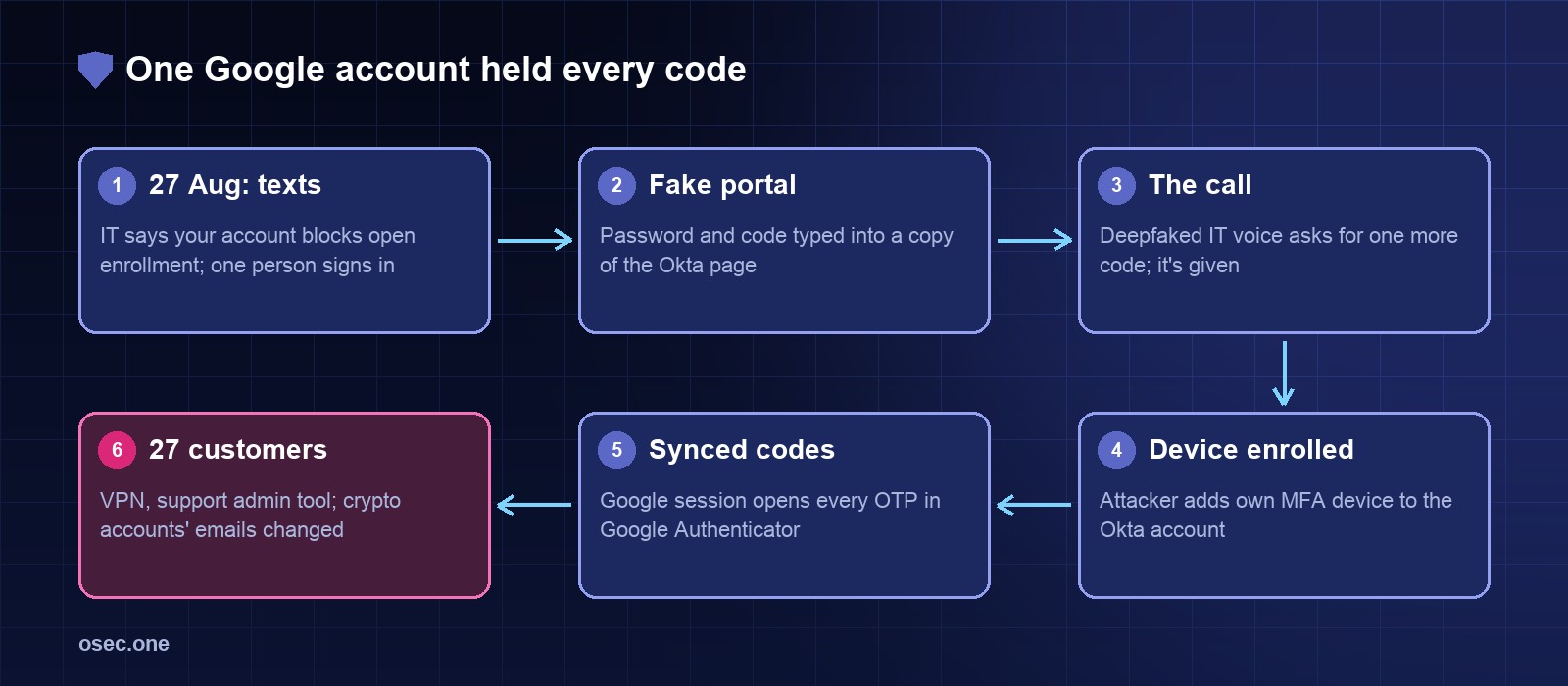
On 27 August 2023 a few Retool employees got a text message from "IT": there was a problem with their account, and it would stop them enrolling in the company's health insurance. Almost everyone ignored it. One person tapped the link, signed in on a copy of Retool's sign-in portal and typed a one-time code. Then the phone rang.
The caller sounded like someone from IT the employee knew, knew the office layout and the names of colleagues, and asked for one more code. The employee was suspicious and gave it anyway. With that second code the attacker added their own device to the employee's Okta account. What happened next is the reason this case is worth reading: the employee's codes lived in Google Authenticator with cloud sync on, so the attacker's Google sign-in opened every code the employee had. Two days later Retool told 27 cloud customers, all in crypto, that their accounts had been taken over.
The timeline
Step 1: a lure timed to something real
The text didn't say "your password expired". It said a problem with the account would block open enrollment, the yearly window in the US when staff pick their health plan, and it arrived while Retool was moving its sign-ins to Okta. Both were true things happening inside the company. The link pointed to a domain made to look like Retool's internal identity portal, and that portal had an MFA form, so typing a code felt normal.
Retool's own words: "almost all" of the targeted employees ignored it. A campaign like this only needs one.
Step 2: the phone call with a familiar voice
After the sign-in, the attacker called the employee, posing as IT and using a deepfake of a staff member's voice. The caller knew the floor plan, colleagues and internal processes. Retool says the employee "grew more and more suspicious" during the call but still gave one more one-time code.
That one code was enough to enrol a new MFA device in the employee's Okta account. From then on the attacker didn't need the employee for codes at all.
Step 3: one Google account, every code
Since 24 April 2023, Google Authenticator can back up its entries to the user's Google Account. Sign in to the app and sync is on; Retool says the setup flow pushes users toward it and that a company admin had no way to turn it off for staff. The attacker's device also held an active Google Workspace session for the employee. In Retool's words: "if your Google account is compromised, so are your MFA codes."
What actually syncs is the seed (the shared secret from the QR code), not the six-digit codes. That changes how long a theft lasts:
That is why Retool's headline was "MFA isn't actually MFA": the second factor had quietly become part of the first. Whoever controls the Google account controls the codes. There was a second problem too: in April 2023 the researchers at Mysk showed the synced seeds were not end-to-end encrypted, so Google could read them; Google said it encrypts them in transit and at rest and planned end-to-end encryption later.
Step 4: the support tool did the rest
With the Okta account, a working code generator and the Google session, the attacker reached Retool's VPN and internal admin systems, including the Retool instance its staff use for customer support. From there they took over accounts of a specific set of customers, all in the crypto industry: changed the account email, reset the password, then looked around inside some of those customers' Retool apps.
Retool revoked every internal session (Okta, Google Workspace and others), locked the affected accounts, restored the 27 customers' original emails and called in law enforcement and a forensics firm. CoinDesk reported that one affected customer, the custodian Fortress Trust, lost close to $15 million in crypto in the same period and blamed a third-party vendor. Retool also noted that customers who had built approval steps into their own apps stopped the attacker even after the takeover.
Google's reply to the criticism didn't promise an admin switch; it pointed to passkeys, which are phishing resistant, as the direction it wants people to move.
Where this sits next to similar cases
Retool's case is the only one where one extra account (Google) quietly held the second factor for everything else. The others are worth reading for the rest of the chain: 0ktapus, Uber's push fatigue and the MGM help-desk reset.
What breaks each step
For staff accounts
1. Phishing-resistant sign-in for anything that can reach production or support tools. A FIDO2 security key or a passkey is tied to the real domain; there is no code to read out over the phone. Retool's own recommendation after the incident was hardware keys.
2. Remove the fallback. If Okta, Google Workspace or Microsoft 365 still accepts an authenticator code when the key "isn't working", the caller will ask for the code. In Okta that is an authentication policy that requires a phishing-resistant authenticator; in Google Workspace, security keys only for 2-Step Verification; in Microsoft Entra, the "Phishing-resistant MFA" authentication strength.
3. Keep work codes out of personal sync. Where codes are still needed, use an authenticator the company manages, or Google Authenticator with "Use without an account". A cloud icon at the top of the app means entries are synced to a Google Account.
4. Alert on new MFA devices. In Okta, user.mfa.factor.activate in the System Log is the event for a new factor; one on an IT or admin account outside a planned change deserves a phone call back to a known number.
5. Call back, never call in. Staff should hang up on "IT" and ring the help desk on a number they already have. Say it in onboarding: IT will never ask you for a code.
6. Approvals in the support tool. Changing a customer's email and resetting their password in one sitting should need a second person or a notice to the old address.
For your own users
The same trick works on your customers: a call or text asks them for "the code we just sent". Make that harder: send codes that say what they're for and where not to type them, notify the old address when an email changes, and count failed codes and new devices per account. osec Login Protection adds those per-account rules to a sign-in form without moving your DNS.
Want sign-in for your own site without storing passwords or one-time-code seeds? osec Auth gives you email codes plus Google and Apple sign-in, and those accounts support passkeys. No OAuth setup on your side, free.
Add passwordless sign-inSources: Retool: When MFA isn't actually MFA (13 Sept 2023); BleepingComputer: Retool blames breach on Google Authenticator MFA cloud sync feature; Help Net Security: Attackers hit software firm Retool to get to crypto companies and assets; SecurityWeek: Google feature blamed for Retool breach that led to cryptocurrency firm hacks; Google Security Blog: Google Authenticator now supports Google Account synchronization (24 April 2023); Malwarebytes: Google will eventually add end-to-end encryption to Google Authenticator. Code lifetimes: RFC 6238 (TOTP, 30-second default step).