
Why bother
• uses: owner/action@v4 isn't a version. It's a tag: a label the action's owner can point at different code any time.
• tj-actions/changed-files, 14 March 2025: every version tag was moved to one malicious commit. Workflows in more than 23,000 repositories followed. 218 public repos printed their secrets into public logs. Full story: tj-actions/changed-files 2025.
• Pinned workflows were fine. A full commit SHA can't be moved. They kept running the old, clean code.
• GitHub says the same: pinning to a full-length commit SHA is the only way to use an action as an immutable release.
What you need
• The uses: lines from your .github/workflows/*.yml files.
• Public actions on github.com. Your own repo can be private: you paste lines, not files.
• Two minutes. Free, no account.
Pin them in five steps
1. Open osec.one/tools/action-pins.
2. Paste the uses: lines, up to 30 at once. Indentation and - don't matter.
3. Click Get the commit SHAs.
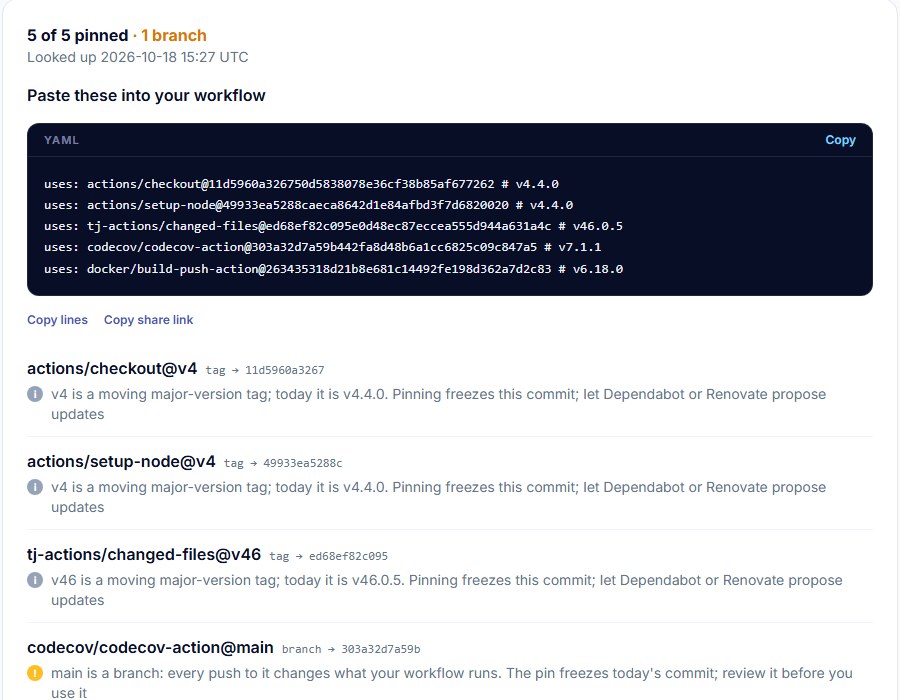
4. Read the flag under each action (next section).
5. Click Copy lines, replace the old lines in your workflow, open a pull request.
Read the flags
• Moving major-version tag (grey, e.g. @v4): the owner moves it to each new release. The pin freezes today's commit; the comment says which release (# v4.4.0).
• Branch (amber, e.g. @main): every push changes what your workflow runs. The pin freezes today's commit. Read that commit before you trust it.
• Exact version tag (green, e.g. @v6.18.0): fine, but a tag is still a tag. Pin it anyway.
• Tag moved since an earlier lookup (red): an exact tag now points at a different commit than when someone last looked it up here. That's the tj-actions pattern. Stop, check the repo's releases and issues before you pin.
• No tag or branch called … (red): a typo, or the ref was deleted.
• Already pinned to a full commit SHA (green): nothing to do.
What goes back in your workflow
• Keep the comment. It's how people (and Dependabot) know which release a SHA is.
• Pin your own reusable workflows too: uses: org/repo/.github/workflows/x.yml@<sha>.
• Local actions (uses: ./.github/actions/x) live in your repo already. Nothing to pin.
Keep pins current with Dependabot
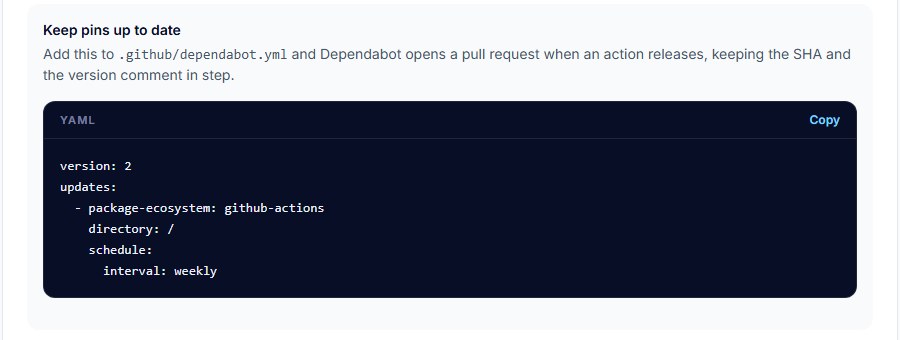
1. Add .github/dependabot.yml (the result page has it ready to copy).
2. Dependabot opens a pull request when a pinned action releases. It updates the SHA and the comment.
3. Don't merge the same hour. A short wait skips most bad releases: Dependabot now waits three days by default (our note on the 2026 changes).
Make it stick
• Enforce it: org or repo Settings → Actions → General → allowed actions policy → Require actions to be pinned to a full-length commit SHA (GitHub, August 2025). Unpinned workflows then fail.
• Turn it on after pinning, or the next run of every unpinned workflow fails.
• Block a known-bad action in the same policy: prefix it with !.
Find the lines you missed
1. Paste the repo into the Workflow risk check.
2. It lists actions on a tag or branch for each workflow file and each composite action (action.yml).
3. Click Pin them with the Action pin lookup →. The lines arrive pre-filled.

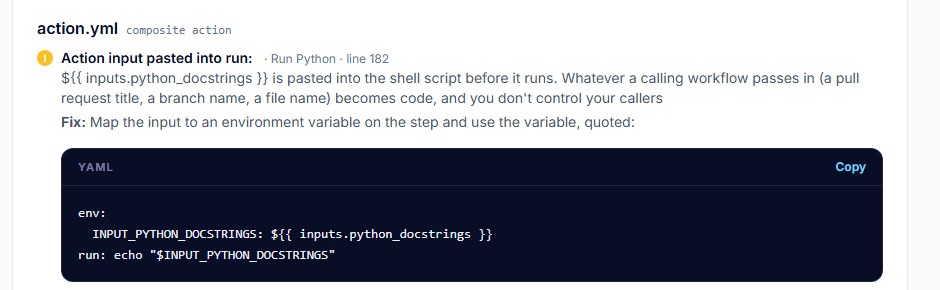
• Publish an action yourself? The same check now reads composite action.yml files: actions inside them that aren't pinned, and ${{ inputs.* }} pasted into run: steps, each with the env: fix.
Good to know
• Reads public data only: each action's tag list from github.com, the same as git ls-remote. Nothing from your repo.
• Up to 30 lines and 15 action repos per lookup.
• Moved-tag warnings only cover tags someone looked up here before.
• A pin means "the same code next time", not "safe code". Read new actions before you add them.
• Install scripts in the same pipeline? Pin those with Pinned download: steps here.
Paste your uses: lines, get commit SHAs with version comments and a flag on anything that moves. Free, no account.
Pin your actionsSources
• GitHub Docs, security hardening for GitHub Actions (using third-party actions): https://docs.github.com/en/actions/security-for-github-actions/security-guides/security-hardening-for-github-actions
• GitHub changelog, Actions policy now supports blocking and SHA pinning actions (15 August 2025): https://github.blog/changelog/2025-08-15-github-actions-policy-now-supports-blocking-and-sha-pinning-actions/
• CISA, supply chain compromise of tj-actions/changed-files (CVE-2025-30066) and reviewdog/action-setup (CVE-2025-30154): https://www.cisa.gov/news-events/alerts/2025/03/18/supply-chain-compromise-third-party-tj-actionschanged-files-cve-2025-30066-and-reviewdogaction-setup-cve-2025-30154
• GitHub Docs, Dependabot options (github-actions ecosystem, cooldown): https://docs.github.com/en/code-security/dependabot/working-with-dependabot/dependabot-options-reference
• osec.one Action pin lookup, live result (18 October 2026): https://osec.one/tools/action-pins?id=ym7f4a6ANhnU