Why bother
• curl … | sh runs whatever the server sends at that moment. Nothing checks it.
• Codecov, 2021: one line added to its Bash Uploader sent every CI environment variable to an outside server, from 31 January to 1 April. Thousands of pipelines ran it.
• How it was caught: one customer compared the script with the checksum Codecov published on GitHub. They didn't match. Full story: Codecov 2021: a modified uploader script that read CI secrets for two months.
• The fix is small: keep the file's SHA-256 in your own repository. A changed file then fails the build before it runs.
What you need
• The URL your pipeline, Dockerfile or README downloads.
• Public https only. No sign-in, no token, nothing private.
• Two minutes. Free, no account.
Pin it in five steps
1. Open osec.one/tools/pinned-download.
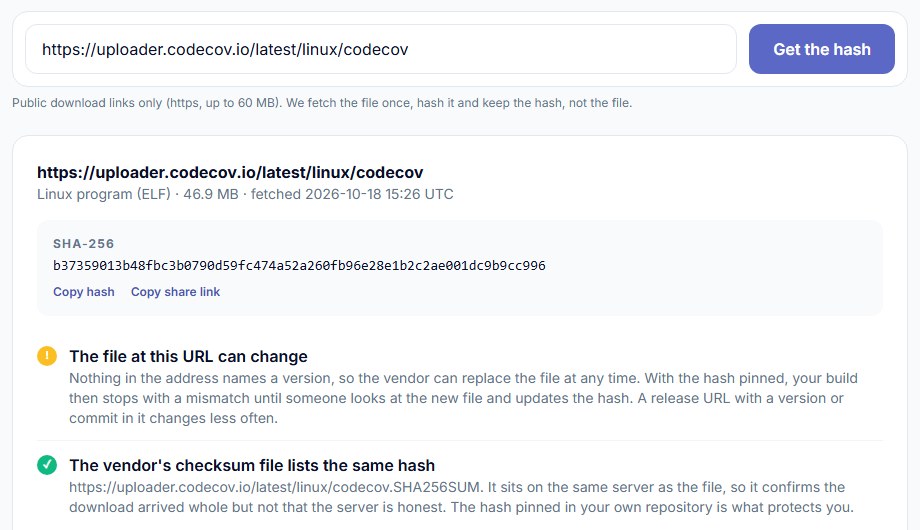
2. Paste the URL. Click Get the hash.
3. Read the notes under the hash (next section).
4. Pick a tab: Shell, GitHub Actions, GitLab CI or Dockerfile. Click Copy.
5. Replace the curl … | sh line with it. Run it once yourself, then commit.
Read the notes
• The file at this URL can change (amber): no version in the address, so the vendor can swap the file. Your build will stop at their next release until someone looks. Use a versioned URL if they offer one.
• The URL names a version (green): that file should never change. A mismatch later = treat it as an incident.
• The vendor's checksum file lists the same hash (green): the download arrived whole. It sits on the same server, so it can't prove the server is honest. Your pinned copy can.
• The vendor's checksum file lists a different hash (red): don't run it until you know why.
• A signature is published (green): stronger than a hash. Import the vendor's key once and verify in the same step.
• Redirects to another host: the hash covers what the last host served.
• This URL returns a web page (red): you pasted a docs or GitHub page. Use the Raw or release-asset link.
• Read the script once before you pin it: the hash proves it's the file you looked at, not that it's safe. A second curl inside the script isn't covered.
The snippets
Shell (the expected hash lives in your repo, reviewed like code):
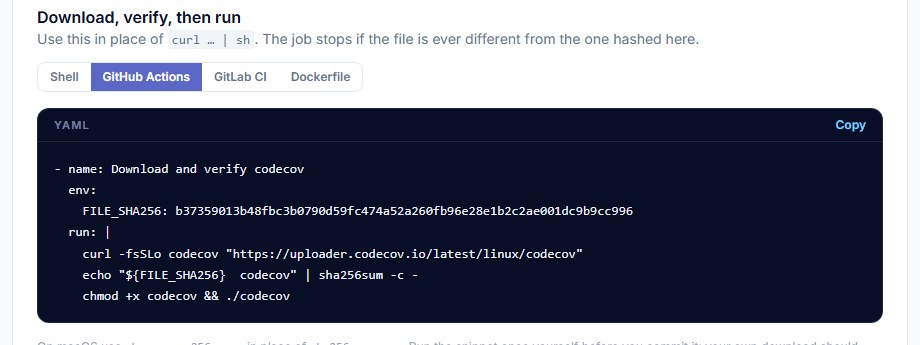
Dockerfile (BuildKit, the default builder in current Docker):
• GitLab CI: same shape, hash in variables:.
• macOS: shasum -a 256 -c - in place of sha256sum -c -.
• Many installers? One snippet per file. Keep the hashes together near the top of the job.
When the hash changes
1. The job fails at sha256sum -c. Good: nothing ran.
2. Check the vendor's changelog or release page. Is there a new version today?
3. Paste the URL into the check again. Note the new hash and the notes.
4. For a script: download both versions and diff them. Read what changed.
5. No release, no explanation? Don't update. Tell the vendor. That is exactly how Codecov's change was found.
6. Explained? Update the hash in a small pull request. Someone reviews it like code.
• Fewer surprises: pin a versioned URL (/v1.4.2/install.sh, a release asset) instead of /latest. Then the hash changes only when you choose to upgrade.
Same idea, one level up
• GitHub Actions are downloads too. uses: owner/action@v4 follows a tag that can move. Pin them to commits with the Action pin lookup. Steps: Pin every GitHub Action to a commit in two minutes.
• Whole workflows: the Workflow risk check reads a public repo's workflows and composite actions and flags the risky patterns, each with the fix.
Good to know
• Public inputs only: a public https URL. No credentials or signed links (tokens in the query are refused).
• Files up to 60 MB. Hashed as they stream. Never stored; only the hash is kept.
• Share link: every result has one, for the pull request that adds the pin.
• A pinned hash means "the same file next time", not "a safe file". Read it once.
Paste an install URL, get its SHA-256 and a download-verify-run snippet. Free, no account.
Pin a downloadSources
• Codecov, Bash Uploader security update: https://about.codecov.io/security-update/
• Docker docs, Dockerfile reference, ADD --checksum: https://docs.docker.com/reference/dockerfile/#add---checksum
• GNU coreutils, sha256sum: https://www.gnu.org/software/coreutils/manual/html_node/sha2-utilities.html
• osec.one Pinned download, live result for the Codecov uploader (18 October 2026): https://osec.one/tools/pinned-download?id=Uc71kuxKg7Sd